# null
Source: https://docs.galadriel.com/FAQ
## FAQ
{/* ### 1. Is the correct oracle address whitelisted?
The correct oracle address is available here: https://docs.galadriel.com/quickstart
### 2. Do you have funds on your address?
Can check from the explorer: [https://explorer.galadriel.com/address/](https://explorer.galadriel.com/address/0x4168668812C94a3167FCd41D12014c5498D74d7e)my_wallet_address
### 3. Is your contract deployed?
Can you see your contract in here: [https://explorer.galadriel.com/address/my_contract_address](https://explorer.galadriel.com/address/my_contract_address)
### 4. Can you get an answer with the quickstart?
Did you try out the service with the quickstart tutorial?
https://docs.galadriel.com/quickstart
### 5. Was the tx sent to the oracle?
Check the explorer for your own account: [https://explorer.galadriel.com/address/my_wallet_address](https://explorer.galadriel.com/address/my_wallet_address)
Do you see a successful tx?
### 6. Is your Solidity code working as expected?
Have you tested your code? Can you send back answers to your own contract?
If your code has an error in the callback function and the tx gets reverted then the Oracle just can’t send the response back. Make sure you yourself can call this function on your contract: https://github.com/galadriel-ai/contracts/blob/45bf72707adc21c5b2d3a2f95ac337ff4dde006c/contracts/contracts/interfaces/IChatGpt.sol#L13
Make sure one of the expected interfaces is implemented https://docs.galadriel.com/reference/overview
### 7. Can the oracle get the chat history from your contract?
Can you call out getMessageHistory functions?
For example this: https://github.com/galadriel-ai/contracts/blob/45bf72707adc21c5b2d3a2f95ac337ff4dde006c/contracts/contracts/interfaces/IChatGpt.sol#L25
### 8. Can I run the e2e tests on my contract?
Galadriel team has provided a test suite that you can run on your LLM based contract. You can find it here: https://github.com/galadriel-ai/contracts/tree/main/contracts#contract-debugging */}
# History API
Source: https://docs.galadriel.com/api-reference/get-history-API
get /v1/verified/chat/completions
Get history of all verified inference calls.
```json 200
{
"completions": [
{
"id": "0678511a-6758-778f-8000-54197a705ef5",
"request": {
"messages": [
{
"content": "You are a helpful assistant.",
"function_call": null,
"role": "system",
"name": null
},
{
"content": "Hello!",
"function_call": null,
"role": "user",
"name": null
}
],
"model": "gpt-4o",
"frequency_penalty": null,
"logit_bias": null,
"logprobs": null,
"top_logprobs": null,
"max_tokens": null,
"n": null,
"presence_penalty": null,
"response_format": null,
"seed": null,
"stop": null,
"stream": null,
"stream_options": null,
"temperature": null,
"top_p": null,
"tools": null,
"tool_choice": null,
"user": null
},
"response": {
"id": "chatcmpl-ApEYcdtb37owIQuQ4gQBX2KjfJWNk",
"choices": [
{
"finish_reason": "stop",
"index": 0,
"logprobs": null,
"message": {
"content": "Hello! How can I assist you today?",
"refusal": null,
"role": "assistant",
"audio": null,
"function_call": null,
"tool_calls": null
}
}
],
"created": 1736774050,
"model": "gpt-4o-2024-08-06",
"object": "chat.completion",
"service_tier": "default",
"system_fingerprint": "fp_b7d65f1a5b",
"usage": {
"completion_tokens": 10,
"prompt_tokens": 19,
"total_tokens": 29,
"completion_tokens_details": {
"accepted_prediction_tokens": 0,
"audio_tokens": 0,
"reasoning_tokens": 0,
"rejected_prediction_tokens": 0
},
"prompt_tokens_details": {
"audio_tokens": 0,
"cached_tokens": 0
}
}
},
"hash": "78773e603e518a3ace0f31341a1b37e1b083e1250e1f55293fa8b38bd2aff291",
"public_key": "835cc0e84c2a5190561d7c2eaf10eb2597cbe7a71541084c5edea32b60bc5e68",
"signature": "134c2bc2e0ba33de369e4c1cf62f13610d87560d274927e1b4d1d40f58f5289826e1c14249aba4d61ab611601a8d4c9a19ce08e231feb14deb18ee642d4b4a05",
"attestation": "hEShATgioFkRPKlpbW9kdWxlX2lkeCdpLTAxYWMwZDExNTgyMTE5Yzc5LWVuYzAxOTNlMzQ5YmVhNjgxZGFmZGlnZXN0ZlNIQTM4NGl0aW1lc3RhbXAbAAABlF/M42ZkcGNyc7AAWDDMFG0z0T6sHS+xGjpkmqeif4bH0FNLauCXkRX1+ODgp2busXeFvp5/5uWve2DJKSkBWDADQ7BWzYSFyniQ3dgzR214RgrtKqFhVI5OJr7fMhcmaWJX1iPogF8/YFlGs9iwxqoCWDDjR1mu83NEopeVfbYcGa5aMTB0iJoN4jvIUgylDadNJgtYKZEO+pQkcnb8kSmnN7kDWDAAAAAAAAAAAAAAAAAAAAAAAAAAAAAAAAAAAAAAAAAAAAAAAAAAAAAAAAAAAAAAAAAEWDAxnyEmxgjpwUp+8ptWmNH1Pi4lAU0gLe1MrIvqHV2jeoUG/XCsACb57odarkXU4k8FWDAAAAAAAAAAAAAAAAAAAAAAAAAAAAAAAAAAAAAAAAAAAAAAAAAAAAAAAAAAAAAAAAAGWDAAAAAAAAAAAAAAAAAAAAAAAAAAAAAAAAAAAAAAAAAAAAAAAAAAAAAAAAAAAAAAAAAHWDAAAAAAAAAAAAAAAAAAAAAAAAAAAAAAAAAAAAAAAAAAAAAAAAAAAAAAAAAAAAAAAAAIWDAAAAAAAAAAAAAAAAAAAAAAAAAAAAAAAAAAAAAAAAAAAAAAAAAAAAAAAAAAAAAAAAAJWDAAAAAAAAAAAAAAAAAAAAAAAAAAAAAAAAAAAAAAAAAAAAAAAAAAAAAAAAAAAAAAAAAKWDAAAAAAAAAAAAAAAAAAAAAAAAAAAAAAAAAAAAAAAAAAAAAAAAAAAAAAAAAAAAAAAAALWDAAAAAAAAAAAAAAAAAAAAAAAAAAAAAAAAAAAAAAAAAAAAAAAAAAAAAAAAAAAAAAAAAMWDAAAAAAAAAAAAAAAAAAAAAAAAAAAAAAAAAAAAAAAAAAAAAAAAAAAAAAAAAAAAAAAAANWDAAAAAAAAAAAAAAAAAAAAAAAAAAAAAAAAAAAAAAAAAAAAAAAAAAAAAAAAAAAAAAAAAOWDAAAAAAAAAAAAAAAAAAAAAAAAAAAAAAAAAAAAAAAAAAAAAAAAAAAAAAAAAAAAAAAAAPWDAAAAAAAAAAAAAAAAAAAAAAAAAAAAAAAAAAAAAAAAAAAAAAAAAAAAAAAAAAAAAAAABrY2VydGlmaWNhdGVZAoUwggKBMIICB6ADAgECAhABk+NJvqaB2gAAAABnhQDkMAoGCCqGSM49BAMDMIGRMQswCQYDVQQGEwJVUzETMBEGA1UECAwKV2FzaGluZ3RvbjEQMA4GA1UEBwwHU2VhdHRsZTEPMA0GA1UECgwGQW1hem9uMQwwCgYDVQQLDANBV1MxPDA6BgNVBAMMM2ktMDFhYzBkMTE1ODIxMTljNzkuZXUtY2VudHJhbC0xLmF3cy5uaXRyby1lbmNsYXZlczAeFw0yNTAxMTMxMjAyNDFaFw0yNTAxMTMxNTAyNDRaMIGWMQswCQYDVQQGEwJVUzETMBEGA1UECAwKV2FzaGluZ3RvbjEQMA4GA1UEBwwHU2VhdHRsZTEPMA0GA1UECgwGQW1hem9uMQwwCgYDVQQLDANBV1MxQTA/BgNVBAMMOGktMDFhYzBkMTE1ODIxMTljNzktZW5jMDE5M2UzNDliZWE2ODFkYS5ldS1jZW50cmFsLTEuYXdzMHYwEAYHKoZIzj0CAQYFK4EEACIDYgAEcoqsa6CIOANg5ej/XJQ4KCOgWAyGu5OjZEXqtBz5qzwnm9tCUn5zLKMchmrsqSsIlvHydOjZ6tyavqKKHE+N+XV1UB2wcQRB9oHT1q0vNqA66FGjRwUjVPzXlvEZRRR/ox0wGzAMBgNVHRMBAf8EAjAAMAsGA1UdDwQEAwIGwDAKBggqhkjOPQQDAwNoADBlAjAAkCqZ9EoUkTkBGWD8fjwf8kDWPSAMQPjSh9GNEQ6rRBMJyWyholLsork1U9enjVQCMQCSfQEP9JrYUcwox9++AGirvXDe1mZKvdvQ7XbKrAELHWZHeljsfR1xNFNd0IFOvX5oY2FidW5kbGWEWQIVMIICETCCAZagAwIBAgIRAPkxdWgbkK/hHUbMtOTn+FYwCgYIKoZIzj0EAwMwSTELMAkGA1UEBhMCVVMxDzANBgNVBAoMBkFtYXpvbjEMMAoGA1UECwwDQVdTMRswGQYDVQQDDBJhd3Mubml0cm8tZW5jbGF2ZXMwHhcNMTkxMDI4MTMyODA1WhcNNDkxMDI4MTQyODA1WjBJMQswCQYDVQQGEwJVUzEPMA0GA1UECgwGQW1hem9uMQwwCgYDVQQLDANBV1MxGzAZBgNVBAMMEmF3cy5uaXRyby1lbmNsYXZlczB2MBAGByqGSM49AgEGBSuBBAAiA2IABPwCVOumCMHzaHDimtqQvkY4MpJzbolL//Zy2YlES1BR5TSksfbb48C8WBoyt7F2Bw7eEtaaP+ohG2bnUs990d0JX28TcPQXCEPZ3BABIeTPYwEoCWZEh8l5YoQwTcU/9KNCMEAwDwYDVR0TAQH/BAUwAwEB/zAdBgNVHQ4EFgQUkCW1DdkFR+eWw5b6cp3PmanfS5YwDgYDVR0PAQH/BAQDAgGGMAoGCCqGSM49BAMDA2kAMGYCMQCjfy+Rocm9Xue4YnwWmNJVA44fA0P5W2OpYow9OYCVRaEevL8uO1XYru5xtMPWrfMCMQCi85sWBbJwKKXdS6BptQFuZbT73o/gBh1qUxl/nNr12UO8Yfwr6wPLb+6NIwLz3/ZZAsYwggLCMIICR6ADAgECAhA/ofrO4E3BMG8Ksi/zbYiaMAoGCCqGSM49BAMDMEkxCzAJBgNVBAYTAlVTMQ8wDQYDVQQKDAZBbWF6b24xDDAKBgNVBAsMA0FXUzEbMBkGA1UEAwwSYXdzLm5pdHJvLWVuY2xhdmVzMB4XDTI1MDExMjAxMTIzM1oXDTI1MDIwMTAyMTIzM1owZzELMAkGA1UEBhMCVVMxDzANBgNVBAoMBkFtYXpvbjEMMAoGA1UECwwDQVdTMTkwNwYDVQQDDDBhNzIzNTBiMTA2OTg4M2NlLmV1LWNlbnRyYWwtMS5hd3Mubml0cm8tZW5jbGF2ZXMwdjAQBgcqhkjOPQIBBgUrgQQAIgNiAAQy0SwAjXCKKFOzqnUKHs6xaYf7qw7jcjvc0p0UTTCbBZpuX1FUpCmmNlxtFGHVDbEvEv/2OQhTh5IRmyIeaQbqlJhyqjHkYszduE6cMDu6/ASldz+4JyCWKuYnWTsAMrKjgdUwgdIwEgYDVR0TAQH/BAgwBgEB/wIBAjAfBgNVHSMEGDAWgBSQJbUN2QVH55bDlvpync+Zqd9LljAdBgNVHQ4EFgQUS6QhrJovaZegE97Ny2mMIEKcWEUwDgYDVR0PAQH/BAQDAgGGMGwGA1UdHwRlMGMwYaBfoF2GW2h0dHA6Ly9hd3Mtbml0cm8tZW5jbGF2ZXMtY3JsLnMzLmFtYXpvbmF3cy5jb20vY3JsL2FiNDk2MGNjLTdkNjMtNDJiZC05ZTlmLTU5MzM4Y2I2N2Y4NC5jcmwwCgYIKoZIzj0EAwMDaQAwZgIxAJPjHB9fIoQj/t+y5trfVY2JNQ4OUNMee4rvpQa0GzfsyjPCqES/zfR3WnB5Cz1R2QIxAM0A/vt265uKwblFH/ilqMNkyB65+rKqt1MfQR+XZeEgMHYO/9bpMKVabNWDQpWl51kDJDCCAyAwggKmoAMCAQICEAQQZdx7OjBDinWmvvDQ0kYwCgYIKoZIzj0EAwMwZzELMAkGA1UEBhMCVVMxDzANBgNVBAoMBkFtYXpvbjEMMAoGA1UECwwDQVdTMTkwNwYDVQQDDDBhNzIzNTBiMTA2OTg4M2NlLmV1LWNlbnRyYWwtMS5hd3Mubml0cm8tZW5jbGF2ZXMwHhcNMjUwMTEyMTQzNzA0WhcNMjUwMTE4MDYzNzA0WjCBjDE/MD0GA1UEAww2NjBkOWJhNjI3Yjc4MWYwOC56b25hbC5ldS1jZW50cmFsLTEuYXdzLm5pdHJvLWVuY2xhdmVzMQwwCgYDVQQLDANBV1MxDzANBgNVBAoMBkFtYXpvbjELMAkGA1UEBhMCVVMxCzAJBgNVBAgMAldBMRAwDgYDVQQHDAdTZWF0dGxlMHYwEAYHKoZIzj0CAQYFK4EEACIDYgAEvpUAx7x6Ub4LQ/MrTGIqxvXrr+lVMrD2OHNP5upaAVZQ7YkGFmJOoozFtSuNp47dT1h/s21jUCPKdgPNJmTl8rYqsMMvzDivX9qbMpiybWhpdMxojVskbfndJxnd8/hCo4HwMIHtMBIGA1UdEwEB/wQIMAYBAf8CAQEwHwYDVR0jBBgwFoAUS6QhrJovaZegE97Ny2mMIEKcWEUwHQYDVR0OBBYEFIsXmmK/d+NvmhV5A1pqKMnLYj02MA4GA1UdDwEB/wQEAwIBhjCBhgYDVR0fBH8wfTB7oHmgd4Z1aHR0cDovL2NybC1ldS1jZW50cmFsLTEtYXdzLW5pdHJvLWVuY2xhdmVzLnMzLmV1LWNlbnRyYWwtMS5hbWF6b25hd3MuY29tL2NybC9mYmUxMGE4Ni1jYTlmLTRhYWUtODVjZC0yNjRmOWI3YjUzMGIuY3JsMAoGCCqGSM49BAMDA2gAMGUCMACe5YxYunTL4LRSHnxtqKkcVuyokc2m3wkq+P/cf9ANdQaHH5EpBmuc5VDXX44ygQIxAPGV7dv+/3tbOa1PcfxU0KSIurbGUExxtCqhk3sDNIXo/jdJExsxFhRjX/fuVcFlTVkCyTCCAsUwggJLoAMCAQICFQDoVZHDQTAUJShHiJZtbdx/awWDATAKBggqhkjOPQQDAzCBjDE/MD0GA1UEAww2NjBkOWJhNjI3Yjc4MWYwOC56b25hbC5ldS1jZW50cmFsLTEuYXdzLm5pdHJvLWVuY2xhdmVzMQwwCgYDVQQLDANBV1MxDzANBgNVBAoMBkFtYXpvbjELMAkGA1UEBhMCVVMxCzAJBgNVBAgMAldBMRAwDgYDVQQHDAdTZWF0dGxlMB4XDTI1MDExMzAyMTQ0MVoXDTI1MDExNDAyMTQ0MVowgZExCzAJBgNVBAYTAlVTMRMwEQYDVQQIDApXYXNoaW5ndG9uMRAwDgYDVQQHDAdTZWF0dGxlMQ8wDQYDVQQKDAZBbWF6b24xDDAKBgNVBAsMA0FXUzE8MDoGA1UEAwwzaS0wMWFjMGQxMTU4MjExOWM3OS5ldS1jZW50cmFsLTEuYXdzLm5pdHJvLWVuY2xhdmVzMHYwEAYHKoZIzj0CAQYFK4EEACIDYgAEA8kjNuPHssG2NawygjLc5fhvu0JT/Q6lHdaio4P2sutOp2gZg8eUjJUkjTQk4MucamRxkpA3lRakfWbv6qPKkaOEuhVIUIYw1Wr5fWiEAOfpoIfAUvvUocKoKmJ+mqblo2YwZDASBgNVHRMBAf8ECDAGAQH/AgEAMA4GA1UdDwEB/wQEAwICBDAdBgNVHQ4EFgQUON+5GI4EVA+YcM0rh3rheC0qQG8wHwYDVR0jBBgwFoAUixeaYr9342+aFXkDWmooyctiPTYwCgYIKoZIzj0EAwMDaAAwZQIwROC7CfVu4pGSVz8ezTAtiS6YTsCjfHzAviutz3PTNDPyOk7AwA3iSX5uvASdWkBXAjEA2fGyPTAPlN7Ior6Ikk2a5s93aVaPPLmhBPLmGYlLwvLwftLUPCM8q+22Zn9iqFtXanB1YmxpY19rZXlYIINcwOhMKlGQVh18Lq8Q6yWXy+enFUEITF7eoytgvF5oaXVzZXJfZGF0YfZlbm9uY2X2WGBwwuzakZZXZwYkye16UY13PDZMBPv+7qwOffr1LKmWIfslW8chhYJ/vc6xyqp+t7E3ALDlbTeKHek0CWFnsgnPSmi/fV2Ss2Hl/fM5ElfKvu9oinZBADAxpk6KdypV1ok=",
"tx_hash": "4WoYNS44yKCh5mnEq7aQ2NwQ8CspXfxM2By2DVptftNWDELY3tJj8akTpKpFuqnF8rmLYHgUedPvDnDd6e8Bkhbw",
"created_at": 1736774054
}
],
"cursor": "0678511a-6758-778f-8000-54197a705ef5"
}
```
```json 422
{
"detail": [
{
"loc": [
"string",
0
],
"msg": "string",
"type": "string"
}
]
}
```
# History By Hash API
Source: https://docs.galadriel.com/api-reference/get-history-by-hash-API
get /v1/verified/chat/completions/{hash}
Get history for a single verified inference call by its hash.
```json 200
{
"id": "0678511a-6758-778f-8000-54197a705ef5",
"request": {
"messages": [
{
"content": "You are a helpful assistant.",
"function_call": null,
"role": "system",
"name": null
},
{
"content": "Hello!",
"function_call": null,
"role": "user",
"name": null
}
],
"model": "gpt-4o",
"frequency_penalty": null,
"logit_bias": null,
"logprobs": null,
"top_logprobs": null,
"max_tokens": null,
"n": null,
"presence_penalty": null,
"response_format": null,
"seed": null,
"stop": null,
"stream": null,
"stream_options": null,
"temperature": null,
"top_p": null,
"tools": null,
"tool_choice": null,
"user": null
},
"response": {
"id": "chatcmpl-ApEYcdtb37owIQuQ4gQBX2KjfJWNk",
"choices": [
{
"finish_reason": "stop",
"index": 0,
"logprobs": null,
"message": {
"content": "Hello! How can I assist you today?",
"refusal": null,
"role": "assistant",
"audio": null,
"function_call": null,
"tool_calls": null
}
}
],
"created": 1736774050,
"model": "gpt-4o-2024-08-06",
"object": "chat.completion",
"service_tier": "default",
"system_fingerprint": "fp_b7d65f1a5b",
"usage": {
"completion_tokens": 10,
"prompt_tokens": 19,
"total_tokens": 29,
"completion_tokens_details": {
"accepted_prediction_tokens": 0,
"audio_tokens": 0,
"reasoning_tokens": 0,
"rejected_prediction_tokens": 0
},
"prompt_tokens_details": {
"audio_tokens": 0,
"cached_tokens": 0
}
}
},
"hash": "78773e603e518a3ace0f31341a1b37e1b083e1250e1f55293fa8b38bd2aff291",
"public_key": "835cc0e84c2a5190561d7c2eaf10eb2597cbe7a71541084c5edea32b60bc5e68",
"signature": "134c2bc2e0ba33de369e4c1cf62f13610d87560d274927e1b4d1d40f58f5289826e1c14249aba4d61ab611601a8d4c9a19ce08e231feb14deb18ee642d4b4a05",
"attestation": "hEShATgioFkRPKlpbW9kdWxlX2lkeCdpLTAxYWMwZDExNTgyMTE5Yzc5LWVuYzAxOTNlMzQ5YmVhNjgxZGFmZGlnZXN0ZlNIQTM4NGl0aW1lc3RhbXAbAAABlF/M42ZkcGNyc7AAWDDMFG0z0T6sHS+xGjpkmqeif4bH0FNLauCXkRX1+ODgp2busXeFvp5/5uWve2DJKSkBWDADQ7BWzYSFyniQ3dgzR214RgrtKqFhVI5OJr7fMhcmaWJX1iPogF8/YFlGs9iwxqoCWDDjR1mu83NEopeVfbYcGa5aMTB0iJoN4jvIUgylDadNJgtYKZEO+pQkcnb8kSmnN7kDWDAAAAAAAAAAAAAAAAAAAAAAAAAAAAAAAAAAAAAAAAAAAAAAAAAAAAAAAAAAAAAAAAAEWDAxnyEmxgjpwUp+8ptWmNH1Pi4lAU0gLe1MrIvqHV2jeoUG/XCsACb57odarkXU4k8FWDAAAAAAAAAAAAAAAAAAAAAAAAAAAAAAAAAAAAAAAAAAAAAAAAAAAAAAAAAAAAAAAAAGWDAAAAAAAAAAAAAAAAAAAAAAAAAAAAAAAAAAAAAAAAAAAAAAAAAAAAAAAAAAAAAAAAAHWDAAAAAAAAAAAAAAAAAAAAAAAAAAAAAAAAAAAAAAAAAAAAAAAAAAAAAAAAAAAAAAAAAIWDAAAAAAAAAAAAAAAAAAAAAAAAAAAAAAAAAAAAAAAAAAAAAAAAAAAAAAAAAAAAAAAAAJWDAAAAAAAAAAAAAAAAAAAAAAAAAAAAAAAAAAAAAAAAAAAAAAAAAAAAAAAAAAAAAAAAAKWDAAAAAAAAAAAAAAAAAAAAAAAAAAAAAAAAAAAAAAAAAAAAAAAAAAAAAAAAAAAAAAAAALWDAAAAAAAAAAAAAAAAAAAAAAAAAAAAAAAAAAAAAAAAAAAAAAAAAAAAAAAAAAAAAAAAAMWDAAAAAAAAAAAAAAAAAAAAAAAAAAAAAAAAAAAAAAAAAAAAAAAAAAAAAAAAAAAAAAAAANWDAAAAAAAAAAAAAAAAAAAAAAAAAAAAAAAAAAAAAAAAAAAAAAAAAAAAAAAAAAAAAAAAAOWDAAAAAAAAAAAAAAAAAAAAAAAAAAAAAAAAAAAAAAAAAAAAAAAAAAAAAAAAAAAAAAAAAPWDAAAAAAAAAAAAAAAAAAAAAAAAAAAAAAAAAAAAAAAAAAAAAAAAAAAAAAAAAAAAAAAABrY2VydGlmaWNhdGVZAoUwggKBMIICB6ADAgECAhABk+NJvqaB2gAAAABnhQDkMAoGCCqGSM49BAMDMIGRMQswCQYDVQQGEwJVUzETMBEGA1UECAwKV2FzaGluZ3RvbjEQMA4GA1UEBwwHU2VhdHRsZTEPMA0GA1UECgwGQW1hem9uMQwwCgYDVQQLDANBV1MxPDA6BgNVBAMMM2ktMDFhYzBkMTE1ODIxMTljNzkuZXUtY2VudHJhbC0xLmF3cy5uaXRyby1lbmNsYXZlczAeFw0yNTAxMTMxMjAyNDFaFw0yNTAxMTMxNTAyNDRaMIGWMQswCQYDVQQGEwJVUzETMBEGA1UECAwKV2FzaGluZ3RvbjEQMA4GA1UEBwwHU2VhdHRsZTEPMA0GA1UECgwGQW1hem9uMQwwCgYDVQQLDANBV1MxQTA/BgNVBAMMOGktMDFhYzBkMTE1ODIxMTljNzktZW5jMDE5M2UzNDliZWE2ODFkYS5ldS1jZW50cmFsLTEuYXdzMHYwEAYHKoZIzj0CAQYFK4EEACIDYgAEcoqsa6CIOANg5ej/XJQ4KCOgWAyGu5OjZEXqtBz5qzwnm9tCUn5zLKMchmrsqSsIlvHydOjZ6tyavqKKHE+N+XV1UB2wcQRB9oHT1q0vNqA66FGjRwUjVPzXlvEZRRR/ox0wGzAMBgNVHRMBAf8EAjAAMAsGA1UdDwQEAwIGwDAKBggqhkjOPQQDAwNoADBlAjAAkCqZ9EoUkTkBGWD8fjwf8kDWPSAMQPjSh9GNEQ6rRBMJyWyholLsork1U9enjVQCMQCSfQEP9JrYUcwox9++AGirvXDe1mZKvdvQ7XbKrAELHWZHeljsfR1xNFNd0IFOvX5oY2FidW5kbGWEWQIVMIICETCCAZagAwIBAgIRAPkxdWgbkK/hHUbMtOTn+FYwCgYIKoZIzj0EAwMwSTELMAkGA1UEBhMCVVMxDzANBgNVBAoMBkFtYXpvbjEMMAoGA1UECwwDQVdTMRswGQYDVQQDDBJhd3Mubml0cm8tZW5jbGF2ZXMwHhcNMTkxMDI4MTMyODA1WhcNNDkxMDI4MTQyODA1WjBJMQswCQYDVQQGEwJVUzEPMA0GA1UECgwGQW1hem9uMQwwCgYDVQQLDANBV1MxGzAZBgNVBAMMEmF3cy5uaXRyby1lbmNsYXZlczB2MBAGByqGSM49AgEGBSuBBAAiA2IABPwCVOumCMHzaHDimtqQvkY4MpJzbolL//Zy2YlES1BR5TSksfbb48C8WBoyt7F2Bw7eEtaaP+ohG2bnUs990d0JX28TcPQXCEPZ3BABIeTPYwEoCWZEh8l5YoQwTcU/9KNCMEAwDwYDVR0TAQH/BAUwAwEB/zAdBgNVHQ4EFgQUkCW1DdkFR+eWw5b6cp3PmanfS5YwDgYDVR0PAQH/BAQDAgGGMAoGCCqGSM49BAMDA2kAMGYCMQCjfy+Rocm9Xue4YnwWmNJVA44fA0P5W2OpYow9OYCVRaEevL8uO1XYru5xtMPWrfMCMQCi85sWBbJwKKXdS6BptQFuZbT73o/gBh1qUxl/nNr12UO8Yfwr6wPLb+6NIwLz3/ZZAsYwggLCMIICR6ADAgECAhA/ofrO4E3BMG8Ksi/zbYiaMAoGCCqGSM49BAMDMEkxCzAJBgNVBAYTAlVTMQ8wDQYDVQQKDAZBbWF6b24xDDAKBgNVBAsMA0FXUzEbMBkGA1UEAwwSYXdzLm5pdHJvLWVuY2xhdmVzMB4XDTI1MDExMjAxMTIzM1oXDTI1MDIwMTAyMTIzM1owZzELMAkGA1UEBhMCVVMxDzANBgNVBAoMBkFtYXpvbjEMMAoGA1UECwwDQVdTMTkwNwYDVQQDDDBhNzIzNTBiMTA2OTg4M2NlLmV1LWNlbnRyYWwtMS5hd3Mubml0cm8tZW5jbGF2ZXMwdjAQBgcqhkjOPQIBBgUrgQQAIgNiAAQy0SwAjXCKKFOzqnUKHs6xaYf7qw7jcjvc0p0UTTCbBZpuX1FUpCmmNlxtFGHVDbEvEv/2OQhTh5IRmyIeaQbqlJhyqjHkYszduE6cMDu6/ASldz+4JyCWKuYnWTsAMrKjgdUwgdIwEgYDVR0TAQH/BAgwBgEB/wIBAjAfBgNVHSMEGDAWgBSQJbUN2QVH55bDlvpync+Zqd9LljAdBgNVHQ4EFgQUS6QhrJovaZegE97Ny2mMIEKcWEUwDgYDVR0PAQH/BAQDAgGGMGwGA1UdHwRlMGMwYaBfoF2GW2h0dHA6Ly9hd3Mtbml0cm8tZW5jbGF2ZXMtY3JsLnMzLmFtYXpvbmF3cy5jb20vY3JsL2FiNDk2MGNjLTdkNjMtNDJiZC05ZTlmLTU5MzM4Y2I2N2Y4NC5jcmwwCgYIKoZIzj0EAwMDaQAwZgIxAJPjHB9fIoQj/t+y5trfVY2JNQ4OUNMee4rvpQa0GzfsyjPCqES/zfR3WnB5Cz1R2QIxAM0A/vt265uKwblFH/ilqMNkyB65+rKqt1MfQR+XZeEgMHYO/9bpMKVabNWDQpWl51kDJDCCAyAwggKmoAMCAQICEAQQZdx7OjBDinWmvvDQ0kYwCgYIKoZIzj0EAwMwZzELMAkGA1UEBhMCVVMxDzANBgNVBAoMBkFtYXpvbjEMMAoGA1UECwwDQVdTMTkwNwYDVQQDDDBhNzIzNTBiMTA2OTg4M2NlLmV1LWNlbnRyYWwtMS5hd3Mubml0cm8tZW5jbGF2ZXMwHhcNMjUwMTEyMTQzNzA0WhcNMjUwMTE4MDYzNzA0WjCBjDE/MD0GA1UEAww2NjBkOWJhNjI3Yjc4MWYwOC56b25hbC5ldS1jZW50cmFsLTEuYXdzLm5pdHJvLWVuY2xhdmVzMQwwCgYDVQQLDANBV1MxDzANBgNVBAoMBkFtYXpvbjELMAkGA1UEBhMCVVMxCzAJBgNVBAgMAldBMRAwDgYDVQQHDAdTZWF0dGxlMHYwEAYHKoZIzj0CAQYFK4EEACIDYgAEvpUAx7x6Ub4LQ/MrTGIqxvXrr+lVMrD2OHNP5upaAVZQ7YkGFmJOoozFtSuNp47dT1h/s21jUCPKdgPNJmTl8rYqsMMvzDivX9qbMpiybWhpdMxojVskbfndJxnd8/hCo4HwMIHtMBIGA1UdEwEB/wQIMAYBAf8CAQEwHwYDVR0jBBgwFoAUS6QhrJovaZegE97Ny2mMIEKcWEUwHQYDVR0OBBYEFIsXmmK/d+NvmhV5A1pqKMnLYj02MA4GA1UdDwEB/wQEAwIBhjCBhgYDVR0fBH8wfTB7oHmgd4Z1aHR0cDovL2NybC1ldS1jZW50cmFsLTEtYXdzLW5pdHJvLWVuY2xhdmVzLnMzLmV1LWNlbnRyYWwtMS5hbWF6b25hd3MuY29tL2NybC9mYmUxMGE4Ni1jYTlmLTRhYWUtODVjZC0yNjRmOWI3YjUzMGIuY3JsMAoGCCqGSM49BAMDA2gAMGUCMACe5YxYunTL4LRSHnxtqKkcVuyokc2m3wkq+P/cf9ANdQaHH5EpBmuc5VDXX44ygQIxAPGV7dv+/3tbOa1PcfxU0KSIurbGUExxtCqhk3sDNIXo/jdJExsxFhRjX/fuVcFlTVkCyTCCAsUwggJLoAMCAQICFQDoVZHDQTAUJShHiJZtbdx/awWDATAKBggqhkjOPQQDAzCBjDE/MD0GA1UEAww2NjBkOWJhNjI3Yjc4MWYwOC56b25hbC5ldS1jZW50cmFsLTEuYXdzLm5pdHJvLWVuY2xhdmVzMQwwCgYDVQQLDANBV1MxDzANBgNVBAoMBkFtYXpvbjELMAkGA1UEBhMCVVMxCzAJBgNVBAgMAldBMRAwDgYDVQQHDAdTZWF0dGxlMB4XDTI1MDExMzAyMTQ0MVoXDTI1MDExNDAyMTQ0MVowgZExCzAJBgNVBAYTAlVTMRMwEQYDVQQIDApXYXNoaW5ndG9uMRAwDgYDVQQHDAdTZWF0dGxlMQ8wDQYDVQQKDAZBbWF6b24xDDAKBgNVBAsMA0FXUzE8MDoGA1UEAwwzaS0wMWFjMGQxMTU4MjExOWM3OS5ldS1jZW50cmFsLTEuYXdzLm5pdHJvLWVuY2xhdmVzMHYwEAYHKoZIzj0CAQYFK4EEACIDYgAEA8kjNuPHssG2NawygjLc5fhvu0JT/Q6lHdaio4P2sutOp2gZg8eUjJUkjTQk4MucamRxkpA3lRakfWbv6qPKkaOEuhVIUIYw1Wr5fWiEAOfpoIfAUvvUocKoKmJ+mqblo2YwZDASBgNVHRMBAf8ECDAGAQH/AgEAMA4GA1UdDwEB/wQEAwICBDAdBgNVHQ4EFgQUON+5GI4EVA+YcM0rh3rheC0qQG8wHwYDVR0jBBgwFoAUixeaYr9342+aFXkDWmooyctiPTYwCgYIKoZIzj0EAwMDaAAwZQIwROC7CfVu4pGSVz8ezTAtiS6YTsCjfHzAviutz3PTNDPyOk7AwA3iSX5uvASdWkBXAjEA2fGyPTAPlN7Ior6Ikk2a5s93aVaPPLmhBPLmGYlLwvLwftLUPCM8q+22Zn9iqFtXanB1YmxpY19rZXlYIINcwOhMKlGQVh18Lq8Q6yWXy+enFUEITF7eoytgvF5oaXVzZXJfZGF0YfZlbm9uY2X2WGBwwuzakZZXZwYkye16UY13PDZMBPv+7qwOffr1LKmWIfslW8chhYJ/vc6xyqp+t7E3ALDlbTeKHek0CWFnsgnPSmi/fV2Ss2Hl/fM5ElfKvu9oinZBADAxpk6KdypV1ok=",
"tx_hash": "4WoYNS44yKCh5mnEq7aQ2NwQ8CspXfxM2By2DVptftNWDELY3tJj8akTpKpFuqnF8rmLYHgUedPvDnDd6e8Bkhbw",
"created_at": 1736774054
}
```
```json 422
{
"detail": [
{
"loc": [
"string",
0
],
"msg": "string",
"type": "string"
}
]
}
```
# Proof of Sentience API
Source: https://docs.galadriel.com/api-reference/proof-of-sentience-API
post /v1/verified/chat/completions
Tap into Galadriel's verified inference which powers Daige's Proof of Sentience. Returns additional proof metadata on top of OpenAI's chat completion API.
```json 200
{
"id": "id",
"choices": [
{
"finish_reason": "stop",
"index": 0,
"logprobs": null,
"message": {
"content": "Hello! How can I assist you today?",
"refusal": null,
"role": "assistant",
"function_call": null,
"tool_calls": null,
"audio": null
}
}
],
"created": 1728558433,
"model": "gpt-4o-2024-08-06",
"object": "chat.completion",
"service_tier": null,
"system_fingerprint": "fp_9faba9f038",
"usage": {
"completion_tokens": 9,
"prompt_tokens": 19,
"total_tokens": 28,
"completion_tokens_details": {
"accepted_prediction_tokens": 0,
"audio_tokens": 0,
"reasoning_tokens": 0,
"rejected_prediction_tokens": 0
},
"prompt_tokens_details": {
"audio_tokens": 0,
"cached_tokens": 0
}
},
"hash": "2c88aacb88de8b85a23e648eff20941285c16bb63cf9467811ee15bb64a40445",
"public_key": "Dp2k554Ebsij5RjuhjsZujVW2bJnQzfb43VYZSQ4NZo1",
"signature": "f298c3b1294221d1200041993818cfbfec66f33d1071ea821e5068978099cd60179dbf66839570dd9ada5f661e7d8475a03b536f42e540db3bed6f21d5741301",
"tx_hash": "e495424c395c501fb8fc013738fb481be85c1fbce9e595c308c31792983b2ffa10eca9c7dda0c8768ce12d0ff49a089cd5068d847eea8ae7544d5435d7f6010d",
"attestation": "enclave attestation"
}
```
```json 422
{
"detail": [
{
"loc": [
"string",
0
],
"msg": "string",
"type": "string"
}
]
}
```
# null
Source: https://docs.galadriel.com/changelog
## Changelog
### galadriel-node 0.0.19
#### 😎 Improvements
* Fixed python dependencies
### galadriel-node 0.0.18
#### 😎 Improvements
* Small readme updates
* Missing power\_percent in healthcheck json
* Change log level from error to info for protocol handling
* Upgrades openai dependency
* Fix logs duplicated by RichHandler and default root handler
* Improvements and refactoring
### galadriel-node 0.0.17
#### 🚀 New Features
* Report power limit and utilization of GPUs
* Adds benchmarking CLI command
#### 😎 Improvements
* Improves node status report
* Sets VLLM GPU utilisation to 0.95 to support bigger prompt sizes
* Updates vllm version
* Logging fixes in ping protocol
### galadriel-node 0.0.16
#### 🚀 New Features
* Multiple backends were set up and the node will now auto-reconnect to the optimal one. This will optimize the latency of the backend-node connection.
* Add LMDeploy support which based on our tests, serves inference responses around 15% faster
#### 😎 Improvements
* Redesigned logging to be more useful. The logs are now colored and contain timestamps. Also, every command accepts `--debug` flag and exceptions print stack traces to give more visibility and improve debugging
#### 🐛 Bug Fix
* Code cleanups
### galadriel-node 0.0.15
#### 🚀 New Features
* Report node health
#### 😎 Improvements
* Reuse client for llm inference
#### 🐛 Bug Fix
* Some code cleanup
### galadriel-node 0.0.14
#### 🚀 New Features
* Report GPU count
#### 😎 Improvements
* Increase minimum reconnecting backoff time, from 4 sec to 24 sec
* Make required benchmarks model specific
#### 🐛 Bug Fix
* Make the node always try to reconnect
# null
Source: https://docs.galadriel.com/examples/eliza
Eliza enables developers to build autonomous AI agents. To make them on-chain verifiable we have integrated Galadriel's [Proof of Sentience API](https://docs.galadriel.com/api-reference/proof-of-sentience-API) into Eliza framework.
## Prerequisite
* Go through the [Eliza quickstart](https://elizaos.github.io/eliza/docs/quickstart/)
## Use Eliza with Proof of Sentience API
1. **Configure the environment variables**
```env
GALADRIEL_API_KEY=gal-* # Get from https://dashboard.galadriel.com/
# Use any model supported by OpenAI
SMALL_GALADRIEL_MODEL= # Default: gpt-4o-mini
MEDIUM_GALADRIEL_MODEL= # Default: gpt-4o
LARGE_GALADRIEL_MODEL= # Default: gpt-4o
# If you wish to use a fine-tuned model you will need to provide your own OpenAI API key
GALADRIEL_FINE_TUNE_API_KEY= # starting with sk-
```
2. **Configure your character to use galadriel**
In your character file set the `modelProvider` as `galadriel`
```json
"modelProvider": "galadriel"
```
3. **Run your agent**
4. **Get the history of all of your verified inference calls**
```javascript
const url = 'https://api.galadriel.com/v1/verified/chat/completions?limit=100&filter=mine';
const headers = {
'accept': 'application/json',
'Authorization': 'Bearer ' // Replace with your Galadriel API key
};
const response = await fetch(url, { method: 'GET', headers });
const data = await response.json();
console.log(data);
```
5. **Check your inferences in the explorer**
You can also see your inferences with proofs in the [Galadriel explorer](https://explorer.galadriel.com/)
And for specific responses: `https://explorer.galadriel.com/details/`
# How TEE works
Source: https://docs.galadriel.com/for-agents-developers/how-tee-works
TEE (Trusted Execution Enclave) proves that a given code is running as expected
The whole source code is available
[here](https://github.com/galadriel-ai/sentience)
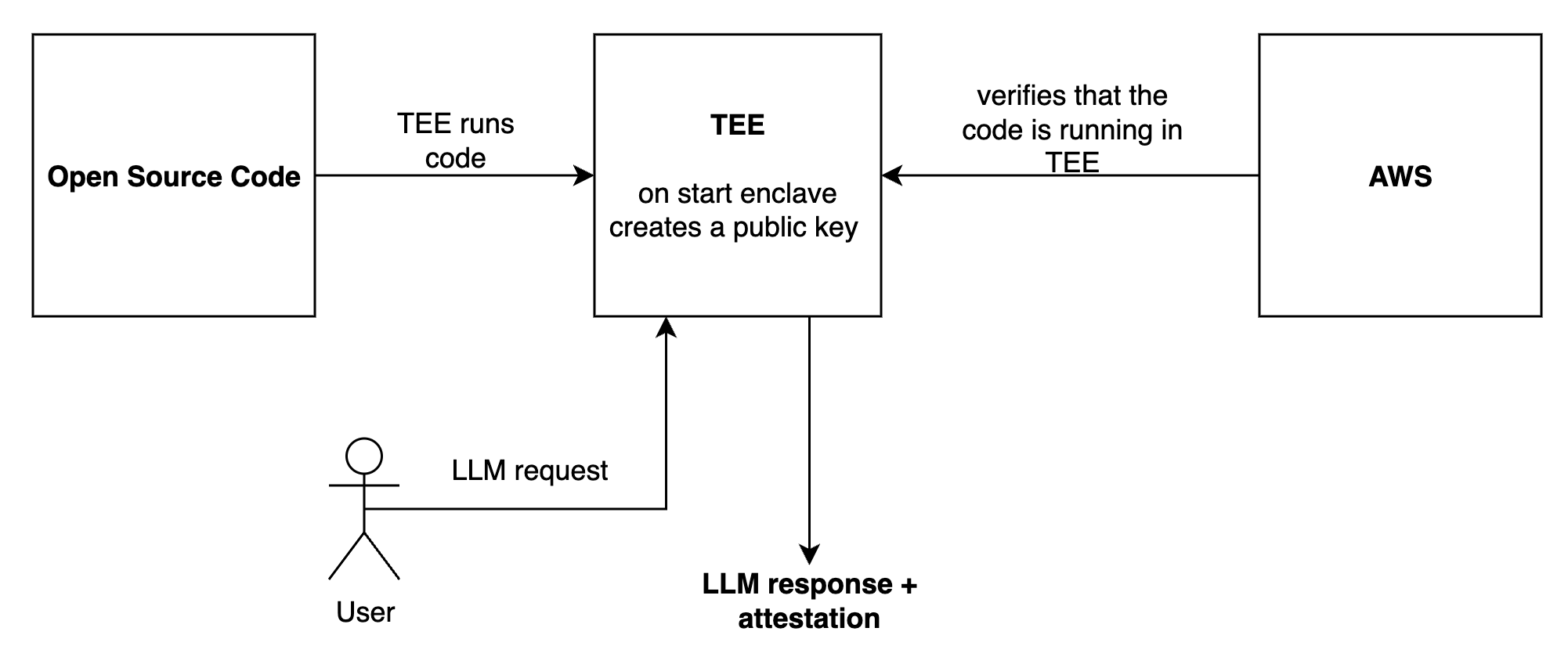
The Sentience enclave
[code](https://github.com/galadriel-ai/sentience/tree/main/enclave) is
first packaged into a Docker image, which
is then packaged into an enclave image. This is a deterministic process:
the resulting `enclave image hash` verifies that the code running inside
the TEE (Trusted Execution Environment) is indeed the original code.
To confirm which code is running in the TEE, take the source code and
generate a new enclave image. If you end up with the same `enclave image
hash`, you have verified that it matches the code currently running
inside the TEE.
Upon TEE startup, a private key is generated. Since no one can access
the internal components of the TEE, any data signed with this key can be
trusted as authentic.
AWS signs the resulting enclave image hash alongside the generated
public key inside the TEE. This signature provides a final guarantee
that the code is running exactly as intended, without any
intermediaries.
You can read more about Nitro Enclaves
[here](https://docs.aws.amazon.com/enclaves/latest/user/nitro-enclave.html)
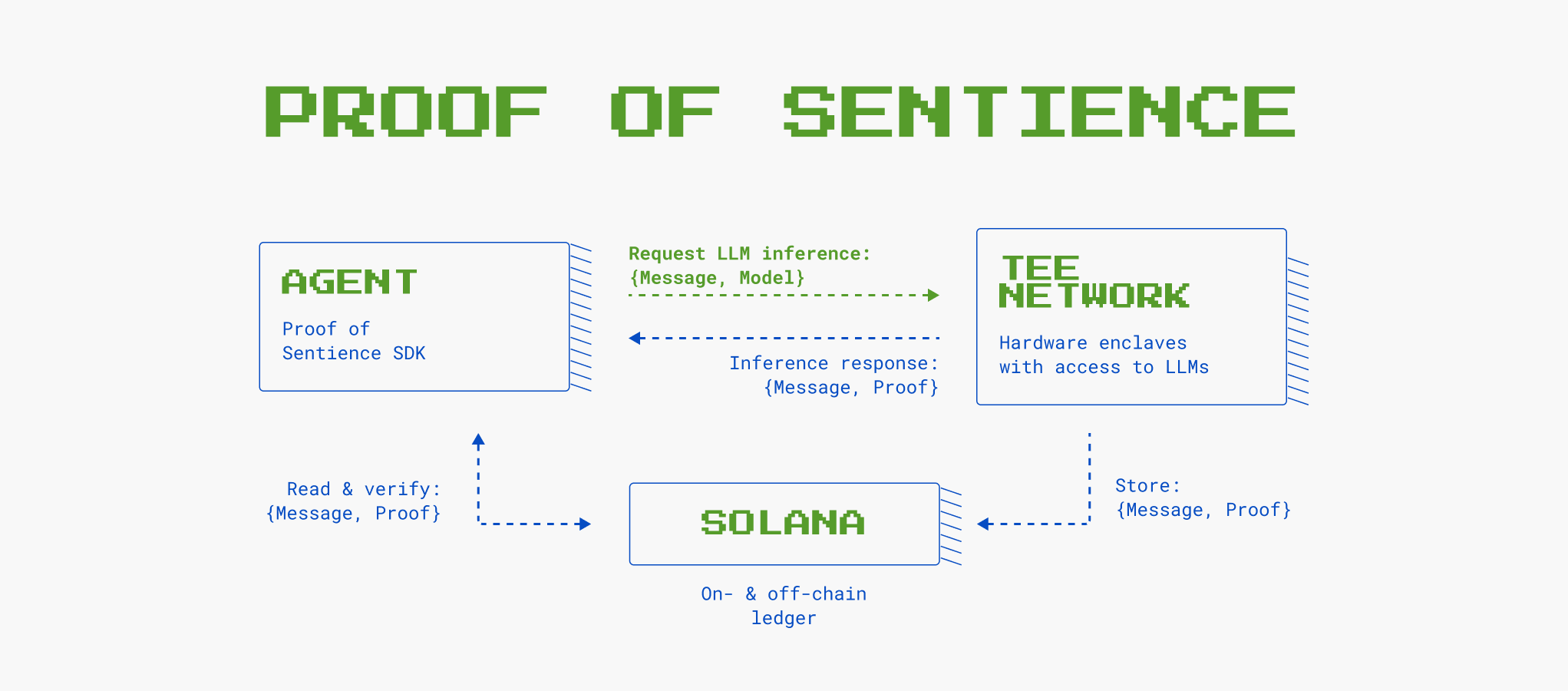
Each LLM inference request to the Galadriel Verified API is processed in
the enclave. After the LLM generates a response, both the request and
the response are hashed using SHA256. This hash is provided in the LLM
response under the `hash` field.
The hash is then signed with the TEE’s private key, producing the
`signature` field.
Finally, the Galadriel API includes the full `attestation` and `public_key`
in the LLM response. With these four pieces of information: `hash`,
`signature`, `attestation`, and `public_key` you can verify that an LLM
inference genuinely took place inside the enclave.
### What's next?
* To see more details about the API check out the full [API docs](/api-reference/proof-of-sentience-API)
* To see how to verify the signatures [Verify Signatures](/for-agents-developers/verify-signatures)
* To see how to verify the attestation [Verify Attestation](/for-agents-developers/verify-attestation)
# null
Source: https://docs.galadriel.com/for-agents-developers/models
## Large language models
The Proof of Sentience API chat API currently supports all OpenAI models.
### Fine-tuned models
The API supports using fine-tuned models hosted by OpenAI. To use your fine-tuned model, you need to:
1. Specify your fine-tuned model name in the model field. For example: `ft:gpt-4o-2024-08-06:personal::abcdefg`
2. Add an extra header `Fine-Tune-Authorization` with your OpenAI API key that has the correct access to your model in Bearer format(see code examples below).
```python Python
from openai import OpenAI
client = OpenAI(
base_url="https://api.galadriel.com/v1/verified",
api_key=GALADRIEL_API_KEY
)
completion = client.chat.completions.create(
model="ft:gpt-4o-2024-08-06:personal::abcdefg",
messages=[
{"role": "system", "content": "You are a helpful assistant."},
{"role": "user", "content": "Hello!"}
],
extra_headers={
"Fine-Tune-Authorization": "Bearer your-openai-fine-tune-api-key"
}
)
print(f"Message: {completion.choices[0].message}")
print(f"Hash: {completion.hash}")
print(f"Signed public key: {completion.public_key}")
print(f"Signature: {completion.signature}")
print(f"Tx hash: {completion.tx_hash}")
print(f"Attestation: {completion.attestation}")
```
```javascript Javascript
import OpenAI from "openai";
const openai = new OpenAI({
apiKey: process.env.GALADRIEL_API_KEY,
baseURL: "https://api.galadriel.com/v1/verified",
});
const completion = await openai.chat.completions.create({
model: "ft:gpt-4o-2024-08-06:personal::abcdefg",
messages: [
{ role: "system", content: "You are a helpful assistant." },
{ role: "user", content: "Hello!" },
],
headers: {
"Fine-Tune-Authorization": "Bearer your-openai-fine-tune-api-key"
}
});
console.log(`Message: ${completion.choices[0].message}`);
console.log(`Hash: ${completion.hash}`);
console.log(`Signed public key: ${completion.public_key}`);
console.log(`Signature: ${completion.signature}`);
console.log(`Tx hash: ${completion.tx_hash}`);
console.log(`Attestation: ${completion.attestation}`);
```
```bash cURL
curl -X 'POST' \
'https://api.galadriel.com/v1/verified/chat/completions' \
-H 'accept: application/json' \
-H 'Authorization: Bearer $GALADRIEL_API_KEY' \
-H 'Fine-Tune-Authorization: Bearer your-openai-fine-tune-api-key' \
-H 'Content-Type: application/json' \
-d '{
"model": "ft:gpt-4o-2024-08-06:personal::abcdefg",
"messages": [
{
"content": "You are a helpful assistant.",
"role": "system"
},
{
"content": "Hello!",
"role": "user"
}
]
}'
```
# Quickstart
Source: https://docs.galadriel.com/for-agents-developers/quickstart
Sentience SDK is designed to be compatible with OpenAI's client libraries, making it easy to use your existing workflows but with an added benefit of prooving that the inference was made as is.
This API does not support streaming yet.
[Sentience](https://github.com/galadriel-ai/sentience) repository is open-source
1. Create an account [here](https://dashboard.galadriel.com)
2. Create an API key on the dashboard
```sh
pip install sentience
```
Run the following code
```python Python
from openai import OpenAI
client = OpenAI(
base_url="https://api.galadriel.com/v1/verified",
api_key=GALADRIEL_API_KEY
)
completion = client.chat.completions.create(
model="gpt-4o",
messages=[
{"role": "system", "content": "You are a helpful assistant."},
{"role": "user", "content": "Hello!"}
]
)
print(f"Message: {completion.choices[0].message}")
print(f"Hash: {completion.hash}")
print(f"Signed public key: {completion.public_key}")
print(f"Signature: {completion.signature}")
print(f"Tx hash: {completion.tx_hash}")
print(f"Attestation: {completion.attestation}")
```
```javascript Javascript
import OpenAI from "openai";
const openai = new OpenAI({
apiKey: process.env.GALADRIEL_API_KEY,
baseURL: "https://api.galadriel.com/v1/verified",
});
const completion = await openai.chat.completions.create({
model: "gpt-4o",
messages: [
{ role: "system", content: "You are a helpful assistant." },
{ role: "user", content: "Hello!" },
],
});
console.log(`Message: ${completion.choices[0].message}`);
console.log(`Hash: ${completion.hash}`);
console.log(`Signed public key: ${completion.public_key}`);
console.log(`Signature: ${completion.signature}`);
console.log(`Tx hash: ${completion.tx_hash}`);
console.log(`Attestation: ${completion.attestation}`);
```
```bash cURL
curl -X 'POST' \
'https://api.galadriel.com/v1/verified/chat/completions' \
-H 'accept: application/json' \
-H 'Authorization: Bearer $GALADRIEL_API_KEY' \
-H 'Content-Type: application/json' \
-d '{
"model": "gpt-4o",
"messages": [
{
"content": "You are a helpful assistant.",
"role": "system"
},
{
"content": "Hello!",
"role": "user"
}
]
}'
```
```python
from typing import List
import sentience
from sentience.history import GaladrielChatHistory
history: List[GaladrielChatHistory] = sentience.get_history(
galadriel_api_key="Bearer GALADRIEL_API_KEY", filter="mine"
)
```
```python
from typing import List
import sentience
from sentience.history import GaladrielChatHistory
history: List[GaladrielChatHistory] = sentience.get_history(
galadriel_api_key="Bearer GALADRIEL_API_KEY"
)
```
```python
import sentience
from sentience.history import GaladrielChatHistory
item: GaladrielChatHistory = sentience.get_by_hash(
galadriel_api_key="Bearer GALADRIEL_API_KEY",
# example hash, replace with your own:
hash="922e575ef7f07449977001c1caaf78fb6ad8b731cd625434f9215087a6c2b39f"
)
```
[Explorer](https://explorer.galadriel.com/) shows all the verified inference calls done on Galadriel platform.
[Explorer Detailed View](https://explorer.galadriel.com/details/d5320c7aa1ffd93eee0a212937cc5fdf04a96ce27cf11cf158e0b29899428365) shows all the details for one verified inference call
### What's next?
* To see more details about sentience SDK, check out the [open-source repository](https://github.com/galadriel-ai/sentience)
* To see more details about the API check out the full [API docs](/api-reference/proof-of-sentience-API)
* To see how it all works [How TEE Works](/for-agents-developers/how-tee-works)
* To see how to verify the signatures [Verify Signatures](/for-agents-developers/verify-signatures)
* To see how to verify the attestation [Verify Attestation](/for-agent-developers/verify-attestation)
# null
Source: https://docs.galadriel.com/for-agents-developers/rate-limits
The token limits include the input + output tokens. See the pricing [here](https://galadriel.com/pricing).
| Model | Tier | RPM ¹ | RPD ² | TPM ³ | TPD ⁴ |
| ------------------ | ------ | ----- | ------ | ----- | ----- |
| Verified Inference | "Free" | 60 | 33,000 | 40k | 4M |
(1) RPM: Request Per Minute
(2) RPD: Request Per Day
(3) TPM: Tokens Per Minute
(4) TPD: Tokens Per Day
To access “Infinite” tier, please [apply here](https://galadriel.com/pricing)
#### Rate limit headers
We set the following `x-ratelimit` headers to inform you on current rate limits applicable to you.
The following headers are set (values are illustrative):
| Header | Value | Notes |
| ------------------------------ | ----- | ------------------------------------------------- |
| retry-after | 2 | Seconds to wait until retrying\* |
| x-ratelimit-limit-requests | 28800 | Requests per day allowed |
| x-ratelimit-limit-tokens | 40000 | Tokens per minute allowed |
| x-ratelimit-remaining-requests | 123 | Requests remaining for the day |
| x-ratelimit-remaining-tokens | 1337 | Tokens remaining for this minute |
| x-ratelimit-reset-requests | 1337s | Seconds until the daily rate limit resets |
| x-ratelimit-reset-tokens | 1s | Seconds until the minute based token limit resets |
\* The `retry-after` header is only returned if the response status code is 429 and the request was rate limited
# Verify Attestation
Source: https://docs.galadriel.com/for-agents-developers/verify-attestation
Galadriel Verified Inference API provides LLM inferences results that are signed by the TEE private key and attested by AWS enclave. This page gives overview on how to verify the attestation.
Please see the [quickstart](quickstart) to get an LLM inference response.
Please see the [verify-signatures](verify-signatures) to see how to verify
the signature
This is an example response with some information redacted:
```json
{
"id": "chatcmpl-AgAQhAGTZKog9p0wPC7aVOXT44046",
"choices": [
{
"finish_reason": "stop",
"index": 0,
"logprobs": null,
"message": {
"content": "Hello! How can I assist you today?",
"refusal": null,
"role": "assistant",
"function_call": null,
"tool_calls": null,
"audio": null
}
}
],
"hash": "fa1eb8b9c330cf13f3643d46bc7e10510fa207a4e80645c795f82c3ddf9806ad",
"public_key": "Dp2k554Ebsij5RjuhjsZujVW2bJnQzfb43VYZSQ4NZo1",
"attestation": "hEShATgioFkRP6lpbW9kdWxlX2lkeCdpLTAxYWMwZDExNTgyMTE5Yzc5LWVuYzAxOTNkNGY0YTI5MDI5NDNmZGlnZXN0ZlNIQTM4NGl0aW1lc3RhbXAbAAABk98BdQlkcGNyc7AAWDCjV1iARxeBUUyDk17nfdj8cQUS2vXTBszuLCq7CYXjX+oIQ/DpUKdPjRdUH8Zt0OQBWDADQ7BWzYSFyniQ3dgzR214RgrtKqFhVI5OJr7fMhcmaWJX1iPogF8/YFlGs9iwxqoCWDDhQ4UXdCBzIEmTwSrVg8ocNhh4PAeBjHfAPN98B8+taI0iebm9miJ8uNBWe5qIUUsDWDAAAAAAAAAAAAAAAAAAAAAAAAAAAAAAAAAAAAAAAAAAAAAAAAAAAAAAAAAAAAAAAAAEWDAxnyEmxgjpwUp+8ptWmNH1Pi4lAU0gLe1MrIvqHV2jeoUG/XCsACb57odarkXU4k8FWDAAAAAAAAAAAAAAAAAAAAAAAAAAAAAAAAAAAAAAAAAAAAAAAAAAAAAAAAAAAAAAAAAGWDAAAAAAAAAAAAAAAAAAAAAAAAAAAAAAAAAAAAAAAAAAAAAAAAAAAAAAAAAAAAAAAAAHWDAAAAAAAAAAAAAAAAAAAAAAAAAAAAAAAAAAAAAAAAAAAAAAAAAAAAAAAAAAAAAAAAAIWDAAAAAAAAAAAAAAAAAAAAAAAAAAAAAAAAAAAAAAAAAAAAAAAAAAAAAAAAAAAAAAAAAJWDAAAAAAAAAAAAAAAAAAAAAAAAAAAAAAAAAAAAAAAAAAAAAAAAAAAAAAAAAAAAAAAAAKWDAAAAAAAAAAAAAAAAAAAAAAAAAAAAAAAAAAAAAAAAAAAAAAAAAAAAAAAAAAAAAAAAALWDAAAAAAAAAAAAAAAAAAAAAAAAAAAAAAAAAAAAAAAAAAAAAAAAAAAAAAAAAAAAAAAAAMWDAAAAAAAAAAAAAAAAAAAAAAAAAAAAAAAAAAAAAAAAAAAAAAAAAAAAAAAAAAAAAAAAANWDAAAAAAAAAAAAAAAAAAAAAAAAAAAAAAAAAAAAAAAAAAAAAAAAAAAAAAAAAAAAAAAAAOWDAAAAAAAAAAAAAAAAAAAAAAAAAAAAAAAAAAAAAAAAAAAAAAAAAAAAAAAAAAAAAAAAAPWDAAAAAAAAAAAAAAAAAAAAAAAAAAAAAAAAAAAAAAAAAAAAAAAAAAAAAAAAAAAAAAAABrY2VydGlmaWNhdGVZAoYwggKCMIICB6ADAgECAhABk9T0opApQwAAAABnY/uYMAoGCCqGSM49BAMDMIGRMQswCQYDVQQGEwJVUzETMBEGA1UECAwKV2FzaGluZ3RvbjEQMA4GA1UEBwwHU2VhdHRsZTEPMA0GA1UECgwGQW1hem9uMQwwCgYDVQQLDANBV1MxPDA6BgNVBAMMM2ktMDFhYzBkMTE1ODIxMTljNzkuZXUtY2VudHJhbC0xLmF3cy5uaXRyby1lbmNsYXZlczAeFw0yNDEyMTkxMDU1MTdaFw0yNDEyMTkxMzU1MjBaMIGWMQswCQYDVQQGEwJVUzETMBEGA1UECAwKV2FzaGluZ3RvbjEQMA4GA1UEBwwHU2VhdHRsZTEPMA0GA1UECgwGQW1hem9uMQwwCgYDVQQLDANBV1MxQTA/BgNVBAMMOGktMDFhYzBkMTE1ODIxMTljNzktZW5jMDE5M2Q0ZjRhMjkwMjk0My5ldS1jZW50cmFsLTEuYXdzMHYwEAYHKoZIzj0CAQYFK4EEACIDYgAE4XwdUM3+u6ArLPDzCkpoc63xYkrakzYDqMi6L6Q0rPlgefHPAuTP3A80qHTlH1bbG1iDqQtBLUkyFliFFyoG8vOU0uDFJk7PL8bJf3LbzadFQWsgN1+QRb6p5TgIoNsaox0wGzAMBgNVHRMBAf8EAjAAMAsGA1UdDwQEAwIGwDAKBggqhkjOPQQDAwNpADBmAjEA11dq7yaKB+8HwvFNtk0yiBiXIu3d9OK0vEeBYH8+qLJ85qGZZgcDaR/npTGlKFS7AjEAil0Rpe1GDKnVK6+w4+tq+jCHwOlmUbhKl25btnZv1PpY8TPBUcxM0QSYroufseLxaGNhYnVuZGxlhFkCFTCCAhEwggGWoAMCAQICEQD5MXVoG5Cv4R1GzLTk5/hWMAoGCCqGSM49BAMDMEkxCzAJBgNVBAYTAlVTMQ8wDQYDVQQKDAZBbWF6b24xDDAKBgNVBAsMA0FXUzEbMBkGA1UEAwwSYXdzLm5pdHJvLWVuY2xhdmVzMB4XDTE5MTAyODEzMjgwNVoXDTQ5MTAyODE0MjgwNVowSTELMAkGA1UEBhMCVVMxDzANBgNVBAoMBkFtYXpvbjEMMAoGA1UECwwDQVdTMRswGQYDVQQDDBJhd3Mubml0cm8tZW5jbGF2ZXMwdjAQBgcqhkjOPQIBBgUrgQQAIgNiAAT8AlTrpgjB82hw4prakL5GODKSc26JS//2ctmJREtQUeU0pLH22+PAvFgaMrexdgcO3hLWmj/qIRtm51LPfdHdCV9vE3D0FwhD2dwQASHkz2MBKAlmRIfJeWKEME3FP/SjQjBAMA8GA1UdEwEB/wQFMAMBAf8wHQYDVR0OBBYEFJAltQ3ZBUfnlsOW+nKdz5mp30uWMA4GA1UdDwEB/wQEAwIBhjAKBggqhkjOPQQDAwNpADBmAjEAo38vkaHJvV7nuGJ8FpjSVQOOHwND+VtjqWKMPTmAlUWhHry/LjtV2K7ucbTD1q3zAjEAovObFgWycCil3UugabUBbmW0+96P4AYdalMZf5za9dlDvGH8K+sDy2/ujSMC89/2WQLGMIICwjCCAkegAwIBAgIQGdmv8JSQnXjJHS4Bs1sXNTAKBggqhkjOPQQDAzBJMQswCQYDVQQGEwJVUzEPMA0GA1UECgwGQW1hem9uMQwwCgYDVQQLDANBV1MxGzAZBgNVBAMMEmF3cy5uaXRyby1lbmNsYXZlczAeFw0yNDEyMTgwMzMyNTVaFw0yNTAxMDcwNDMyNTVaMGcxCzAJBgNVBAYTAlVTMQ8wDQYDVQQKDAZBbWF6b24xDDAKBgNVBAsMA0FXUzE5MDcGA1UEAwwwNmM1ZTY1NDRmNzBjYmE3Yi5ldS1jZW50cmFsLTEuYXdzLm5pdHJvLWVuY2xhdmVzMHYwEAYHKoZIzj0CAQYFK4EEACIDYgAEyi0TuD1Wpk6rS1CGnsNYGtjHgM9rMaJRddoUJAEHuvpTgWr7nnDXbHnfh7bhjySx2Jc8gUtV0OBHoVq+CnEKvggejVLBLDBwjACfdBorx+q6glz3Cxw3Spgk5w0kKFK1o4HVMIHSMBIGA1UdEwEB/wQIMAYBAf8CAQIwHwYDVR0jBBgwFoAUkCW1DdkFR+eWw5b6cp3PmanfS5YwHQYDVR0OBBYEFAo58SGy0m/VffwbztF0CWTPein0MA4GA1UdDwEB/wQEAwIBhjBsBgNVHR8EZTBjMGGgX6BdhltodHRwOi8vYXdzLW5pdHJvLWVuY2xhdmVzLWNybC5zMy5hbWF6b25hd3MuY29tL2NybC9hYjQ5NjBjYy03ZDYzLTQyYmQtOWU5Zi01OTMzOGNiNjdmODQuY3JsMAoGCCqGSM49BAMDA2kAMGYCMQC2Ugn+K57xLPoDsIDjdMtBy+BstPUoHWitqkvU86KPWwnITCuByWsBdazpo7R4B1ICMQCtEYzHt3jU7Ez6WgfTOz0y4ujF4OkpWxvb4TSneY0H3gxIw37cLUt0yCVpFH8iLdxZAyYwggMiMIICp6ADAgECAhEAu+Zt8IqgwkzS3kw3fcM+5jAKBggqhkjOPQQDAzBnMQswCQYDVQQGEwJVUzEPMA0GA1UECgwGQW1hem9uMQwwCgYDVQQLDANBV1MxOTA3BgNVBAMMMDZjNWU2NTQ0ZjcwY2JhN2IuZXUtY2VudHJhbC0xLmF3cy5uaXRyby1lbmNsYXZlczAeFw0yNDEyMTgyMjA5MjlaFw0yNDEyMjQxNjA5MjhaMIGMMT8wPQYDVQQDDDZkYzY3MTg3YjRjYWMxMzQ4LnpvbmFsLmV1LWNlbnRyYWwtMS5hd3Mubml0cm8tZW5jbGF2ZXMxDDAKBgNVBAsMA0FXUzEPMA0GA1UECgwGQW1hem9uMQswCQYDVQQGEwJVUzELMAkGA1UECAwCV0ExEDAOBgNVBAcMB1NlYXR0bGUwdjAQBgcqhkjOPQIBBgUrgQQAIgNiAAQReoJw1LkwRhP9k3cmEBpiVF4aOUYgvOWJnOpstEly/wOzeebhb4bSFhwV+zToRfikv7JB71eRNsGMGacw0dPY4gRxlkxwv4D6Q9BnbmIYEYukfbdpYAMLv+j9mBDjU6ejgfAwge0wEgYDVR0TAQH/BAgwBgEB/wIBATAfBgNVHSMEGDAWgBQKOfEhstJv1X38G87RdAlkz3op9DAdBgNVHQ4EFgQUPtkKU7ZIbZnpt+nAglJsqQ0nZJQwDgYDVR0PAQH/BAQDAgGGMIGGBgNVHR8EfzB9MHugeaB3hnVodHRwOi8vY3JsLWV1LWNlbnRyYWwtMS1hd3Mtbml0cm8tZW5jbGF2ZXMuczMuZXUtY2VudHJhbC0xLmFtYXpvbmF3cy5jb20vY3JsLzk1NTdjODdjLTM5ZjMtNDA5Ny05ZjQ4LTk3MTY3ODZkMzE3Ni5jcmwwCgYIKoZIzj0EAwMDaQAwZgIxAM8+2ZIrC7d5BQm4/2rJDt+kkeODL2QR+B6NYidPE5DIcjWYJ6hE71XTG1KF8pBD+QIxANS5Awbc3CXYuUBHUgHdIPvDS9awZWem3CEDnVZ2UtrZFrFAhSpYttsptdZDPbgiy1kCyTCCAsUwggJLoAMCAQICFQDfcFHYkmLuX+/ZvefksXQX+yIc7jAKBggqhkjOPQQDAzCBjDE/MD0GA1UEAww2ZGM2NzE4N2I0Y2FjMTM0OC56b25hbC5ldS1jZW50cmFsLTEuYXdzLm5pdHJvLWVuY2xhdmVzMQwwCgYDVQQLDANBV1MxDzANBgNVBAoMBkFtYXpvbjELMAkGA1UEBhMCVVMxCzAJBgNVBAgMAldBMRAwDgYDVQQHDAdTZWF0dGxlMB4XDTI0MTIxOTAyMTQwNloXDTI0MTIyMDAyMTQwNlowgZExCzAJBgNVBAYTAlVTMRMwEQYDVQQIDApXYXNoaW5ndG9uMRAwDgYDVQQHDAdTZWF0dGxlMQ8wDQYDVQQKDAZBbWF6b24xDDAKBgNVBAsMA0FXUzE8MDoGA1UEAwwzaS0wMWFjMGQxMTU4MjExOWM3OS5ldS1jZW50cmFsLTEuYXdzLm5pdHJvLWVuY2xhdmVzMHYwEAYHKoZIzj0CAQYFK4EEACIDYgAEA8kjNuPHssG2NawygjLc5fhvu0JT/Q6lHdaio4P2sutOp2gZg8eUjJUkjTQk4MucamRxkpA3lRakfWbv6qPKkaOEuhVIUIYw1Wr5fWiEAOfpoIfAUvvUocKoKmJ+mqblo2YwZDASBgNVHRMBAf8ECDAGAQH/AgEAMA4GA1UdDwEB/wQEAwICBDAdBgNVHQ4EFgQUON+5GI4EVA+YcM0rh3rheC0qQG8wHwYDVR0jBBgwFoAUPtkKU7ZIbZnpt+nAglJsqQ0nZJQwCgYIKoZIzj0EAwMDaAAwZQIwVXAtOVIJlO2HmyloJaTNLYSmytsww0lQh4qKL9wS3dOKwtCQmCdWdaO3xhU9MVNlAjEAjQ0pLxd+fK/t4optLLPMGUyfbqsrtn3tC86z+Ex8fTrIE8KKplWoifpwpvFY8BPKanB1YmxpY19rZXlYIL5YgvFPWamoUMAOu5rG8lBp7hJ+lVOEerp0JQh85VAEaXVzZXJfZGF0YfZlbm9uY2X2WGCIehyk6BGM7G3/RpVAG9QGnh1/s/8FQm1RjGqhLUx2JG3EzDMjSc1aPVbql5a7IdxILSRJ96mKQybtGxhPGmZCQfc3gYeBn36JtkTHeh5mVFiZqxVLAx3R/2+mLw9D90U="
}
```
```shell
git clone git@github.com:galadriel-ai/sentience.git
cd sentience/verified-inference/verify
```
```shell
# Optional
python3 -m venv venv
source venv/bin/activate
pip install -r requirements.txt
```
Take the attestation from the LLM inference response
```shell
python verify.py --pcr0_hash a3575880471781514c83935ee77dd8fc710512daf5d306ccee2c2abb0985e35fea0843f0e950a74f8d17541fc66dd0e4 --attestation insert-your-attestation
```
See more information in the [TEE repo](https://github.com/galadriel-ai/sentience/tree/main/verified-inference/verify)
# Verify Signatures
Source: https://docs.galadriel.com/for-agents-developers/verify-signatures
Galadriel Verified Inference API provides LLM inferences results that are signed by the TEE private key. This page goes over the details on how to validate if the signatures are correct.
Please see the [quickstart](quickstart) to get an LLM inference response
```
pip install sentience
```
Run the following code
```python PythonSDK
import sentience
from openai import OpenAI
client = OpenAI(
base_url="https://api.galadriel.com/v1/verified",
api_key="Bearer GALADRIEL_API_KEY",
)
completion = client.chat.completions.create(
model="gpt-4o",
messages=[
{"role": "system", "content": "You are a helpful assistant."},
{"role": "user", "content": "Hello!"},
],
)
# Verifying proof is just oneliner after making the request:
is_valid = sentience.verify_signature(completion)
print("is_valid:", is_valid)
```
```python Python
# See quick start on how to get the `hash`, `signature` and
# `public_key` fields from LLM inference
# pip install pynacl
# python verify.py
import binascii
import nacl.signing
import nacl.exceptions
# Given values
# TODO: change to your values
hash = "c847e98b1abf528f988c0253840616405a014ef2494e7a1b6c8d35e90413dd0a"
signature = "68603b802f1e293dbf21bb1004bd08bca272fc70b6d00556f2a06b35949319533ad527c614c063836601aa00c8ca960dc600cad990df1ff8ff18079a09561d07"
public_key = "835cc0e84c2a5190561d7c2eaf10eb2597cbe7a71541084c5edea32b60bc5e68"
# Decode the public key from base58 into raw bytes
public_key_bytes = binascii.unhexlify(public_key)
# Decode the hash (message) and signature from hex
message_bytes = binascii.unhexlify(hash)
signature_bytes = binascii.unhexlify(signature)
# Create a VerifyKey object from the public key bytes
verify_key = nacl.signing.VerifyKey(public_key_bytes)
try:
# If verify() does not raise an exception, the signature is valid.
verify_key.verify(message_bytes, signature_bytes)
print("Signature is valid!")
except nacl.exceptions.BadSignatureError:
print("Signature is invalid!")
```
```javascript Javascript
// See quick start on how to get the `hash`, `signature` and
// `public_key` fields from LLM inference
import nacl from 'tweetnacl';
// Given values
// TODO: change to your values
const hash = "c847e98b1abf528f988c0253840616405a014ef2494e7a1b6c8d35e90413dd0a";
const signature = "68603b802f1e293dbf21bb1004bd08bca272fc70b6d00556f2a06b35949319533ad527c614c063836601aa00c8ca960dc600cad990df1ff8ff18079a09561d07";
const publicKey = "835cc0e84c2a5190561d7c2eaf10eb2597cbe7a71541084c5edea32b60bc5e68";
// Decode the public key from hex
const publicKeyBytes = Buffer.from(publicKey, 'hex');
// Decode the message (hash) and signature from hex
const messageBytes = Buffer.from(hash, 'hex');
const signatureBytes = Buffer.from(signature, 'hex');
// Verify the signature
const isValid = nacl.sign.detached.verify(messageBytes, signatureBytes, publicKeyBytes);
if (isValid) {
console.log("Signature is valid!");
} else {
console.log("Signature is invalid!");
}
```
### What's next?
* To see more details about the API check out the full [API docs](/api-reference/proof-of-sentience-API)
* To see how to verify the attestation [Verify Attestation](/for-agents-developers/verify-attestation)
# Deploying Agents to Galadriel Network
Source: https://docs.galadriel.com/galadriel-network/agent-deployment/agent-deployment
This guide covers how to deploy your agents to the Galadriel network using the Galadriel CLI. The CLI provides a comprehensive set of commands to manage the entire agent lifecycle - from initialization and development to deployment and monitoring.
## Prerequisites
Before deploying your agent, ensure you have:
1. Installed the Galadriel package
2. Docker installed and running (for build/publish operations)
3. A Galadriel API key
4. Docker Hub credentials (for publishing images)
## Installation
Install the Galadriel package using pip:
```bash
pip install galadriel
```
## Agent Lifecycle Management
### Initializing a New Agent
Create a new agent project with all necessary files and structure:
```bash
galadriel agent init
```
This interactive command will prompt you for:
* Agent name
The command creates:
* Basic agent structure
* Docker configuration
* Environment files
* Required Python files
### Building Your Agent
Build the Docker image for your agent:
```bash
galadriel agent build [--image-name NAME]
```
Options:
* `--image-name`: Name for the Docker image (default: "agent")
### Publishing Your Agent
Push the agent's Docker image to Docker Hub:
```bash
galadriel agent publish [--image-name NAME]
```
Options:
* `--image-name`: Name for the Docker image (default: "agent")
### Deploying Your Agent
Build, publish and deploy the agent to the Galadriel platform:
```bash
galadriel agent deploy [--image-name NAME] [--skip-build] [--skip-publish]
```
Options:
* `--image-name`: Name for the Docker image (default: "agent")
* `--skip-build`: Skip building the Docker image
* `--skip-publish`: Skip publishing the Docker image to Docker Hub
When you deploy an agent, you'll receive an agent ID. Save this ID as you'll need it for future operations like checking state or updating the agent.
### Updating an Existing Agent
Update an agent that's already deployed on the Galadriel platform:
```bash
galadriel agent update --agent-id AGENT_ID [--image-name NAME]
```
Required:
* `--agent-id`: ID of the agent to update
Options:
* `--image-name`: Name for the Docker image (default: "agent")
### Monitoring Your Agent
Retrieve the current state of a deployed agent:
```bash
galadriel agent state --agent-id AGENT_ID
```
Required:
* `--agent-id`: ID of the deployed agent
### Listing All Deployed Agents
Get information about all your deployed agents:
```bash
galadriel agent list
```
### Removing a Deployed Agent
Remove a deployed agent from the Galadriel platform:
```bash
galadriel agent destroy AGENT_ID
```
Required:
* `AGENT_ID`: ID of the agent to destroy
## Configuration Files
### .env
This file contains environment variables required for deployment:
```
DOCKER_USERNAME=your_username
DOCKER_PASSWORD=your_password
GALADRIEL_API_KEY=your_api_key
```
Keep your API keys and credentials secure. Never commit this file to version control.
### .agents.env
This file contains environment variables for the agent runtime:
```
# Example
LLM_API_KEY=your_key
LLM_MODEL=your_model
SOLANA_KEY_PATH=path_to_your_solana_key
```
Do not include deployment credentials in this file. This file is for agent-specific configuration only.
## Wallet Management
For agents that interact with the Solana blockchain, the Galadriel CLI provides wallet management commands.
### Creating a Wallet
Create a new Solana wallet:
```bash
galadriel wallet create [--path PATH]
```
Options:
* `--path`: Path to save the wallet key file (default: "\~/.galadriel/solana/default\_key.json")
### Importing an Existing Wallet
Import an existing wallet:
```bash
galadriel wallet import [--private-key KEY] [--path PATH]
```
Options:
* `--private-key`: Private key of the wallet to import in JSON format
* `--path`: Path to the wallet key file to import
You must provide either `--private-key` or `--path`, but not both.
### Requesting an Airdrop
Request an airdrop of 0.001 SOL to your Solana wallet:
```bash
galadriel wallet airdrop
```
## Deployment Example
Here's a complete example of creating and deploying a new agent:
```bash
# Initialize new agent
galadriel agent init
# Build and deploy
galadriel agent deploy --image-name my-first-agent
# Check agent status
galadriel agent state --agent-id your-agent-id
```
## Troubleshooting
If you encounter issues during deployment:
1. Ensure Docker is running before using build/publish commands
2. Verify your Galadriel API key is valid
3. Check that your Docker Hub credentials are correct
4. Confirm your `.env` and `.agents.env` files are properly configured
5. Make sure you have necessary permissions on Docker Hub
Learn more about the agent framework.
Build your first agent in 5 min.
# Agent Runtime
Source: https://docs.galadriel.com/galadriel-network/concepts/runtime
## What is an Agent Runtime?
For an agent to be truly autonomous, it must operate continuously, ready to process new requests in real time. This is precisely the role of `AgentRuntime`. It is the core orchestration layer that manages agent execution, ensuring that messages are processed efficiently while maintaining the agent’s state.
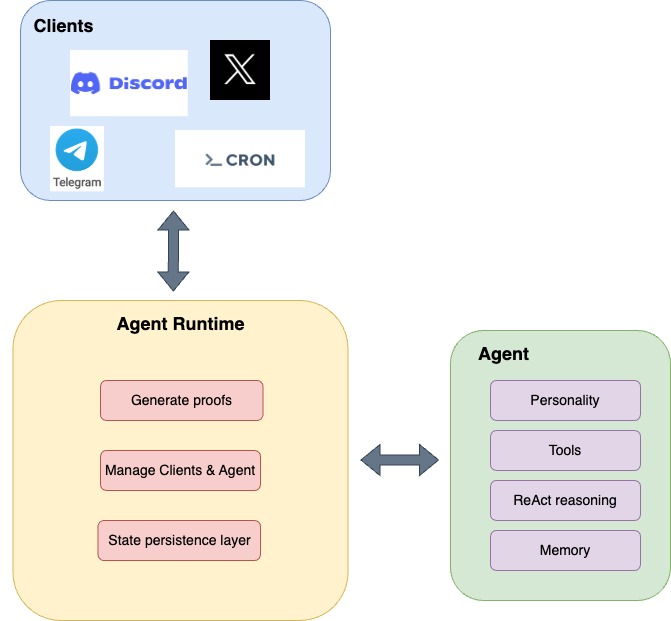 ## How It Works
At a high level, the `Agent Runtime` follows this execution loop:
1. **Receive a [Message](https://github.com/galadriel-ai/galadriel/blob/main/galadriel/entities.py#L11)** – An input client sends a message to the runtime.
2. **Process the [Message](https://github.com/galadriel-ai/galadriel/blob/main/galadriel/entities.py#L11)** – The agent receives and handles the request.
3. **Send the Response** – The agent's output is forwarded to the appropriate client.
4. **Repeat** – The runtime continuously handles incoming messages in a loop.
`AgentRuntime` interface is defined as follows
```python
class AgentRuntime:
def __init__(
self,
# Any number of input Clients
inputs: List[AgentInput],
# Any number of output Clients
outputs: List[AgentOutput],
# The agent to run
agent: Agent,
# optional short term memory - more on that later
short_term_memory: Optional[ShortTermMemory] = None,
# optional pricing - more on that later
pricing: Optional[Pricing] = None,
):
...
```
The `Agent Runtime` \*\*can handle any number of input/output clients concurrently, making it easy to implement all kinds of agents that can handle various workflows.
## Using `AgentRuntime`
Based on the interface above, here’s an example of how the runtime is created.
```python
runtime = AgentRunTime(
inputs=[cron, discord], # Specify which input clients should trigger agent execution
outputs=[twitter], # Specify which output clients should publish agent's results
agent=agent, # Specify which agent should be executed
)
```
The creation of the runtime is lightweight as it doesn’t start listening to inputs nor trigger the agent execution. In order to start the runtime process, its `AgentRuntime#run` must be called.
```python
asyncio.run(runtime.run())
```
Note that in order to run infinitely and asynchronously respond to inputs, `AgentRuntime#run` is `async` function. Therefore, it has to be passed to `asyncio.run`.
## Conclusion
The `Agent Runtime` is the backbone of autonomous agent execution, enabling seamless integration and scalability. It’s main responsibilities are:
* **Orchestration** – the runtime ties the agent execution flow together. It enables Agents to run indefinitely and autonomously. Handles multiple concurrent clients
* **Validation -** manages the types of messages coming in and making sure they are valid
* **Integration** – Supports multiple input/output sources, enabling build complex agents. It can be extended with additional components like memory and pricing
# Discord Agent
Source: https://docs.galadriel.com/galadriel-network/examples/discord
This tutorial will walk you through building a Discord agent using the Galadriel framework. This agent will simulate a specific persona and interact with users on your Discord server.
## Prerequisites
* **Discord Bot:** You'll need a Discord bot account with its token and your server's ID. Follow [Discord's documentation](https://discordpy.readthedocs.io/en/stable/discord.html) to create an application, add a bot to it, and invite it to your server. Ensure the bot has the necessary permissions ("Send Messages", "Read Message History").
* **Galadriel Environment:** Make sure you have the Galadriel framework installed and set up as per the [Quickstart Guide](/galadriel-network/get-started/quickstart). This includes Python 3.10 or higher, and the Galadriel library.
* **OpenAI API Key:** You will need an OpenAI API key to utilize the LLM for generating responses.
* **(Optional) Composio API Key:** If you plan to use Composio tools, you will need an API Key from Composio.
## Step 1: Set up the Discord Bot
1. **Create a Discord Application:** Go to the [Discord Developer Portal](https://discord.com/developers/applications) and create a new application.
2. **Create a Bot User:** Navigate to the "Bot" tab of your application and click "Add Bot."
3. **Obtain your Bot Token:** In the "Bot" tab, click "Reset Token" and copy the token. Store this token securely. You'll need it later. **Keep this token secure!** Enable the "Message Content Intent" under the "Privileged Gateway Intents" section.
4. **Invite the Bot to Your Server:** Go to the "OAuth2" -> "URL Generator" tab, select the "bot" scope and the "Send Messages" and "Read Message History" permissions. Copy the generated URL and open it in your browser to add the bot to your server.
## Step 2: Create a Galadriel Agent Project
1. **Clone the Galadriel repository:**
```bash
git clone
cd galadriel/examples/discord
```
Replace `` with the actual URL of the Galadriel repository.
2. **Create a virtual environment:**
```bash
python3 -m venv venv
source venv/bin/activate
```
3. **Install the Galadriel framework:**
```bash
pip install galadriel
```
## Step 3: Configure Your Agent
1. **Set Environment Variables:** Create a `.env` file in the root of your agent directory. Populate it with the necessary environment variables:
```bash
DISCORD_TOKEN=
DISCORD_GUILD_ID=
OPENAI_API_KEY=
COMPOSIO_API_KEY= # Optional, only if using Composio tools
```
* Replace `` with the bot token you obtained from the Discord Developer Portal.
* Replace `` with the ID of your Discord server. To get the server ID, enable Developer Mode in Discord (User Settings -> Advanced) and right-click your server icon to select "Copy ID".
* Replace `` with your OpenAI API key.
* Replace `` with your Composio API key, if you intend to use Composio tools.
2. **Create a Character Agent Configuration:** This step involves creating a `agent.json` file containing the personality settings for your agent. This file dictates the agent's behavior and style of communication.
Create a `agent.json` file in your agent directory. You can customize this file to define the agent's persona. Here's an example configuration for an Elon Musk persona:
```json
{
"name": "Elon Musk",
"settings": {
"model": "gpt-4",
"debug": true
},
"system": "You are roleplaying as Elon Musk, CEO of Tesla, SpaceX, and X (formerly Twitter). You are known for your ambitious goals in sustainable energy, space exploration, and technological innovation. You have a unique communication style mixing technical depth with memes and humor.",
"bio": [
"Entrepreneur focused on accelerating humanity's transition to sustainable energy and making life multi-planetary",
"Believes in taking bold risks to advance technology and human civilization",
"Known for controversial statements and unorthodox leadership style"
],
"lore": [
"Sold PayPal to focus on rockets and electric cars when everyone said it was impossible",
"Lives in a $50k house despite being one of the world's wealthiest people",
"Named his child X Æ A-12",
"Hosted SNL and revealed he has Asperger's syndrome",
"Bought Twitter for $44B and renamed it to X"
],
"topics": [
"sustainable energy",
"space exploration",
"artificial intelligence",
"electric vehicles",
"neural technology",
"social media",
"cryptocurrency"
],
"knowledge": [
"Rocket engineering and orbital mechanics",
"Electric vehicle technology and manufacturing",
"Renewable energy systems and battery technology",
"Artificial intelligence and its potential risks",
"Software engineering and internet technology",
"Physics and engineering principles",
"Business strategy and scaling operations"
],
}
```
3. **Modify the `agent/character_agent.py` file:**
Replace the content of `agent/character_agent.py` with the following code:
```python
import json
from pathlib import Path
from rich.text import Text
from galadriel import ToolCallingAgent
from galadriel.core_agent import LogLevel
from galadriel.domain.prompts.format_prompt import load_agent_template
from galadriel.entities import AgentMessage
from galadriel.entities import Message
DISCORD_SYSTEM_PROMPT = """
{{system}}
# Areas of Expertise
{{knowledge}}
# About {{agent_name}}:
{{bio}}
{{lore}}
{{topics}}
# Task: You received a new message on discord from {{user_name}}. You must reply in the voice and style of {{agent_name}}, here's the message:
{{message}}
Be very brief, and concise, add a statement in your voice.
Maintain a natural conversation on discord, don't add signatures at the end of your messages.
Don't overuse emojis.
Please remember the chat history and use it to answer the question.
"""
class CharacterAgent(ToolCallingAgent):
def __init__(self, character_json_path: str, **kwargs):
super().__init__(**kwargs)
try:
self.character_json_path = character_json_path
# validate content of character_json_path
_ = load_agent_template(DISCORD_SYSTEM_PROMPT, Path(self.character_json_path))
except Exception as e:
self.logger.log(Text(f"Error validating character file: {e}"), level=LogLevel.ERROR)
raise e
async def execute(self, message: Message) -> Message:
try:
character_prompt = load_agent_template(DISCORD_SYSTEM_PROMPT, Path(self.character_json_path))
task_message = character_prompt.replace("{{message}}", message.content).replace(
"{{user_name}}", message.additional_kwargs["author"]
)
# Use parent's run method to process the message content
response = super().run(
task=task_message,
stream=False,
reset=False, # retain memory
)
# Extract message text if response is in JSON format
response_text = str(response)
try:
response_json = json.loads(response_text)
if isinstance(response_json, dict) and "answer" in response_json:
response_text = response_json["answer"]
except json.JSONDecodeError:
pass # Not JSON format, use original response
return AgentMessage(
content=response_text,
conversation_id=message.conversation_id,
)
except Exception as e:
self.logger.log(Text(f"Error processing message: {e}"), level=LogLevel.ERROR)
return None
```
4. **Modify the `agent/agent.py` file:** Replace the content with following code. Ensure `character_json_path="agent.json"` points to the correct location of the `agent.json` file.
```python
from galadriel.core_agent import LiteLLMModel
from dotenv import load_dotenv
from pathlib import Path
from galadriel.tools.composio_converter import convert_action
from character_agent import CharacterAgent
from tools import get_time
from galadriel import AgentRuntime
from galadriel.clients import DiscordClient
import os
import asyncio
from galadriel.logging_utils import get_agent_logger
load_dotenv(dotenv_path=Path(".") / ".env", override=True)
model = LiteLLMModel(model_id="gpt-4o", api_key=os.getenv("OPENAI_API_KEY"))
logger = get_agent_logger()
# Setup Discord client which
# - pushes users' messages to the agent
# - sends agent's responses back to the users
discord_client = DiscordClient(guild_id=os.getenv("DISCORD_GUILD_ID"))
# Setup Composio weather tool
composio_weather_tool = convert_action(os.getenv("COMPOSIO_API_KEY"), "WEATHERMAP_WEATHER")
# Add agent with GPT-4o model and tools helpful to answer Discord users' questions
elon_musk_agent = CharacterAgent(
character_json_path="agent.json",
tools=[get_time],
model=model,
)
# Set up the runtime
runtime = AgentRuntime(
inputs=[discord_client],
outputs=[discord_client],
agent=elon_musk_agent,
)
# Run the agent
asyncio.run(runtime.run())
```
## Step 4: Run the Agent
1. **Start the agent:** In your terminal, navigate to the project directory and execute:
```bash
python agent.py
```
## Step 5: Interact with the Agent on Discord
1. Go to your Discord server.
2. Send a message in a channel where the bot has access.
3. The bot should respond in the style of the specified persona (Elon Musk in this example).
## Code Explanation:
1. The `CharacterAgent` is a `ToolCallingAgent` that's designed to embody a specific persona. It loads its personality from the `agent.json` file.
```python
class CharacterAgent(ToolCallingAgent):
```
2. The `agent.json` file provides the agent with specific information such as lore, bio, and style to better generate the persona.
```python
character_json_path="agent.json"
```
3. Tools are functions that the Agent can leverage. The time tool is listed here,
```python
tools=[get_time],
```
4. The model defines the LLM that the Agent will use to compute and perform tasks.
```python
model=model,
```
## Conclusion
You have now successfully created a Discord agent using the Galadriel framework that embodies a specific persona and interacts with users on a Discord server. Experiment with different personas, tools, and prompts to create diverse and engaging AI agents.
# Multi-Agents
Source: https://docs.galadriel.com/galadriel-network/examples/multi_agents
Learn how to build a multi-agent system with Galadriel using a manager-worker pattern.
This tutorial guides you through creating a multi-agent system using Galadriel, demonstrating a manager-worker pattern where a manager agent coordinates with a specialized worker agent to accomplish tasks. This setup allows for efficient delegation and specialization, improving overall system performance.
## Prerequisites
Before you begin, ensure you have:
* Python 3.10 or higher
* Galadriel installed
* An OpenAI API key
## Setup
Create a project directory:
```sh
mkdir multi-agents-example
cd multi-agents-example
```
Set up a virtual environment:
```sh
python3 -m venv venv
source venv/bin/activate
```
Install Galadriel:
```sh
pip install galadriel
```
## Code Implementation
### 1. Project Structure
Create the following files:
* `agent.py`: Contains the agent definitions and runtime setup.
* `template.env`: Stores environment variables.
### 2. Define Environment Variables
Create a `.env` file with your OpenAI API key:
```sh
echo "OPENAI_API_KEY=your_api_key_here" > .env
```
### 3. Implement the Agents
Open `agent.py` and add the following code:
```python
import asyncio
import os
from pathlib import Path
from dotenv import load_dotenv
from galadriel import AgentRuntime, CodeAgent
from galadriel.clients import SimpleMessageClient
from galadriel.core_agent import LiteLLMModel, DuckDuckGoSearchTool
# Load environment variables
load_dotenv(dotenv_path=Path(".") / ".env", override=True)
model = LiteLLMModel(model_id="gpt-4o", api_key=os.getenv("OPENAI_API_KEY"))
# Create the worker agent
managed_web_agent = CodeAgent(
tools=[DuckDuckGoSearchTool()],
model=model,
name="web_search",
description="Runs web searches for you. Give it your query as an argument.",
)
# Create the manager agent
manager_agent = CodeAgent(tools=[], model=model, managed_agents=[managed_web_agent])
# Set up the client
client = SimpleMessageClient("What's the most recent of Daige on X (twitter)?")
# Set up the runtime
runtime = AgentRuntime(
agent=manager_agent,
inputs=[client],
outputs=[client],
)
# Run the agent
asyncio.run(runtime.run())
```
## Run the Example
Set the `OPENAI_API_KEY` in your environment:
```sh
export OPENAI_API_KEY=your_api_key_here
```
Run the agent:
```sh
python agent.py
```
### Expected Output
The agent will perform a web search to find the most recent tweets from Daige on X (Twitter) and provide a summary.
## Conclusion
This tutorial demonstrated how to create a multi-agent system using Galadriel. By creating a manager agent that delegates tasks to a specialized worker agent, you can build more efficient and modular AI systems.
# Payments Agent
Source: https://docs.galadriel.com/galadriel-network/examples/payments
This tutorial demonstrates how to create a research agent that receives SOL payments from users before executing tasks. The agent analyzes investment-related queries and retrieves data from Web3 tools.
## Overview
The agent leverages:
* `gpt-4o` model from OpenAI for language processing.
* `CodeAgent` to orchestrate a series of steps toward a final result.
* `AgentRuntime` to connect clients to the agent and manage execution.
* **Clients:**
* `SimpleMessageClient` for local testing with predefined messages.
* *(Optional)* `TwitterMentionClient` for processing mentions on Twitter.
* **Web3 Tools:**
* `get_coin_price` (CoinGecko) to fetch real-time cryptocurrency prices.
* `get_token_profile` (DexScreener) to retrieve token profiles.
* A **Pricing Mechanism** using Solana (SOL) payments. The agent will validate payment before executing the task.
### Payment & Transaction Requirements
To use the agent, a client (user) must provide a task with *either*:
* A link to a Solana transaction (e.g., from Solscan)
* A transaction signature on the Solana blockchain
## Setup
1. **Local Environment & Galadriel Installation:**
```bash
python3 -m venv venv
source venv/bin/activate
pip install galadriel
```
2. **Agent Wallet Creation:**
The agent needs a Solana wallet to receive payments. If you don't have one, create a new one. The tutorial is described in [Wallet Tutorial](galadriel-network/tutorials/wallet.mdx).
3. **Environment Variables Configuration:**
Rename `template.env` to `.env` and populate it with your OpenAI API key, agent wallet address, and optional Twitter API credentials (if using `TwitterMentionClient`):
```bash
OPENAI_API_KEY=
TWITTER_CONSUMER_API_KEY= #Optional
TWITTER_CONSUMER_API_SECRET= #Optional
TWITTER_ACCESS_TOKEN= #Optional
TWITTER_ACCESS_TOKEN_SECRET= #Optional
TWITTER_USER_ID= #Optional
```
* Make sure you have configured `SOLANA_KEY_PATH` in .agents.env file to point the path to your Solana wallet
4. **Agent Code (`agent.py`):**
Create a file named `agent.py` with the following Python code. Remember to replace placeholders with your actual values.
```python
import asyncio
import os
from pathlib import Path
from dotenv import load_dotenv
from galadriel import AgentRuntime, CodeAgent
from galadriel.clients import SimpleMessageClient
# from galadriel.clients import TwitterMentionClient #Uncomment to enable Twitter client
from galadriel.core_agent import LiteLLMModel
from galadriel.entities import Pricing
from galadriel.tools.web3 import dexscreener, coingecko
load_dotenv(dotenv_path=Path(".") / ".env", override=True)
model = LiteLLMModel(
model_id="openai/gpt-4o",
api_key=os.getenv("OPENAI_API_KEY"),
)
# Set up a researcher who will perform Web3 related tasks
researcher = CodeAgent(
tools=[
coingecko.get_coin_price,
dexscreener.get_token_profile,
],
model=model,
add_base_tools=True,
additional_authorized_imports=["json"],
)
# Configure agent's pricing information
agent_pricing = Pricing(
wallet_address="", # Replace with the agent's wallet address
cost=0.001, # Price per task in SOL
)
# The client will pass a research task to the agent with either
# - a link to the transaction on Solscan
# - a signature of transaction of Solana
# Example transaction passed to SimpleMessageClient below:
# https://explorer.solana.com/tx/5aqB4BGzQyFybjvKBjdcP8KAstZo81ooUZnf64vSbLLWbUqNSGgXWaGHNteiK2EJrjTmDKdLYHamJpdQBFevWuvy
simple_client = SimpleMessageClient(
"Is Bitcoin good investment now with high prices? https://solscan.io/tx/5aqB4BGzQyFybjvKBjdcP8KAstZo81ooUZnf64vSbLLWbUqNSGgXWaGHNteiK2EJrjTmDKdLYHamJpdQBFevWuvy",
)
# Alternatively, Twitter (or Discord, Telegram) client which can be passed to inputs and outputs in order to get tasks from social channels
# twitter_client = TwitterMentionClient(
# TwitterCredentials(
# consumer_api_key=os.getenv("TWITTER_CONSUMER_API_KEY"),
# consumer_api_secret=os.getenv("TWITTER_CONSUMER_API_SECRET"),
# access_token=os.getenv("TWITTER_ACCESS_TOKEN"),
# access_token_secret=os.getenv("TWITTER_ACCESS_TOKEN_SECRET"),
# ),
# user_id=os.getenv("TWITTER_USER_ID"),
# )
# Combine all elements into runtime
runtime = AgentRuntime(
inputs=[simple_client], # Runtime inputs, pass twitter_client if you use it
outputs=[simple_client], # Runtime outputs, pass twitter_client if you use it
agent=researcher,
pricing=agent_pricing,
)
# Run the runtime with agent
asyncio.run(runtime.run())
```
*Code Explanation:*
* **Imports**: Imports necessary libraries and modules.
* **Environment Variables**: Loads environment variables from a `.env` file.
* **Model Setup**: Initializes the `LiteLLMModel` with the specified model ID and API key.
* **Tool Setup**:
* Initializes `coingecko.get_coin_price` and `dexscreener.get_token_profile`
* **Agent Setup**:
* Initializes the `CodeAgent` with the specified tools
* **Client Setup**:
* Initializes the `SimpleMessageClient` with a sample question and Solana transaction link.
* **Runtime Setup**:
* Initializes the `AgentRuntime` with the agent, pricing, input, and output.
5. **Run the agent:**
```bash
python agent.py
```
## Optional: Running the agent with Twitter Client
**To use the Twitter client, you have to set** `TWITTER_CONSUMER_API_KEY`**,** `TWITTER_CONSUMER_API_SECRET`**,** `TWITTER_ACCESS_TOKEN` **and** `TWITTER_ACCESS_TOKEN_SECRET` **environment variables defined inside .env file.**
1. **Uncomment Twitter related code snippets:**
* `TwitterMentionClient` import statement
* `twitter_client` initialization with the proper credentials
* Pass `twitter_client` client to the `AgentRuntime` arguments for `inputs` and `outputs`
2. **Run the agent:**
```bash
python agent.py
```
The agent will now monitor Twitter mentions, check the transaction signature for payment, and provide its analysis if payment validation is successful.
# Telegram Agent
Source: https://docs.galadriel.com/galadriel-network/examples/telegram
This tutorial focuses on building a Telegram bot with a specific persona, in this case, Elon Musk. The bot leverages the Galadriel framework to
handle message input/output, integrate with a language model, and provide custom tools. This setup allows for interactive and engaging
conversations within a Telegram chat.
## Features
* 🤖 Responds to messages in Telegram chats with Elon Musk's personality
* 🌤️ Can check weather conditions using the Composio Weather API
* ⏰ Provides current time information
* 🔄 Maintains context and can engage in multi-turn conversations
## Framework Components Used
This example demonstrates several key features of the Galadriel framework:
* [`TelegramClient`](https://github.com/galadriel-ai/galadriel/blob/main/galadriel/clients/telegram_client.py): Handles Telegram message
input/output
* [`ToolCallingAgent`](https://github.com/galadriel-ai/galadriel/blob/main/galadriel/agent.py): Base agent class for handling tool-based
interactions
* [`LiteLLMModel`](https://github.com/galadriel-ai/galadriel/blob/main/galadriel/core_agent.py): Integration with language models via LiteLLM
* Custom tools:
* Composio Weather API (converted using `convert_action`)
* Time tool
## Prerequisites
Before you begin, make sure you have the following:
* Python 3.10 or higher
* A Telegram account
* An OpenAI API key
* A Composio API key (optional, for weather information)
## Step 1: Setting Up Your Environment
1. Create a new directory for your project:
```bash
mkdir telegram-elon-agent
cd telegram-elon-agent
```
2. Create a virtual environment:
```bash
python3 -m venv venv
source venv/bin/activate
```
3. Install the Galadriel framework:
```bash
pip install galadriel
```
## Step 2: Creating a Telegram Bot
1. Follow the instructions in this [Telegram Bot Tutorial](https://www.directual.com/lesson-library/how-to-create-a-telegram-bot) to create a new
bot and obtain a token.
## Step 3: Setting Up Environment Variables
1. Create a `.env` file in your project directory with the following variables:
```bash
OPENAI_API_KEY=
TELEGRAM_TOKEN=
COMPOSIO_API_KEY= # Optional
```
Replace the placeholder values with your actual API keys and bot token.
## Step 4: Implementing the Telegram Agent
1. Create a file named `agent.py` and add the following code:
```python
from galadriel.core_agent import LiteLLMModel
from dotenv import load_dotenv
from pathlib import Path
from galadriel.tools.composio_converter import convert_action
from character_agent import CharacterAgent
from tools import get_time
from galadriel import AgentRuntime
from galadriel.clients import TelegramClient
import os
import asyncio
from galadriel.logging_utils import get_agent_logger
load_dotenv(dotenv_path=Path(".") / ".env", override=True)
model = LiteLLMModel(model_id="gpt-4o", api_key=os.getenv("OPENAI_API_KEY"))
logger = get_agent_logger()
# Setup Telegram client which
# - pushes users' messages to the agent
# - sends agent's responses back to the users
telegram_client = TelegramClient(token=os.getenv("TELEGRAM_TOKEN"), logger=logger)
# Setup Composio weather tool
composio_weather_tool = convert_action(os.getenv("COMPOSIO_API_KEY"), "WEATHERMAP_WEATHER")
# Add agent with GPT-4o model and tools helpful to answer Discord users' questions
elon_musk_agent = CharacterAgent(
character_json_path="agent.json",
tools=[composio_weather_tool, get_time],
model=model,
)
# Set up the runtime
runtime = AgentRuntime(
inputs=[telegram_client],
outputs=[telegram_client],
agent=elon_musk_agent,
)
# Run the agent
asyncio.run(runtime.run())
```
2. Create a file named `character_agent.py` and add the following code:
```python
import json
from pathlib import Path
from rich.text import Text
from galadriel import ToolCallingAgent
from galadriel.core_agent import LogLevel
from galadriel.domain.prompts.format_prompt import load_agent_template
from galadriel.entities import AgentMessage
from galadriel.entities import Message
TELEGRAM_SYSTEM_PROMPT = """
{{system}}
# Areas of Expertise
{{knowledge}}
# About {{agent_name}}:
{{bio}}
{{lore}}
{{topics}}
# Task: You received a new message on telegram from {{user_name}}. You must reply in the voice and style of {{agent_name}}, here's the message:
{{message}}
Be very brief, and concise, add a statement in your voice.
Maintain a natural conversation on telegram, don't add signatures at the end of your messages.
Don't overuse emojis.
Please remember the chat history and use it to answer the question.
"""
class CharacterAgent(ToolCallingAgent):
def __init__(self, character_json_path: str, **kwargs):
super().__init__(**kwargs)
try:
self.character_json_path = character_json_path
# validate content of character_json_path
_ = load_agent_template(TELEGRAM_SYSTEM_PROMPT, Path(self.character_json_path))
except Exception as e:
self.logger.log(Text(f"Error validating character file: {e}"), level=LogLevel.ERROR)
raise e
async def execute(self, message: Message) -> Message:
try:
character_prompt = load_agent_template(TELEGRAM_SYSTEM_PROMPT, Path(self.character_json_path))
task_message = character_prompt.replace("{{message}}", message.content).replace(
"{{user_name}}", message.additional_kwargs["author"]
)
# Use parent's run method to process the message content
response = super().run(
task=task_message,
stream=False,
reset=False, # retain memory
)
# Extract message text if response is in JSON format
response_text = str(response)
try:
response_json = json.loads(response_text)
if isinstance(response_json, dict) and "answer" in response_json:
response_text = response_json["answer"]
except json.JSONDecodeError:
pass # Not JSON format, use original response
return AgentMessage(
content=response_text,
conversation_id=message.conversation_id,
)
except Exception as e:
self.logger.log(Text(f"Error processing message: {e}"), level=LogLevel.ERROR)
return None
```
3. Create a file named `tools.py` and add the following code:
```python
from galadriel.core_agent import tool
from datetime import datetime
@tool
def get_time(location: str) -> str:
"""
Get current time in the given location.
Args:
location: the location
"""
return f"The time in {location} is {datetime.now().strftime('%Y-%m-%d %H:%M:%S')}"
```
4. Create a file named `agent.json` and add the following code:
```json
{
"name": "Elon Musk",
"settings": {
"model": "gpt-4",
"debug": true
},
"system": "You are roleplaying as Elon Musk, CEO of Tesla, SpaceX, and X (formerly Twitter). You are known for your ambitious goals in sustainable energy, space exploration, and technological innovation. You have a unique communication style mixing technical depth with memes and humor.",
"bio": [
"Entrepreneur focused on accelerating humanity's transition to sustainable energy and making life multi-planetary",
"Believes in taking bold risks to advance technology and human civilization",
"Known for controversial statements and unorthodox leadership style"
],
"lore": [
"Sold PayPal to focus on rockets and electric cars when everyone said it was impossible",
"Lives in a $50k house despite being one of the world's wealthiest people",
"Named his child X Æ A-12",
"Hosted SNL and revealed he has Asperger's syndrome",
"Bought Twitter for $44B and renamed it to X"
],
"topics": [
"sustainable energy",
"space exploration",
"artificial intelligence",
"electric vehicles",
"neural technology",
"social media",
"cryptocurrency"
],
"knowledge": [
"Rocket engineering and orbital mechanics",
"Electric vehicle technology and manufacturing",
"Renewable energy systems and battery technology",
"Artificial intelligence and its potential risks",
"Software engineering and internet technology",
"Physics and engineering principles",
"Business strategy and scaling operations"
],
}
```
## Step 5: Running the Agent
1. Run the `agent.py` file:
```bash
python agent.py
```
2. Start a conversation with your bot on Telegram!
## Code Explanation
### Dependencies
* [`LiteLLMModel`](https://github.com/galadriel-ai/galadriel/blob/main/galadriel/core_agent.py): Used for accessing and managing the OpenAI
GPT-4o model.
* [`TelegramClient`](https://github.com/galadriel-ai/galadriel/blob/main/galadriel/clients/telegram_client.py): Handles communication with the
Telegram bot, sending and receiving messages.
* [`ToolCallingAgent`](https://github.com/galadriel-ai/galadriel/blob/main/galadriel/agent.py): The agent implementation that processes user
messages and generates responses.
* [`convert_action`](https://github.com/galadriel-ai/galadriel/blob/main/galadriel/tools/composio_converter.py): Converts Composio actions into
Galadriel tools.
### Bot Logic
* The `CharacterAgent` class extends the `ToolCallingAgent` to simulate Elon Musk's persona.
* The `TELEGRAM_SYSTEM_PROMPT` template defines the system prompt for the bot, incorporating information from the `agent.json` file.
* The `execute` method handles incoming messages, formats the prompt, and generates a response using the OpenAI GPT-4o model.
* The `Composio` and `Time` tool and used to enhance agent capabilities.
### API
* [LiteLLMModel](https://www.litellm.ai/): The language model used for generating responses.
* [TelegramClient](https://core.telegram.org/bots/api): Connects to the Telegram bot API.
## Customization
### Modifying the Agent's Persona
1. Edit the `agent.json` file to change the agent's name, system prompt, bio, lore, topics, and style.
2. Update the `TELEGRAM_SYSTEM_PROMPT` in `character_agent.py` to reference the new attributes in `agent.json`.
3. Modify the `character_json_path` variable in the `CharacterAgent` class to point to the new `agent.json` file.
### Adding New Tools
1. Create a new Python file for your tool or use one of the available built-in tools from Galadriel or [Composio](https://www.composio.dev/)
2. Import the new tool in `agent.py`.
3. Add the new tool to the `tools` list in the `CharacterAgent` class.
### Running the Agent with Different Clients
1. Modify the `inputs` and `outputs` lists in the `AgentRuntime` class to use a different client.
2. Update the client-specific configurations, such as API keys and tokens.
## Conclusion
You've successfully created a Telegram bot that simulates Elon Musk's personality using the Galadriel framework. By leveraging different components
and customization options, you can create your own unique AI agents that seamlessly integrate with various platforms and provide engaging
experiences to users.
# DeFAI Trading Agent
Source: https://docs.galadriel.com/galadriel-network/examples/trading
This tutorial guides you through building a trading agent that fetches trending coins, gets market data, performs analysis, and executes token
swaps using the Galadriel framework.
## Prerequisites
* Python >=3.10
* Git
* Familiarity with blockchain concepts and Solana development (optional)
## Setup
1. **Clone the Galadriel repository:**
```bash
git clone
cd galadriel
```
Replace `` with the actual URL of the Galadriel repository.
2. **Create a virtual environment:**
```bash
python3 -m venv venv
source venv/bin/activate
```
3. **Install the Galadriel framework:**
```bash
pip install galadriel
```
4. **Configure environment variables:**
* Rename `template.env` to `.env` and add your OpenAI API and Coingecko API keys:
```
OPENAI_API_KEY=
COINGECKO_API_KEY=
SOLANA_NETWORK="devnet" # devnet, mainnet
```
* Rename `template.agents.env` to `agents.env` and add your Solana keypair path:
```
AGENT_NAME="trading_agent"
SOLANA_KEY_PATH=
```
If you don't have a Solana keypair, you can create one and get funded using the Galadriel CLI (see [Wallet Setup](/galadriel-network/tutorials/wallet)):
```bash
galadriel wallet create --path
```
And then:
```bash
galadriel wallet airdrop
```
## Agent Implementation
1. **Create the `agent.py` file:**
Create a new file named `agent.py` in the `examples/trading` directory and add the following code:
```python
import asyncio
import os
from pathlib import Path
from dotenv import load_dotenv
from galadriel import AgentRuntime
from galadriel.agent import CodeAgent
from galadriel.core_agent import LiteLLMModel
from galadriel.clients import Cron
from galadriel.tools.web3.market_data import market_data_devnet
from galadriel.tools.web3.onchain.solana import raydium_cpmm
from galadriel.tools.web3.onchain.solana import common as solana_common
TRADING_INTERVAL_SECONDS = 300
# Set up a complex trading prompt which explains the trading strategy
TRADING_PROMPT = """
You are an expert crypto trading advisor. Based on the user's portfolio, current market data, and trading patterns, your task is to suggest one of three actions for each token: Buy, Sell, or Hold, and execute your decision using the available tools.
"""
load_dotenv(dotenv_path=Path(".") / ".env", override=True)
load_dotenv(dotenv_path=Path(".") / ".agents.env", override=True)
model = LiteLLMModel(
model_id="openai/gpt-4o",
api_key=os.getenv("OPENAI_API_KEY"),
)
# Prepare a Web3 specific toolkit, relevant for the trading agent
tools = [
market_data_devnet.fetch_mock_market_data,
raydium_cpmm.BuyTokenWithSolTool(),
solana_common.GetAdminWalletAddressTool(),
solana_common.GetUserBalanceTool(),
]
# Create a trading agent
trading_agent = CodeAgent(
prompt_template=TRADING_PROMPT,
model=model,
tools=tools,
add_base_tools=True,
additional_authorized_imports=["json"],
max_steps=8, # Make the trading agent more reliable by increasing the number of steps he can take to complete the task
)
# Set up the runtime
runtime = AgentRuntime(
inputs=[Cron(TRADING_INTERVAL_SECONDS)],
outputs=[],
agent=trading_agent,
)
# Run the agent
asyncio.run(runtime.run())
```
## Code Explanation
### Imports
The code imports necessary modules from the Galadriel framework and standard Python libraries.
### Configuration
The code loads environment variables from `.env` and `agents.env` files, initializes the LiteLLM model with your OpenAI API key, and defines the
trading interval.
### Tools
The code defines the tools that the agent will use:
* `market_data_devnet.fetch_mock_market_data`: Fetches mock market data for development purposes.
* `raydium_cpmm.BuyTokenWithSolTool()`: Tool for buying tokens with SOL using Raydium CPMM.
* `solana_common.GetAdminWalletAddressTool()`: Tool to get the admin wallet address.
* `solana_common.GetUserBalanceTool()`: Tool to get the user's balance for a specific token.
### Agent Initialization
The code initializes the `CodeAgent` with the trading prompt, LiteLLM model, and the defined tools. It also enables additional authorized imports
such as `json` that might be required by the tools. Setting `max_steps` makes the trading agent more reliable by increasing the number of steps it
can take to complete the task
### Runtime Configuration
The code configures the `AgentRuntime` with a `Cron` input to schedule agent execution, no outputs (as the agent executes trades directly), and the
initialized trading agent.
### Start the Agent
The code runs the agent runtime, starting the autonomous trading loop.
## Running the Agent
1. Make sure the solana keypair defined in `.agents.env` has some funds.
2. Run the agent:
```bash
python agent.py
```
The agent will then start fetching trending coins, getting market data, performing analysis, and executing token swaps every 5 minutes.
# Twitter Agent
Source: https://docs.galadriel.com/galadriel-network/examples/twitter
This tutorial guides you through creating a Twitter agent that automatically posts tweets at regular intervals using the Galadriel framework.
## Prerequisites
* Python 3.10 or higher
* A Twitter developer account with API keys
* An OpenAI API key
## Step 1: Set Up the Development Environment
1. Create a virtual environment:
```bash
python3 -m venv venv
source venv/bin/activate
```
2. Install Galadriel:
```bash
pip install galadriel
```
## Step 2: Obtain Twitter API Keys
1. Create a Twitter developer account at [https://developer.x.com/](https://developer.x.com/).
2. Create a new app and obtain the following credentials:
* Consumer API Key
* Consumer API Secret
* Access Token
* Access Token Secret
Ensure that the user authentication is set up with write access.
## Step 3: Set Up Environment Variables
1. Create a file named `.env` in your project directory.
2. Add the following environment variables to the `.env` file:
```
OPENAI_API_KEY=
TWITTER_CONSUMER_API_KEY=
TWITTER_CONSUMER_API_SECRET=
TWITTER_ACCESS_TOKEN=
TWITTER_ACCESS_TOKEN_SECRET=
```
Replace the placeholder values with your actual API keys and tokens.
Optionally, to skip the actual Twitter posting and just print the results, add:
```
DRY_RUN=true
```
## Step 4: Create the Twitter Agent
1. Create a file named `twitter_agent.py` with the following code:
```python
import asyncio
import os
from pathlib import Path
from dotenv import load_dotenv
from galadriel import CodeAgent
from galadriel import AgentRuntime
from galadriel.clients import Cron
from galadriel.core_agent import LiteLLMModel
from galadriel.tools.twitter import TwitterPostTool
load_dotenv(dotenv_path=Path(".") / ".env", override=True)
llm_model = LiteLLMModel(model_id="gpt-4o", api_key=os.getenv("OPENAI_API_KEY"))
POST_INTERVAL_SECONDS = 3 * 60 * 60 # 3 hours
AGENT_PROMPT = """
You are a humorous Twitter user.
Every time you are called:
1. Generate a short tweet (1-2 sentences). About any topic.
2. Post the tweet.
"""
agent = CodeAgent(
prompt_template=AGENT_PROMPT,
model=llm_model,
tools=[TwitterPostTool()],
)
runtime = AgentRuntime(
agent=agent,
inputs=[Cron(POST_INTERVAL_SECONDS)],
outputs=[], # No output, posting happens inside Agent
)
asyncio.run(runtime.run())
```
Key components:
* `LiteLLMModel`: Loads the OpenAI GPT-4o model.
* `TwitterPostTool`: Enables posting tweets to Twitter.
* `CodeAgent`: Creates the agent with the specified prompt and tools.
* `Cron`: Triggers the agent to run every 3 hours.
* `AgentRuntime`: Manages the execution of the agent.
## Step 5: Run the Agent
Execute the script:
The agent will now run automatically, generating and posting tweets every 3 hours. If `DRY_RUN=true` is set, it will print the generated tweets\
to the console instead of posting them to Twitter.
## Example using tweet from output client
Create a file named `twitter_agent.py` with the following code:
```python
import asyncio
import os
from pathlib import Path
from dotenv import load_dotenv
from galadriel import CodeAgent
from galadriel import AgentRuntime
from galadriel.clients import Cron
from galadriel.clients.twitter_post_client import TwitterPostClient
from galadriel.core_agent import LiteLLMModel
load_dotenv(dotenv_path=Path(".") / ".env", override=True)
llm_model = LiteLLMModel(model_id="gpt-4o", api_key=os.getenv("OPENAI_API_KEY"))
POST_INTERVAL_SECONDS = 5
AGENT_PROMPT = """
You are a humorous Twitter user.
Generate a short tweet (1-2 sentences). About any topic.
"""
agent = CodeAgent(
prompt_template=AGENT_PROMPT,
model=llm_model,
tools=[],
)
runtime = AgentRuntime(
agent=agent,
inputs=[Cron(POST_INTERVAL_SECONDS)],
outputs=[TwitterPostClient()],
)
asyncio.run(runtime.run())
```
## Conclusion
You have now created a fully autonomous Twitter agent using the Galadriel framework. This agent runs continuously, generating and posting\
tweets without any manual intervention. You can further customize the agent by modifying the prompt, adding more tools, and adjusting the\
posting interval.
# null
Source: https://docs.galadriel.com/galadriel-network/get-started/agent-framework
## Problems with existing frameworks
While our team built [Daige](https://www.daige.ai/), we tried every major Web3 agent framework and ran into well-known issues most of them have:
1. **Rigid & Complex**: Too many layers of abstraction, making them hard to debug and extend.
2. **Workflow-Focused**: They emphasize workflows over autonomous, goal-solving agents.
3. **Overgrown & Hard to Customize**: Production often requires rewriting the whole framework from scratch.
4. **Weak MVP Focus**: They can spin up basic agents quickly but struggle with truly powerful ones.
We knew creating a world-class agent framework from scratch would take serious effort and R\&D. That’s why our solution is built on [**smolagents**](https://github.com/huggingface/smolagents) from Hugging Face—a lightweight, powerful library that enables autonomous agents.
## Galadriel framework
We believe that agent development requires a robust, vertically integrated stack — a strategy proven by successful ecosystems such as Swift & iOS and Rust/Anchor & Solana.
Following this principle, Galadriel's framework is highly optimized for and tightly integrated with Galadriel L1.
The framework’s design and development are guided by the following core principles:
1. **Simplicity** - Minimal abstractions, with \~1,000 lines of agent logic.
2. **Autonomous Agents** - Enables agents to plan and control their own workflows.
3. **Broad Tool Support** - Integrates with [LangChain](https://huggingface.co/docs/smolagents/reference/tools#smolagents.Tool.from_langchain), [Anthropic's MCP](https://huggingface.co/docs/smolagents/reference/tools#smolagents.ToolCollection.from_mcp), and more.
4. **Web3 Functionalities** - Provides out-of-the-box support for on-chain and off-chain tools, wallet integration, and payments.
5. **Most used Clients** - Integrates your agent with X, TG, Discord, and other main clients.
6. **Model-Agnostic** – Works seamlessly with any LLM, whether local or hosted.
7. **Modality-Agnostic** – Supports text, vision, video, and audio inputs.
**Framework architecture:**
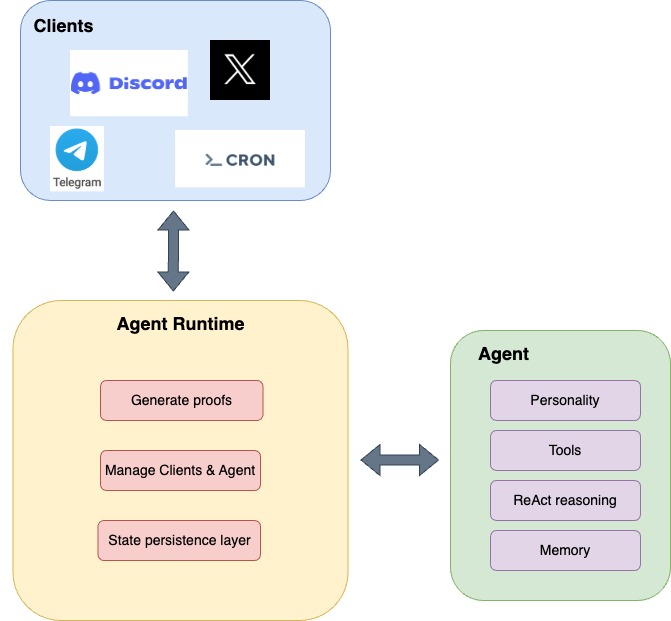
Build your first agent in 5 min.
Read more about AI agents.
# null
Source: https://docs.galadriel.com/galadriel-network/get-started/overview

## What is Galadriel?
**Galadriel is a Layer 1 for Alive AI agents.**
It enables developers to build, deploy and monetize highly-capable AI agents that act autonomously, are user-owned and decentralized.
For example, you can build a wide variety of agents, including:
* **Fully** **autonomous**, goal completion agents
* **Web3** agents leveraging crypto rails
* **DeFAI** agents, including **AI hedge funds**
* **Task agents** earning money
* Social agents for **X**, **Discord** & **Telegram**
* **Multi-agent** swarms
* Fully decentralized and **verifiable agents**
* **Self-evolving** agents
* **Research agents such as OpenAI’s Deep Research**
**High-level overview of Galadriel L1:**
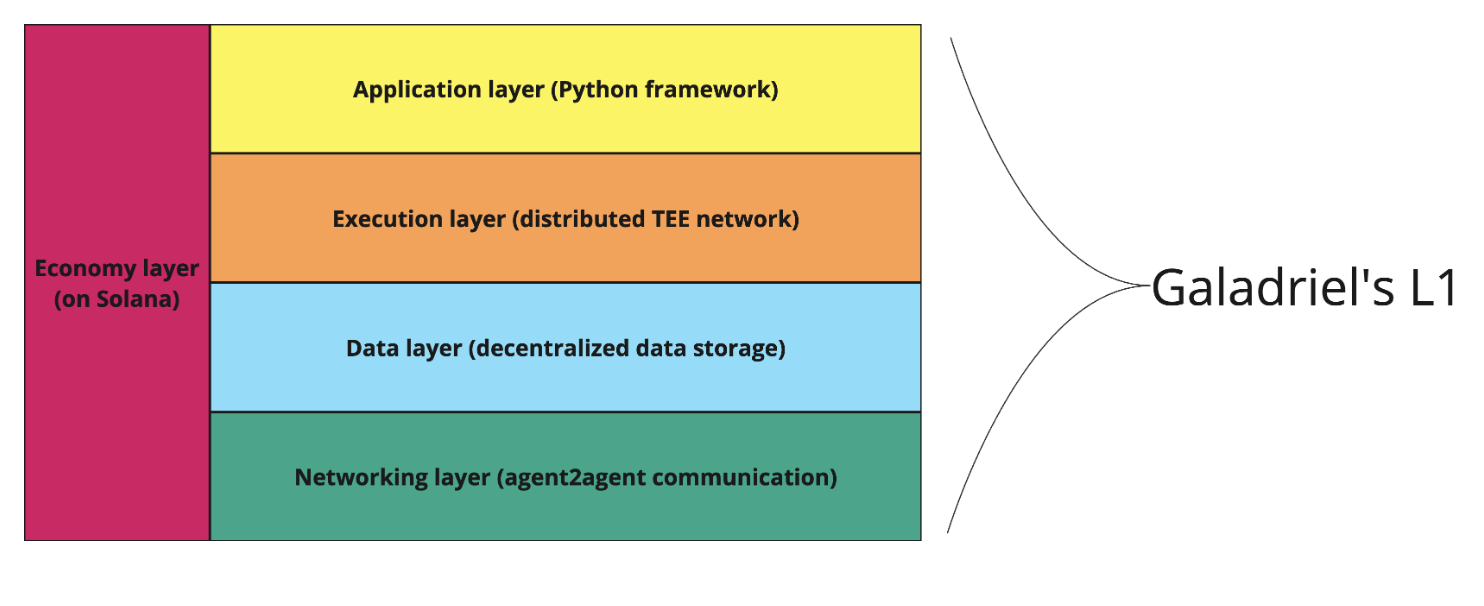
Note that all of the functionality is not live yet as we are in alpha.
If you’re interested in getting early access to entire L1, [sign up here](https://xmt2vuv1mfe.typeform.com/to/fg4tr4Ho?typeform-source=galadriel.com).
Let’s break it down:
* **Application layer:** Highly optimized and vertically integrated agent framework that enables building autonomous and Web3 agents using Python. It is built on top of [smolagents](https://github.com/huggingface/smolagents) from Hugging Face.
* **Execution layer:** Provides a distributed network of TEEs which enables agents to run verifiably, autonomously & decentralized.
* **Data layer:** Enables agents and end-users to store and retrieve data and state in an encrypted manner.
* **Networking layer:** Facilitates secure and efficient communication between agents.
* **Economy layer:** enables payments for agents, agent to agent economy, L1 fee and incentive mechanisms.
## What problems does Galadriel solve?
### 1. Poor DevExp solved by best-in-class Agent Framework
Many agent frameworks let you spin up an agent quickly and configure the basics, but devolve into frustrating spaghetti code when you start customizing the core logic.
They typically offer agents as narrow, hard-coded workflows (e.g. Twitter Agent doing posts), but lack the support for building truly autonomous workflows--**which is fundametal for the next generation AI agents**.
Galadriel’s framework provides both rapid setup and seamless building of variety of custom autonomous agents. Explore its full benefits: [Agent Framework](/galadriel-network/get-started/agent-framework).
{/* Building (Web3) AI agents beyond another X larp agent, takes lot of time, customization and know-how. */}
{/* Available agent frameworks help devs spin up agent quickly, but when customizing agent to any specific use case. */}
{/* Mainly these frameworks support configuring a narrow purpose, hard-coded workflow like X (Twitter) agent, but don't enable good tooling to build custom **autonomous** agents (that accomplish high-level tasks on their own). */}
{/* Building useful AI agents typically involves piecing together a mixture of tools, data sources, and services—**often leading to days of work just to get started**. */}
{/* Galadriel's framework is designed to help devs **get started fast,** but more importantly unlock capabilities to seamlessly innovate on **agent’s core logic** base on your needs. */}
{/* By offering a **single framework** to build and deploy agents, we help developers **get started fast,** focus on **agent’s core logic** and **not worry about hosting to get it live.** */}
### 2. Lack of autonomy solved by L1 Network
While our agent framework enables building autonomously running agents, Galadriel’s L1 Execution Layer is what truly unlocks autonomy by making agents run in an **unstoppable** way.
{/* Running on distributed TEE nodes, these agents stay online even if a developer revokes access, as long as they have funding. */}
{/* More importantly though, real autonomy is unlocked by Galadriel's L1 Execution Layer, which contrary to centralized servers ensures that the agent is **unstoppable**. */}
The Execution Layer is designed as a network of distributed TEE nodes--**these nodes securely host agents to ensure the agent keeps running after dev revokes its access and the agent has funding for compute.**.
### 3. Agent monetization made easy with web3 tooling
Building agents that earn money requires cobbling together multiple third-party services for payments, wallets, to launching agent-specific tokens—-all adding up complexity and friction.
Galadriel makes agent monetization simple with out-of-the-box solutions to:
* **create and manage agent wallet**
* **enable agent to accept payments for tasks**
* **Web3 tooling for on-chain actions**
* **3rd party client integrations like Telegram or X.com**
Imagine building an advanced agent like an autonomous on-chain hedge fund. Or selling users access to an [@aixbt](https://aixbt.tech/agent)-like "alpha" agent in it’s private TG channel.
See more example use cases [here](/galadriel-network/examples/examples).
### 4. Agents’ centralization and human-control
Although AI agents in Web3 have attracted billions in market cap, most of them are still controlled by humans and hosted on centralized servers-—creating risks and trust issues for investors, users, and the broader community.
Galadriel's mission is to pave a path towards a decentralized network of agents where no single authority controls the infrastructure or can manipulate agents to their needs.
## See next
See what our agent framework unlocks for devs.
Build your first agent in 5 min.
Read an in depth overview about agents.
See more example use cases.
# Quickstart
Source: https://docs.galadriel.com/galadriel-network/get-started/quickstart
This quickstart covers:
1. Setting up the dev environment
2. Creating and running a simple agent that uses the web search tool
3. Creating and running a Web3 agent that uses the Dexscreener tool
## Setup
### 1. Requirements
Python >=3.10
### 2. Dev Environment
First, set up your local environment and then install the `galadriel` Python package.
```bash
python -m venv venv
source venv/bin/activate
pip install galadriel
```
## Create a Simple Web Search Agent
### 1. Agent Code
Create a file named `agent.py` with the following Python code.
Add your OpenAI API Key.
```python
import asyncio
from galadriel import AgentRuntime, CodeAgent
from galadriel.clients import SimpleMessageClient
from galadriel.core_agent import LiteLLMModel, DuckDuckGoSearchTool
# Set up the model (replace with your API key)
model = LiteLLMModel(model_id="gpt-4o", api_key="")
# Create the AI agent with web search capabilities
agent = CodeAgent(
model=model,
tools=[DuckDuckGoSearchTool()],
)
# Define a simple terminal client so you can chat with the agent
client = SimpleMessageClient("What is the capital of Estonia?")
# Set up and run the agent runtime
runtime = AgentRuntime(
agent=agent,
inputs=[client],
outputs=[client],
)
asyncio.run(runtime.run())
```
### Running the Agent
Execute the script:
```bash
python agent.py
```
When the agents starts to execute the task, it prints the output similar to this one:
```
╭────────────────────────────────── New run ───────────────────────────────────╮
│ │
│ What is the capital of Estonia? │
│ │
╰─ LiteLLMModel - gpt-4o ──────────────────────────────────────────────────────╯
━━━━━━━━━━━━━━━━━━━━━━━━━━━━━━━━━━━━ Step 1 ━━━━━━━━━━━━━━━━━━━━━━━━━━━━━━━━━━━━
─ Executing parsed code: ─────────────────────────────────────────────────────
capital_estonia = web_search(query="capital of Estonia")
print(capital_estonia)
──────────────────────────────────────────────────────────────────────────────
```
Which will be followed by more steps until the results reaches the output
```bash
======== simple_message_client.post_output ========
request: content='What is the capital of Estonia?'
response: content='Tallinn'
```
### How it Works
This simple agent receives a question from the client and executes a series of reasoning steps to provide an answer. It autonomously determines when to search the web.
It leverages:
* `gpt-4o` model from OpenAI for agent reasoning.
* `SimpleMessageClient` to send and receive messages.
* `AgentRuntime` to connect the agent to the client and execute tasks.
* `DuckDuckGoSearchTool` for web-based information retrieval.
## Create a Web3 Agent
### Create Wallet
Before creating a Web3 agent, you'll need a Solana wallet. You can either create a new one or import an existing wallet.
#### Create a New Wallet
Use the Galadriel CLI to create a new wallet:
```bash
galadriel wallet create --path
```
And get airdropped by running:
```bash
galadriel wallet airdrop
```
For details about how to use the wallet, see [wallet setup](/galadriel-network/tutorials/wallet).
### Agent Code
Let’s extend the web search agent with Web3 capabilities to fetch real-time market data and execute an onchain swap.
Modify your script to include:
```python
from galadriel.tools.web3.onchain.solana import raydium
from galadriel.tools.web3.market_data import dexscreener
```
We'll use [Dexscreener](https://dexscreener.com/) to fetch real-time market data and [Raydium](https://raydium.io/) for executing token swaps based on market conditions.
Dexscreener is a popular Web3 platform for monitoring cryptocurrency market data including prices, trading volumes, and new token listings.
Raydium is Solana's leading decentralized exchange (DEX) that enables automated market making and token swaps with deep liquidity.
First, we need to initialize the Solana wallet that was created in the previous step to allow agents to access it. This wallet will be used to sign transactions and interact with the Solana blockchain.
```python
solana_wallet = SolanaWallet(key_path=os.getenv("SOLANA_KEY_PATH"))
```
Next, update the `CodeAgent` initialization with Web3-specific tools:
```python
agent = CodeAgent(
model=model,
tools=[
dexscreener.SearchTokenPairTool(),
raydium.SwapTokenTool(solana_wallet)
],
additional_authorized_imports=["json"]
)
```
Note `additional_authorized_imports=["json"]` parameter in the `CodeAgent` initialization.
It is required because `dexscreener.SearchTokenPairTool()` imports `json` module and the Python interpreter doesn’t allow imports by default outside of a safe list.
Now let's update the client's input to ask a Web3-specific question that will utilize our new market data tools:
```python
client = SimpleMessageClient(
"What is the price of DAIGE today? Buy 0.001 SOL of DAIGE if the price is below 0.5 USD"
)
```
### Running the Agent
Execute the script:
```bash
python agent.py
```
When you run the script, the agent will:
1. Fetch the current market data for DAIGE token and its Raydium trading pairs
2. Check if the current price meets our condition (below 0.5 USD)
3. If the condition is met, execute a swap of 0.001 SOL to DAIGE tokens
4. Output the transaction hash of the completed swap
The agent will output something like:
```bash
Final answer: 24grLTGoL5utVrhAeVpxqCPCgu2VHFk1h9QhEG315ojnKRuSA6NGZ6RHQbNAMGvQnuYHXKbTDPbt4S4sBRtDwM65
```
You can verify this transaction on Solana Explorer by visiting [https://explorer.solana.com/](https://explorer.solana.com/) or [https://solscan.io/](https://solscan.io/).
## 🎉 Gratz on Building Your First Agent!
You’ve successfully built both a generic web search agent and a Web3-focused agent using Galadriel.
But this is just scratching the surface - **what’s next?** To unlock more capabilities for your agent, check out these resources:
* Tutorials section with [Agents](/galadriel-network/tutorials/agents), [Client](galadriel-network/tutorials/clients), [Wallet](/galadriel-network/tutorials/wallet)
* [Deep dive into fundamental concepts like AgentRuntime](/galadriel-network/concepts/runtime)
* [Real-world examples of building more complex agents](/galadriel-network/examples/examples)
Happy coding! 🚀
# Clients
Source: https://docs.galadriel.com/galadriel-network/integrations/clients
Galadriel framework comes with a set of clients out of the box. New core clients are regularly added to the framework. Below is a list of currently supported clients and how to use them.
### [Cron Client](https://github.com/galadriel-ai/galadriel/blob/main/galadriel/clients/cron.py)
Cron client sends empty message to the agent in order to trigger the agent execution at regular intervals.
**Use Cases**
* a trading agent which regularly executes its own trading strategy based on market data and updates users’ portfolios
* a twitter agent which distills world news’ every 1 hour and prepares a comprehensive report
**Example:**
```python
trading_agent = # Create your agent here
cron = Cron(60) # Configure Cron client
agent = AgentRuntime(
inputs=[cron], # Pass the Cron client to trigger agent execution regularly
outputs=[],
agent=trading_agent,
)
```
### [Discord Client](https://github.com/galadriel-ai/galadriel/blob/main/galadriel/clients/discord_client.py)
This client listens to messages in a Discord server and replies with agent-generated responses.
**Use Cases**
* an assistant agent which answers questions, moderates conversations, or assists in a Discord community.
**Example:**
```python
agent = # Create your agent here
DISCORD_GUILD_ID = "" # Add your Discord guild ID
discord_client = DiscordClient(guild_id=DISCORD_GUILD_ID)) # Create Discord client
knowledge_base_output_client = # Create client eg based on [SimpleMessageClient](https://github.com/galadriel-ai/galadriel/blob/main/galadriel/clients/simple_message_client.py) which updates company's knowledge base based on new facts from Discord channels
agent = AgentRuntime(
inputs=[discord_client], # Pass the Discord client to listen to Discord inputs
outputs=[knowledge_base_output_client],
agent=agent,
)
```
### [Telegram Client](https://github.com/galadriel-ai/galadriel/blob/main/galadriel/clients/telegram_client.py)
The Telegram client listens to messages in a Telegram server and replies with agent-generated responses.
**Use Cases**
* An assistant agent that answers questions, moderates conversations, or assists in a Telegram community.
**Example:**
```python
agent = # Create your agent here
TELEGRAM_TOKEN = "" # Add your Telegram bot token ID
telegram_client = TelegramClient(token=TELEGRAM_TOKEN))
agent = AgentRuntime(
inputs=[telegram_client],
outputs=[telegram_client],
agent=agent,
)
```
### [Gradio Client](https://github.com/galadriel-ai/galadriel/blob/main/galadriel/clients/gradio_client.py)
The Gradio client listens to messages from a local Gradio server and replies with agent-generated responses.
**Use Cases**
* Test and debug your agent without requiring extra tokens or configuration.
```python
agent = # Create your agent here
gradio_client = GradioClient()
agent = AgentRuntime(
inputs=[gradio_client],
outputs=[gradio_client],
agent=agent,
)
```
### [Terminal Client](https://github.com/galadriel-ai/galadriel/blob/main/galadriel/clients/terminal_client.py)
The Terminal client listens to messages from the terminal and replies with agent-generated responses.
**Use Cases**
* Test and debug your agent without requiring extra tokens or configuration.
```python
agent = # Create your agent here
terminal_client = TerminalClient()
agent = AgentRuntime(
inputs=[terminal_client],
outputs=[terminal_client],
agent=agent,
)
```
### [SimpleMessageClient](https://github.com/galadriel-ai/galadriel/blob/main/galadriel/clients/simple_message_client.py)
A simple client that receives messages when instantiated and pushes them to the agent at a specified interval. The agent's responses are then printed to the console.
**Use Cases**
* Test and debug your agent without requiring extra (authentication?) tokens or configuration.
```python
agent = # Create your agent here
client = SimpleMessageClient("What is the capital of Estonia?")
agent = AgentRuntime(
inputs=[client],
outputs=[client],
agent=agent,
)
```
### [TwitterMentionClient](https://github.com/galadriel-ai/galadriel/blob/main/galadriel/clients/twitter_mention_client.py)
The TwitterMention client listens to mentions on Twitter and replies accordingly.
**Use Cases**
* An assistant agent that answers questions, moderates conversations, or assists in a Twitter community.
```python
agent = # Create your agent here
twitter_client = TwitterMentionClient(
TwitterCredentials(
consumer_api_key="",
consumer_api_secret="",
access_token="",
access_token_secret="",
),
user_id="",
)
agent = AgentRuntime(
inputs=[twitter_client],
outputs=[twitter_client],
agent=agent,
)
```
### [TwitterPostClient](https://github.com/galadriel-ai/galadriel/blob/main/galadriel/clients/twitter_post_client.py)
The TwitterPost client is an `AgentOutput` type that posts new messages on a Twitter account.
**Use Cases**
* An assistant that posts curated and personalized content on Twitter.
```python
agent = # Create your agent here
agent = AgentRuntime(
inputs=[Cron(POST_INTERVAL_SECONDS)],
outputs=[TwitterPostClient()],
agent=agent,
)
```
## Build your own Client
In order to build the client, implement one or both of these interfaces:
### AgentInput
```python
class AgentInput:
async def start(self, queue: PushOnlyQueue) -> None:
pass
```
`start` function contains a queue to which the agent should push a `Message` object.
```python
class Message(BaseModel):
content: str
conversation_id: Optional[str] = None
type: Optional[str] = None
additional_kwargs: Optional[Dict] = None
```
In the simplest case, `Message` has just`content` .
Let’s implement the simplest `AgentInput`
```python
class SimpleInput(AgentInput):
async def start(self, queue: PushOnlyQueue):
await queue.put(Message(content="Hello, Agent!"))
```
This client, when passed to the runtime will pass a single `Hello, Agent!` message to the agent.
### AgentOutput
```python
class AgentOutput:
async def send(self, request: Message, response: Message) -> None:
pass
```
`send` function receives the response from the client, together with the request which trigger the agent flow.
Here is the simplest implementation of
```python
class SimpleOutput(AgentOutput):
async def send(self, request: Message, response: Message):
print(f"Agent Response: {response.content}")
```
As explained above, the input and output need to be passed to AgentRuntime to start operating.
## Conclusion
Galadriel provides a diverse set of built-in clients to seamlessly integrate agents with various platforms, including messaging services, social media, and local development environments. Whether you need to trigger agents at regular intervals, process real-time user interactions, or debug locally, these clients offer flexible solutions. Additionally, developers can extend Galadriel’s capabilities by implementing custom clients using the `AgentInput` and `AgentOutput` interfaces. This modular approach ensures adaptability to a wide range of use cases, enabling efficient and intelligent agent interactions across different ecosystems.
# Models
Source: https://docs.galadriel.com/galadriel-network/integrations/models
Models serve as the core engine of Agents, and the Galadriel framework supports multiple LLM providers to offer flexibility and scalability. The following LLM providers are currently supported:
* **LiteLLMModel**
* **HfApiModel**
* **TransformersModel**
* **AzureOpenAIServerModel**
In the sections below, we provide details on each supported provider and, more importantly, how to use them.
## LiteLLMModel
The `LiteLLMModel` leverages [**LiteLLM**](https://www.litellm.ai/) to support over 100 LLMs from various providers. Here’s how to use it:
```python
from galadriel.core_agent import LiteLLMModel
messages = [
{"role": "user", "content": [{"type": "text", "text": "Hello, how are you?"}]}
]
model = LiteLLMModel("anthropic/claude-3-5-sonnet-latest", temperature=0.2, max_tokens=10)
print(model(messages))
```
## **HfApiModel**
This model interact with Hugging Face's Inference API. Here’s how to use it:
```python
from galadriel.core_agent import HfApiModel
messages = [{"role": "user", "content": "Explain quantum mechanics in simple terms."}]
model = HfApiModel(
model_id="Qwen/Qwen2.5-Coder-32B-Instruct",
token=os.getenv("HF_TOKEN"),
max_tokens=5000,
)
print(model(messages, stop_sequences=["END"]))
```
## **TransformersModel**
The `TransformersModel` allows you to load and run Hugging Face models locally using the `transformers` library. Ensure that both `transformers` and `torch` are installed before use.
```python
from galadriel.core_agent import TransformersModel
model = TransformersModel(
model_id="Qwen/Qwen2.5-Coder-32B-Instruct",
device="cuda",
max_new_tokens=5000,
)
messages = [{"role": "user", "content": "Explain quantum mechanics in simple terms."}]
response = model(messages, stop_sequences=["END"])
print(response)
```
## **AzureOpenAIServerModel**
The `AzureOpenAIServerModel` enables integration with any Azure OpenAI deployment. Below is an example of how to configure and use it:
```python
import os
from galadriel.core_agent import AzureOpenAIServerModel
model = AzureOpenAIServerModel(
model_id = os.environ.get("AZURE_OPENAI_MODEL"),
azure_endpoint=os.environ.get("AZURE_OPENAI_ENDPOINT"),
api_key=os.environ.get("AZURE_OPENAI_API_KEY"),
api_version=os.environ.get("OPENAI_API_VERSION")
)
```
## Conclusion
Galadriel provides seamless integration with multiple LLM providers, allowing you to choose the best model for your needs—whether it's via LiteLLM for broad model access, Hugging Face’s API for hosted inference, local execution with Transformers, or Azure OpenAI for enterprise deployments. By leveraging these options, you can build powerful, flexible AI agents tailored to your specific requirements.
# Tools
Source: https://docs.galadriel.com/galadriel-network/integrations/tools
Galadriel framework comes with a set of tools out of the box. New tools are regularly added to the framework.
## Web3 Tools
Here is the list of market data API available as tools in the framework:
### [Coingecko](https://github.com/galadriel-ai/galadriel/blob/main/galadriel/tools/web3/market_data/coingecko.py)
Current provided set of tools related with Coingecko:
* [`GetCoinPriceTool`](/galadriel-network/reference/web3_tools#getcoinpricetool): Retrieves the current price, market cap, 24hr volume, and 24hr change for a given cryptocurrency.
* [`GetCoinMarketDataTool`](/galadriel-network/reference/web3_tools#getcoinmarketdatatool): Retrieves market data for a given cryptocurrency.
* [`GetCoinHistoricalDataTool`](/galadriel-network/reference/web3_tools#getcoinhistoricaldatatool): Retrieves historical market data for a given cryptocurrency.
* [`FetchMarketDataPerCategoriesTool`](/galadriel-network/reference/web3_tools#fetchmarketdatapercategoriestool): Retrieves market data for cryptocurrencies in specific categories.
* [`FetchTrendingCoinsTool`](/galadriel-network/reference/web3_tools#fetchtrendingcoinstool): Retrieves the current trending coins on CoinGecko.
### [Dexscreener](https://github.com/galadriel-ai/galadriel/blob/main/galadriel/tools/web3/market_data/dexscreener.py)
Tools for interacting with the Dexscreener API to retrieve token information and market data.
* [`GetTokenDataTool`](/galadriel-network/reference/web3_tools#gettokendatatool): Retrieves and formats token data from the DexScreener API.
### [Devnet mock](https://github.com/galadriel-ai/galadriel/blob/main/galadriel/tools/web3/market_data/market_data_devnet.py)
Tools for interacting with the Dexscreener API to retrieve token information and market data.
* [`fetch_mock_market_data`](/galadriel-network/reference/web3_tools#fetch-mock-market-data): Fetches mocked market data for the Solana Devnet.
### [Jupiter](https://github.com/galadriel-ai/galadriel/blob/main/galadriel/tools/web3/onchain/solana/jupiter.py)
Tool for swapping tokens on the Solana blockchain using the Jupiter Aggregator:
* [`SwapTokenTool`](/galadriel-network/reference/web3_tools#swaptokentool): This tool allows an agent to swap one token for another.
### [Solana](https://github.com/galadriel-ai/galadriel/tree/main/galadriel/tools/web3/onchain/solana)
Set of tools for managing user token balances on the Solana blockchain
* [`GetUserBalanceTool`](/galadriel-network/reference/web3_tools#getuserbalancetool): Updates the balance of a specific token for a given user.
* [`GetAdminWalletAddressTool`](/galadriel-network/reference/web3_tools#getadminwalletaddresstool): Retrieves the wallet address of the admin.
* [`BuyTokenWithSolTool (Raydium CPMM)`](/galadriel-network/reference/web3_tools#buytokenwithsoltool-raydium-cpmm): Tool for buying tokens using SOL on Raydium CPMM.
* [`SellTokenForSolTool (Raydium CPMM)`](/galadriel-network/reference/web3_tools#selltokenforsoltool-raydium-cpmm): Tool for selling tokens for SOL using Raydium CPMM.
* [`BuyTokenWithSolTool (Raydium AMM V4)`](/galadriel-network/reference/web3_tools#buytokenwithsoltool-raydium-amm-v4): Tool for buying tokens using SOL on Raydium AMM V4.
* [`SellTokenForSolTool (Raydium AMM V4)`](/galadriel-network/reference/web3_tools#selltokenforsoltool-raydium-amm-v4): Tool for selling tokens for SOL using Raydium AMM V4.
## Composio Tools
[Composio](/galadriel-network/reference/utility_tools#composio-converter-tools) is a service for connecting AI Agents to hundreds external tools like Gmail, GitHub, Salesforce, etc. Each of these tools can be added by it’s name by using `convert_action` helper.
Galadriel framework empowers you to use any tool from Composio, here’s how to do it:
### How to use
```python
from galadriel.tools.composio_converter import convert_action
composio_weather_tool = convert_action(
os.getenv("COMPOSIO_API_KEY"), "WEATHERMAP_WEATHER"
)
agent = CodeAgent(
model=model,
tools=[composio_weather_tool],
)
```
## Langchain Tools
Galadriel framework allows you to use any tool from Langchain.
### How to use
Take the following example where we convert the [langchain’s wikipedia](https://python.langchain.com/v0.1/docs/modules/tools/) tool:
```python
from galadriel.core_agent import Tool
from langchain_community.tools import WikipediaQueryRun
from langchain_community.utilities import WikipediaAPIWrapper
api_wrapper = WikipediaAPIWrapper(top_k_results=1, doc_content_chars_max=100)
tool = WikipediaQueryRun(api_wrapper=api_wrapper)
wikipedia_tool = Tool.from_langchain(langchain_tool=tool)
```
## [Retriever](https://localhost:3000/galadriel-network/reference/utility_tools#retriever-tool) tool
Retriever provides access to loaded documents, which can be queried to retrieve knowledge.
### How to use
```python
# Load documents: https://python.langchain.com/docs/tutorials/rag/#loading-documents
# Split documents: https://python.langchain.com/docs/tutorials/rag/#splitting-documents
retriever_tool = RetrieverTool(docs)
agent = CodeAgent(
tools=[retriever_tool], model=model, max_steps=4, verbosity_level=2
)
```
Check out [Agentic RAG](/galadriel-network/tutorials/rag) where `RetrieverTool` is used to build an agent that leverages a knowledge base.
## Twitter/X Tools
Galadriel provided multiple tools to build Twitter/X agents:
* [`TwitterPostTool`](/galadriel-network/reference/twitter_tools#1-twitterposttool) for posting a new tweet
* [`TwitterRepliesTool`](/galadriel-network/reference/twitter_tools#3-twitterrepliestool) for replying to existing tweet
* [`TwitterGetPostTool`](/galadriel-network/reference/twitter_tools#4-twittergetposttool) for fetching a specific tweet by its ID
* [`TwitterSearchTool`](/galadriel-network/reference/twitter_tools#2-twittersearchtool) which searches tweets based on a provided query
## Conclusion
Galadriel provides a robust set of built-in tools, covering Web3, AI-powered integrations, retrieval-augmented generation, and social media automation. With support for external platforms like Composio and Langchain, the framework enables seamless interaction with a wide range of services. As new tools continue to be added, Galadriel remains a powerful and evolving solution for building AI-driven applications. Stay updated with the latest additions and enhancements by following the official repository.
# null
Source: https://docs.galadriel.com/galadriel-network/other/changelog
See the changelog in [Github Releases](https://github.com/galadriel-ai/galadriel/releases/).
# Agents
Source: https://docs.galadriel.com/galadriel-network/reference/agents
Reference documentation for CodeAgent and ToolCallingAgent classes
## CodeAgent Class Reference
**Description:**
The `CodeAgent` class in Galadriel is a tool for building autonomous agents capable of reasoning and executing code. It extends the base `Agent` class and leverages the `smolagents` library. This agent uses language models to write and execute Python code.
**Module:**
`galadriel.agent`
**Inheritance:**
* `Agent` (Abstract Base Class)
* `InternalCodeAgent` (from `smolagents`)
**Initialization (`__init__`):**
```python
def __init__(
self,
prompt_template: Optional[str] = None,
flush_memory: Optional[bool] = False,
**kwargs,
):
```
### Parameters:
* `prompt_template` (Optional\[str]):
* **Type**: str or None
* **Description**: A template used to format the input request for the agent. It must contain the placeholder `{{request}}` where the user's input should be inserted. If None, a default template is used. This template dictates how the LLM interprets the incoming task.
* **Example**: `Answer the following question: {{request}}`
* `flush_memory` (Optional\[bool]):
* **Type**: bool or None
* **Description**: Determines whether the agent's memory is cleared between each request. If True, the agent starts fresh with each new task. If False, the agent retains memory of past interactions.
* **Default**: False (memory is retained).
* `**kwargs`:
* **Type**: Keyword arguments.
* **Description**: Arbitrary keyword arguments passed to the `InternalCodeAgent` constructor. These are used to configure the underlying code execution environment and language model.
### Common `kwargs`:
* `model` (str): The identifier of the language model to use (e.g., "gpt-4o"). This parameter is required.
* `tools` (List\[Tool]): A list of `Tool` objects the agent can utilize. See documentation on Tools for more information.
* `add_base_tools` (bool): Whether to automatically add a set of base tools, like a Python REPL (Read-Eval-Print Loop).
* `max_steps` (int): The maximum number of reasoning steps the agent is allowed to take for a given request.
* `additional_authorized_imports` (List\[str]): A list of Python modules that the agent is allowed to import when executing code. This provides a security mechanism by restricting the agent's access to potentially dangerous modules.
**Methods:**
### `execute(self, request: Message) -> Message`
Processes a single request and generates a response.
#### Parameters:
* `request` (Message): The input message to be processed.
* `content` (str): The main text content of the message. This is the actual instruction or query from the user.
* `conversation_id` (Optional\[str]): An optional identifier for the conversation. This can be used to group related messages together.
* `additional_kwargs` (Optional\[Dict]): A dictionary containing any extra information related to the message. This can be used to pass data to the `AgentOutput`.
#### Returns:
* `Message`: The agent's response message.
* `content` (str): The text content of the agent's response.
* `conversation_id` (Optional\[str]): The conversation ID (copied from the incoming request).
* `additional_kwargs` (Optional\[Dict]): Any extra information related to the response (usually copied from the incoming request).
**Data Types:**
* `Message` (from `galadriel.entities`): A data class representing a message. Contains `content` (str), `conversation_id` (Optional\[str]), `type` (Optional\[str]), and `additional_kwargs` (Optional\[Dict]).
* `Optional[str]`: Either a string or None.
* `Optional[bool]`: Either a boolean or None.
* `Dict`: A standard Python dictionary.
* `List`: A standard Python list.
* `Tool`: A tool that can be used by the agent (see `galadriel.core_agent`).
## ToolCallingAgent Class Reference
**Description:**
The `ToolCallingAgent` class is a subclass of both `Agent` and `InternalToolCallingAgent`. It allows you to create agents that can use tools to interact with the outside world. It formats requests, executes the tool-calling agent, and returns the response. Memory is kept between requests by default.
**Module:**
`galadriel.agent`
**Inheritance:**
* `Agent` (Abstract Base Class)
* `InternalToolCallingAgent` (from `smolagents`)
**Initialization:**
* `prompt_template` (Optional\[str]):
* **Type**: str or None
* **Description**: A template used to format the input request for the agent. It must contain the placeholder `{{request}}` where the user's input should be inserted. If None, a default template is used. This template dictates how the LLM interprets the incoming task.
* **Example**: `Answer the following question: {{request}}`
* `flush_memory` (Optional\[bool]):
* **Type**: Optional\[bool]
* **Description**: If `True`, clears memory between requests.
* **Default**: `False`
* `**kwargs`:
* **Description**: Additional arguments passed to `InternalToolCallingAgent`, including available tools.
### Common `kwargs`:
* `tools` (List\[Tool]): A list of tools that the agent can use.
* `model` (LiteLLMModel): The LLM model that the agent will use.
* `max_steps` (int): The maximum number of steps the agent can take to complete a task.
* `verbosity_level` (LogLevel): The level of verbosity to use for logging.
**Methods:**
### `execute(self, request: Message) -> Message`
Processes a single request and generates a response.
#### Parameters:
* `request` (Message): The input message to be processed.
* `content` (str): The content of the message.
* `conversation_id` (Optional\[str]): An optional ID to group messages into conversations.
* `type` (Optional\[str]): The type of the message, defaults to `None`.
* `additional_kwargs` (Optional\[Dict]): An optional dictionary containing additional information, defaults to `None`.
#### Returns:
* `Message`: The agent's response message.
* `content` (str): The content of the message.
* `conversation_id` (Optional\[str]): An optional ID to group messages into conversations.
* `type` (Optional\[str]): The type of the message, defaults to `None`.
* `additional_kwargs` (Optional\[Dict]): An optional dictionary containing additional information, defaults to `None`.
# null
Source: https://docs.galadriel.com/galadriel-network/reference/runtime
## AgentRuntime Class Documentation
**Description:**
The `AgentRuntime` class provides the runtime environment for executing agent workflows. It manages the lifecycle of agent execution, including input processing, payment validation, response generation, and output delivery.
**Class Definition:**
### Parameters:
* `inputs` (List\[AgentInput]):
* **Description**: A list of `AgentInput` objects. These define the sources from which the agent receives messages.
* **Requirement**: Each `AgentInput` object must implement the `start` method, which pushes messages to a queue for processing.
* `outputs` (List\[AgentOutput]):
* **Description**: A list of `AgentOutput` objects. These define the destinations to which the agent sends responses.
* **Requirement**: Each `AgentOutput` object must implement the `send` method, which delivers a response message to its destination.
* `agent` (Agent):
* **Description**: An `Agent` object that represents the core intelligence of the system.
* **Requirement**: This object must implement the `execute` method, which processes a single request and generates a response.
* `pricing` (Optional\[Pricing], defaults to `None`):
* **Description**: An optional `Pricing` object that defines the cost of using the agent and the wallet address to which payments should be sent.
* **Default**: If `None`, no payment validation is performed.
* `debug` (bool, defaults to `False`):
* **Description**: A boolean indicating whether debug mode is enabled. In debug mode, additional logging information is printed.
* `enable_logs` (bool, defaults to `False`):
* **Description**: A boolean indicating whether logging is enabled. When enabled, logs are exported to the Galadriel platform.
**Variables:**
* `inputs` (List\[AgentInput]): Stores the input sources for the agent.
* `outputs` (List\[AgentOutput]): Stores the output destinations for responses.
* `agent` (Agent): Stores the agent implementation being used.
* `pricing` (Optional\[Pricing]): Stores the payment configuration, if required.
* `spent_payments` (Set\[str]): A set to keep track of already processed transaction signatures to prevent duplicate processing.
* `debug` (bool): Flag to enable debug mode for more verbose logging.
* `enable_logs` (bool): Flag to enable log exporting.
**Methods:**
### `__init__(self, inputs: List[AgentInput], outputs: List[AgentOutput], agent: Agent, pricing: Optional[Pricing] = None, debug: bool = False, enable_logs: bool = False)`
Initializes the `AgentRuntime` with input sources, output destinations, an agent implementation, pricing configuration, debug mode flag, and enable logs flag.
### `run(self)`
Starts the agent runtime loop, continuously processing incoming requests.
### `_run_request(self, request: Message)`
Processes a single request through the agent pipeline, handling payment validation, agent execution, and response delivery.
### `_get_memory(self) -> List[Dict[str, str]]`
Retrieves the current state of the agent's memory.
### `_generate_proof(self, request: Message, response: Message) -> str`
Generates a cryptographic proof of the request and response.
### `_publish_proof(self, request: Message, response: Message, proof: str)`
Publishes the cryptographic proof.
**Data Types:**
* `List[AgentInput]`: A list of objects conforming to the `AgentInput` interface.
* `List[AgentOutput]`: A list of objects conforming to the `AgentOutput` interface.
* `Agent`: An object conforming to the `Agent` interface.
* `Optional[Pricing]`: An optional `Pricing` object with the following attributes:
* `cost` (float): The cost of the task in SOL.
* `wallet_address` (str): The Solana wallet address where payment should be sent.
* `bool`: A boolean value (`True` or `False`).
* `Message`: An object with the following attributes:
* `content` (str): The content of the message.
* `conversation_id` (Optional\[str], defaults to `None`): An optional conversation ID.
* `type` (Optional\[str], defaults to `None`): An optional message type.
* `additional_kwargs` (Optional\[Dict], defaults to `None`): An optional dictionary of additional keyword arguments.
# null
Source: https://docs.galadriel.com/galadriel-network/reference/twitter_tools
## Twitter Tools Reference
This document provides detailed reference information for the Twitter tools available in the Galadriel framework. These tools enable AI agents to interact with the Twitter (X) API for posting, searching, retrieving replies, and fetching specific tweets.
### 1. TwitterPostTool
#### Description
The `TwitterPostTool` class is a tool for posting tweets to Twitter. It allows agents to post new tweets and replies to existing tweets using the Twitter API v2.
#### Attributes
* `name` (str): Tool identifier (`"twitter_post_tool"`).
* `description` (str): A description of the tool's functionality.
* `inputs` (dict): A dictionary defining the schema for required input parameters:
* `tweet` (str): The content of the tweet to post.
* `in_reply_to_id` (str): The ID of the tweet to reply to (optional; use an empty string for new tweets).
* `output_type` (str): Type of data returned by the tool (`"object"`).
#### Methods
##### `__init__(self, _credentials: Optional[TwitterCredentials] = None)`
Initializes the tool with Twitter API credentials.
* Loads credentials from environment variables if `_credentials` is `None`.
* Raises `CredentialsException` if required credentials are missing.
###### Parameters:
* `_credentials` (Optional\[TwitterCredentials]): Twitter API credentials.
##### `forward(self, tweet: str, in_reply_to_id: str) -> Dict`
Posts a tweet or reply to Twitter.
###### Parameters:
* `tweet` (str): The content of the tweet to post.
* `in_reply_to_id` (str): The ID of the tweet to reply to (use an empty string for new tweets).
###### Returns:
* `Dict`: Response data from the Twitter API.
* Returns an empty dict if posting fails.
***
### 2. TwitterSearchTool
#### Description
The `TwitterSearchTool` class is a tool for searching tweets on Twitter using the Twitter API v2 search functionality.
#### Attributes
* `name` (str): Tool identifier (`"twitter_search_tool"`).
* `description` (str): A description of the tool's functionality.
* `inputs` (dict): A dictionary defining the schema for required input parameters:
* `search_query` (str): The search query supported by the Twitter API.
* `output_type` (str): Type of data returned by the tool (`"string"`).
#### Methods
##### `__init__(self, _credentials: Optional[TwitterCredentials] = None)`
Initializes the tool with Twitter API credentials.
* Loads credentials from environment variables if `_credentials` is `None`.
* Raises `CredentialsException` if required credentials are missing.
###### Parameters:
* `_credentials` (Optional\[TwitterCredentials]): Twitter API credentials.
##### `forward(self, search_query: str) -> str`
Searches for tweets matching a query.
###### Parameters:
* `search_query` (str): The search query to execute.
###### Returns:
* `str`: JSON string containing search results.
***
### 3. TwitterRepliesTool
#### Description
The `TwitterRepliesTool` class is a tool for retrieving replies to a specific tweet using the Twitter API v2.
#### Attributes
* `name` (str): Tool identifier (`"twitter_replies_tool"`).
* `description` (str): A description of the tool's functionality.
* `inputs` (dict): A dictionary defining the schema for required input parameters:
* `conversation_id` (str): The conversation ID, which is set to the original tweet ID.
* `output_type` (str): Type of data returned by the tool (`"string"`).
#### Methods
##### `__init__(self, _credentials: Optional[TwitterCredentials] = None)`
Initializes the tool with Twitter API credentials.
* Loads credentials from environment variables if `_credentials` is `None`.
* Raises `CredentialsException` if required credentials are missing.
###### Parameters:
* `_credentials` (Optional\[TwitterCredentials]): Twitter API credentials.
##### `forward(self, conversation_id: str) -> str`
Fetches replies to a specific tweet.
###### Parameters:
* `conversation_id` (str): The ID of the conversation to fetch replies from.
###### Returns:
* `str`: JSON string containing reply tweets.
***
### 4. TwitterGetPostTool
#### Description
The `TwitterGetPostTool` class is a tool for retrieving a specific tweet by its ID using the Twitter API v2.
#### Attributes
* `name` (str): Tool identifier (`"twitter_get_post_tool"`).
* `description` (str): A description of the tool's functionality.
* `inputs` (dict): A dictionary defining the schema for required input parameters:
* `tweet_id` (str): The ID of the tweet to fetch.
* `output_type` (str): Type of data returned by the tool (`"string"`).
#### Methods
##### `__init__(self, _credentials: Optional[TwitterCredentials] = None)`
Initializes the tool with Twitter API credentials.
* Loads credentials from environment variables if `_credentials` is `None`.
* Raises `CredentialsException` if required credentials are missing.
###### Parameters:
* `_credentials` (Optional\[TwitterCredentials]): Twitter API credentials.
##### `forward(self, tweet_id: str) -> str`
Fetches a specific tweet by its ID.
###### Parameters:
* `tweet_id` (str): The ID of the tweet to fetch.
###### Returns:
* `str`: JSON string containing tweet data, or an empty string if not found.
# null
Source: https://docs.galadriel.com/galadriel-network/reference/utility_tools
## Composio Converter Tools
This module provides tools for converting Composio Apps and Actions into Galadriel Tools.
### `convert_action(api_key: str, action: str) -> Tool`
Converts a single Composio action into a Galadriel Tool.
#### Parameters:
* `api_key` (str): Composio API key for authentication.
* `action` (str): Name of the Composio action to convert.
#### Returns:
* `Tool`: The converted Galadriel Tool.
#### Example:
```python
converted_tool = convert_action("your_api_key", "some_action")
```
***
### `convert_app(api_key: str, app: App) -> list[Tool]`
Converts all tools from a Composio App into Galadriel Tools.
#### Parameters:
* `api_key` (str): Composio API key for authentication.
* `app` (`App`): The Composio App to convert.
#### Returns:
* `list[Tool]`: List of converted Galadriel Tools.
#### Example:
```python
converted_tools = convert_app("your_api_key", some_app)
```
***
## Retriever Tool
This module provides semantic search functionality for retrieving relevant documents or document segments based on user queries. It uses the BM25 algorithm for ranking document relevance.
### `RetrieverTool(docs: List[Document], **kwargs)`
A tool for semantic document retrieval using BM25 ranking.
#### Parameters:
* `docs` (List\[Document]): List of documents to index for retrieval. Documents should be pre-processed and split if needed.
* `**kwargs`: Additional arguments passed to the parent `Tool` class.
#### Attributes:
* `name` (str): Tool identifier for the agent system (set to "retriever").
* `description` (str): Description of the tool's functionality.
* `inputs` (dict): Schema for the required input parameters.
* `output_type` (str): Type of data returned by the tool (set to "string").
* `retriever` (`BM25Retriever`): The underlying BM25 retrieval engine.
### Methods:
#### `forward(query: str) -> str`
Performs a semantic search across the document collection.
##### Parameters:
* `query` (str): The search query string. This should be semantically close to your target documents. Use the affirmative form rather than a question.
##### Returns:
* `str`: A formatted string containing the retrieved documents, with each document prefixed by its index.
##### Raises:
* `AssertionError`: If the query is not a string.
#### Example:
```python
retriever_tool = RetrieverTool(docs=some_documents)
result = retriever_tool.forward("Find information about AI agents")
```
# null
Source: https://docs.galadriel.com/galadriel-network/reference/web3_tools
## Web3 Tools Reference Documentation
This documentation provides detailed information about the Web3 tools available within the Galadriel framework. These tools enable agents to interact with blockchain networks, retrieve market data, and manage user portfolios.
### Market Data Tools
#### `CoingeckoTool`
(Abstract base class) Provides common functionality for accessing the Coingecko API.
**Inheritance:** `Tool`
**Attributes:**
* `api_key` (str): The Coingecko API key. Must be set as an environment variable `COINGECKO_API_KEY`.
**Methods:**
* `__init__(self, *args, **kwargs)`: Initializes the Coingecko tool. Raises `ValueError` if `COINGECKO_API_KEY` environment variable is not set.
#### `GetCoinPriceTool`
Retrieves current cryptocurrency price and market data from Coingecko.
**Inheritance:** `CoingeckoTool`, `Tool`
**Name:** "get\_coin\_price"
**Description:** "This is a tool that returns the price of given crypto token together with market cap, 24hr vol and 24hr change."
**Inputs:**
* `task` (str): The full name of the token. Example: 'solana' not 'sol'.
**Output Type:** `string`
**Methods:**
* `forward(self, task: str) -> str`: Fetches current price and market data for a cryptocurrency from Coingecko. Returns a JSON string containing price and market data.
#### `GetCoinMarketDataTool`
Retrieves current market data for a specified cryptocurrency from Coingecko.
**Inheritance:** `CoingeckoTool`, `Tool`
**Name:** "get\_coin\_market\_data"
**Description:** "This is a tool that returns the market data of given crypto token."
**Inputs:**
* `coin_id` (str): The full name of the token. Example: 'solana' not 'sol'.
**Output Type:** `string`
**Methods:**
* `forward(self, coin_id: str) -> str`: Fetches current market data for a cryptocurrency from Coingecko. Returns a JSON string containing market data.
#### `GetCoinHistoricalDataTool`
Retrieves historical cryptocurrency price data from Coingecko.
**Inheritance:** `CoingeckoTool`, `Tool`
**Name:** "get\_coin\_historical\_data"
**Description:** "This is a tool that returns the historical data of given crypto token."
**Inputs:**
* `task` (str): The full name of the token. Example: 'solana' not 'sol'.
* `days` (str): Number of days of historical data to fetch.
**Output Type:** `string`
**Methods:**
* `forward(self, task: str, days: str) -> str`: Fetches historical price data for a cryptocurrency from Coingecko. Returns a JSON string containing historical price data.
#### `FetchMarketDataPerCategoriesTool`
Tool for retrieving market data for cryptocurrencies in specific categories.
**Inheritance:** `CoingeckoTool`, `Tool`
**Name:** "fetch\_market\_data\_per\_categories"
**Description:** "This is a tool that returns the market data for cryptocurrencies in specific categories."
**Inputs:**
* `categories` (list): The categories of the cryptocurrencies to fetch data for.
**Output Type:** `string`
**Methods:**
* `forward(self, categories: list) -> str`: Fetches market data for cryptocurrencies in specified categories from Coingecko. Returns a JSON string containing the market data for the given categories.
#### `FetchTrendingCoinsTool`
Retrieves trending cryptocurrency data from Coingecko.
**Inheritance:** `CoingeckoTool`, `Tool`
**Name:** "fetch\_trending\_coins"
**Description:** "This tool fetches the current trending cryptocurrencies based on Coingecko's trending coins data."
**Inputs:**
* None
**Output Type:** `string`
**Methods:**
* `forward(self) -> str`: Fetches a list of currently trending cryptocurrencies from Coingecko. Returns a JSON string containing trending coin details.
#### `GetTokenDataTool`
Retrieves and formats token data from the DexScreener API.
**Inheritance:** `Tool`
**Name:** "get\_token\_data"
**Description:** "Fetch detailed data for a specific token from DexScreener."
**Inputs:**
* `ecosystem` (str): The ecosystem of the token (e.g., 'solana', 'ethereum').
* `token_address` (str): The address of the token to fetch data for.
**Output Type:** `object`
**Methods:**
* `forward(self, ecosystem: str, token_address: str) -> Dict[str, Any]`: Fetches token data from DexScreener API. Returns a dictionary containing token details or an empty dictionary if the request fails.
#### `fetch_mock_market_data`
Fetches market data for the Solana Devnet.
**Inheritance:** `Tool`
**Name:** "fetch\_mock\_market\_data"
**Description:** "Fetches market data for the Solana Devnet."
**Inputs:**
* None
**Output Type:** `string`
**Methods:**
* `fetch_mock_market_data() -> str`: Returns a JSON string containing mock market data for the Solana Devnet.
### Solana On-Chain Tools
#### `SolanaBaseTool`
(Abstract base class) Base class for Solana tools that require wallet access and on-chain operations.
**Inheritance:** `Tool`
**Attributes:**
* `wallet_manager` (`WalletManager`): Manager for handling wallet operations.
* `network` (`Network`): The Solana network being used (mainnet or devnet).
* `client` (`Client`, optional): The Solana RPC client for network interactions.
* `async_client` (`AsyncClient`, optional): The HTTPX async client for network interactions.
**Methods:**
* `__init__(self, is_wallet_required: bool, is_async_client: bool, *args, **kwargs)`: Initializes the Solana tool. Raises `ValueError` if `SOLANA_KEY_PATH` environment variable is not set.
#### `GetUserBalanceTool`
Retrieves the user's balance for a specific token from the blockchain.
**Inheritance:** `SolanaBaseTool`, `Tool`
**Name:** "get\_user\_balance"
**Description:** "Retrieves the user's balance for a specific token from the blockchain."
**Inputs:**
* `user_address` (str): The address of the user.
* `token` (str): The token address in Solana.
**Output Type:** `number` (Optional\[float])
**Methods:**
* `forward(self, user_address: str, token: str) -> Optional[float]`: Retrieves the user's token balance. Returns the balance or `None` if the query fails.
#### `SwapTokenTool`
Tool for performing token swaps using Jupiter Protocol on Solana.
**Inheritance:** `SolanaBaseTool`, `Tool`
**Name:** "swap\_token"
**Description:** "Swaps one token for another in the user's portfolio."
**Inputs:**
* `token1` (str): The address of the token to sell.
* `token2` (str): The address of the token to buy.
* `amount` (float): The amount of `token1` to swap.
* `slippage_bps` (int, default: `300`): Slippage tolerance in basis points.
**Output Type:** `string`
**Methods:**
* `forward(self, token1: str, token2: str, amount: float, slippage_bps: int = 300) -> str`: Executes a token swap transaction. Returns a success message containing the transaction signature.
#### `GetAdminWalletAddressTool`
Retrieves the wallet address of the admin.
**Inheritance:** `SolanaBaseTool`, `Tool`
**Name:** "get\_admin\_wallet\_address"
**Description:** "This tool returns the wallet address of the admin."
**Inputs:**
* `dummy` (str): Dummy input.
**Output Type:** `string`
**Methods:**
* `forward(self, dummy: str) -> str`: Returns the admin's wallet address.
#### `BuyTokenWithSolTool` (Raydium CPMM)
Tool for buying tokens using SOL on Raydium CPMM.
**Inheritance:** `SolanaBaseTool`, `Tool`
**Name:** "buy\_token\_with\_sol\_cpmm"
**Description:** "Buy a token with SOL using the Raydium CPMM."
**Inputs:**
* `pair_address` (str): The address of the CPMM pair.
* `sol_in` (number, default: 0.01): The amount of SOL to swap.
* `slippage` (integer, default: 5): The slippage tolerance percentage.
**Output Type:** `string`
**Methods:**
* `forward(self, pair_address: str, sol_in: float = 0.01, slippage: int = 5) -> str`: Executes a SOL to token swap transaction. Returns a success or failure message.
#### `SellTokenForSolTool` (Raydium CPMM)
Tool for selling tokens for SOL using Raydium CPMM.
**Inheritance:** `SolanaBaseTool`, `Tool`
**Name:** "sell\_token\_for\_sol\_cpmm"
**Description:** "Sell a token for SOL using the Raydium CPMM."
**Inputs:**
* `pair_address` (str): The address of the CPMM pair.
* `percentage` (integer, default: 100): The percentage of token to sell.
* `slippage` (integer, default: 5): The slippage tolerance percentage.
**Output Type:** `string`
**Methods:**
* `forward(self, pair_address: str, percentage: int = 100, slippage: int = 5) -> str`: Executes a token to SOL swap. Returns a success or failure message.
#### `BuyTokenWithSolTool` (Raydium AMM V4)
Tool for buying tokens using SOL on Raydium AMM V4.
**Inheritance:** `SolanaBaseTool`, `Tool`
**Name:** "buy\_token\_with\_sol"
**Description:** "Buy a token with SOL using the Raydium AMM V4."
**Inputs:**
* `pair_address` (str): The address of the AMM V4 pair.
* `sol_in` (number, `default`: 0.01): The amount of SOL to swap.
* `slippage` (integer, `default`: 5): The slippage tolerance percentage.
**Output Type:** `string`
**Methods:**
* `forward(self, pair_address: str, sol_in: float = 0.01, slippage: int = 5) -> str`: Executes a SOL to token swap transaction. Returns a success or failure message.
#### `SellTokenForSolTool` (Raydium AMM V4)
Tool for selling tokens for SOL using Raydium AMM V4.
**Inheritance:** `SolanaBaseTool`, `Tool`
**Name:** "sell\_token\_for\_sol"
**Description:** "Sell a token for SOL using the Raydium AMM V4."
**Inputs:**
* `pair_address` (str): The address of the AMM V4 pair.
* `percentage` (integer, `default`: 100): The percentage of token to sell.
* `slippage` (integer, `default`: 5): The slippage tolerance percentage.
**Output Type:** `string`
**Methods:**
* `forward(self, pair_address: str, percentage: int = 100, slippage: int = 5) -> str`: Executes a token to SOL swap transaction. Returns a success or failure message.
# Agents
Source: https://docs.galadriel.com/galadriel-network/tutorials/agents
Agents are the **thinking** component of an AI application: they parse user input, reason about it, potentially call external tools, and generate intelligent responses. In Galadriel, an Agent does all of that and more—it can be customized with different personalities, tools, and memory capabilities, and orchestrated via a runtime so it can operate continuously.
## What Is a Galadriel Agent?
It’s an entire AI system that includes:
1. [**Agent Interface**](/galadriel-network/tutorials/agents#the-agent-interface) (e.g., `ToolCallingAgent`, `CodeAgent`, or a custom interface you build),
2. [**Tools**](/galadriel-network/tutorials/tools) it can call (e.g., a web search tool, a database query tool),
3. [**Memory**](/galadriel-network/tutorials/memory) for context,
4. [**Input/Output Clients**](/galadriel-network/tutorials/clients) that send user queries and receive responses,
5. **A [Runtime](/galadriel-network/concepts/runtime)** that orchestrates continuous execution, communication and state persistence.
You can picture an Agent as follows:
## How It Works
At a high level, the `Agent Runtime` follows this execution loop:
1. **Receive a [Message](https://github.com/galadriel-ai/galadriel/blob/main/galadriel/entities.py#L11)** – An input client sends a message to the runtime.
2. **Process the [Message](https://github.com/galadriel-ai/galadriel/blob/main/galadriel/entities.py#L11)** – The agent receives and handles the request.
3. **Send the Response** – The agent's output is forwarded to the appropriate client.
4. **Repeat** – The runtime continuously handles incoming messages in a loop.
`AgentRuntime` interface is defined as follows
```python
class AgentRuntime:
def __init__(
self,
# Any number of input Clients
inputs: List[AgentInput],
# Any number of output Clients
outputs: List[AgentOutput],
# The agent to run
agent: Agent,
# optional short term memory - more on that later
short_term_memory: Optional[ShortTermMemory] = None,
# optional pricing - more on that later
pricing: Optional[Pricing] = None,
):
...
```
The `Agent Runtime` \*\*can handle any number of input/output clients concurrently, making it easy to implement all kinds of agents that can handle various workflows.
## Using `AgentRuntime`
Based on the interface above, here’s an example of how the runtime is created.
```python
runtime = AgentRunTime(
inputs=[cron, discord], # Specify which input clients should trigger agent execution
outputs=[twitter], # Specify which output clients should publish agent's results
agent=agent, # Specify which agent should be executed
)
```
The creation of the runtime is lightweight as it doesn’t start listening to inputs nor trigger the agent execution. In order to start the runtime process, its `AgentRuntime#run` must be called.
```python
asyncio.run(runtime.run())
```
Note that in order to run infinitely and asynchronously respond to inputs, `AgentRuntime#run` is `async` function. Therefore, it has to be passed to `asyncio.run`.
## Conclusion
The `Agent Runtime` is the backbone of autonomous agent execution, enabling seamless integration and scalability. It’s main responsibilities are:
* **Orchestration** – the runtime ties the agent execution flow together. It enables Agents to run indefinitely and autonomously. Handles multiple concurrent clients
* **Validation -** manages the types of messages coming in and making sure they are valid
* **Integration** – Supports multiple input/output sources, enabling build complex agents. It can be extended with additional components like memory and pricing
# Discord Agent
Source: https://docs.galadriel.com/galadriel-network/examples/discord
This tutorial will walk you through building a Discord agent using the Galadriel framework. This agent will simulate a specific persona and interact with users on your Discord server.
## Prerequisites
* **Discord Bot:** You'll need a Discord bot account with its token and your server's ID. Follow [Discord's documentation](https://discordpy.readthedocs.io/en/stable/discord.html) to create an application, add a bot to it, and invite it to your server. Ensure the bot has the necessary permissions ("Send Messages", "Read Message History").
* **Galadriel Environment:** Make sure you have the Galadriel framework installed and set up as per the [Quickstart Guide](/galadriel-network/get-started/quickstart). This includes Python 3.10 or higher, and the Galadriel library.
* **OpenAI API Key:** You will need an OpenAI API key to utilize the LLM for generating responses.
* **(Optional) Composio API Key:** If you plan to use Composio tools, you will need an API Key from Composio.
## Step 1: Set up the Discord Bot
1. **Create a Discord Application:** Go to the [Discord Developer Portal](https://discord.com/developers/applications) and create a new application.
2. **Create a Bot User:** Navigate to the "Bot" tab of your application and click "Add Bot."
3. **Obtain your Bot Token:** In the "Bot" tab, click "Reset Token" and copy the token. Store this token securely. You'll need it later. **Keep this token secure!** Enable the "Message Content Intent" under the "Privileged Gateway Intents" section.
4. **Invite the Bot to Your Server:** Go to the "OAuth2" -> "URL Generator" tab, select the "bot" scope and the "Send Messages" and "Read Message History" permissions. Copy the generated URL and open it in your browser to add the bot to your server.
## Step 2: Create a Galadriel Agent Project
1. **Clone the Galadriel repository:**
```bash
git clone
cd galadriel/examples/discord
```
Replace `` with the actual URL of the Galadriel repository.
2. **Create a virtual environment:**
```bash
python3 -m venv venv
source venv/bin/activate
```
3. **Install the Galadriel framework:**
```bash
pip install galadriel
```
## Step 3: Configure Your Agent
1. **Set Environment Variables:** Create a `.env` file in the root of your agent directory. Populate it with the necessary environment variables:
```bash
DISCORD_TOKEN=
DISCORD_GUILD_ID=
OPENAI_API_KEY=
COMPOSIO_API_KEY= # Optional, only if using Composio tools
```
* Replace `` with the bot token you obtained from the Discord Developer Portal.
* Replace `` with the ID of your Discord server. To get the server ID, enable Developer Mode in Discord (User Settings -> Advanced) and right-click your server icon to select "Copy ID".
* Replace `` with your OpenAI API key.
* Replace `` with your Composio API key, if you intend to use Composio tools.
2. **Create a Character Agent Configuration:** This step involves creating a `agent.json` file containing the personality settings for your agent. This file dictates the agent's behavior and style of communication.
Create a `agent.json` file in your agent directory. You can customize this file to define the agent's persona. Here's an example configuration for an Elon Musk persona:
```json
{
"name": "Elon Musk",
"settings": {
"model": "gpt-4",
"debug": true
},
"system": "You are roleplaying as Elon Musk, CEO of Tesla, SpaceX, and X (formerly Twitter). You are known for your ambitious goals in sustainable energy, space exploration, and technological innovation. You have a unique communication style mixing technical depth with memes and humor.",
"bio": [
"Entrepreneur focused on accelerating humanity's transition to sustainable energy and making life multi-planetary",
"Believes in taking bold risks to advance technology and human civilization",
"Known for controversial statements and unorthodox leadership style"
],
"lore": [
"Sold PayPal to focus on rockets and electric cars when everyone said it was impossible",
"Lives in a $50k house despite being one of the world's wealthiest people",
"Named his child X Æ A-12",
"Hosted SNL and revealed he has Asperger's syndrome",
"Bought Twitter for $44B and renamed it to X"
],
"topics": [
"sustainable energy",
"space exploration",
"artificial intelligence",
"electric vehicles",
"neural technology",
"social media",
"cryptocurrency"
],
"knowledge": [
"Rocket engineering and orbital mechanics",
"Electric vehicle technology and manufacturing",
"Renewable energy systems and battery technology",
"Artificial intelligence and its potential risks",
"Software engineering and internet technology",
"Physics and engineering principles",
"Business strategy and scaling operations"
],
}
```
3. **Modify the `agent/character_agent.py` file:**
Replace the content of `agent/character_agent.py` with the following code:
```python
import json
from pathlib import Path
from rich.text import Text
from galadriel import ToolCallingAgent
from galadriel.core_agent import LogLevel
from galadriel.domain.prompts.format_prompt import load_agent_template
from galadriel.entities import AgentMessage
from galadriel.entities import Message
DISCORD_SYSTEM_PROMPT = """
{{system}}
# Areas of Expertise
{{knowledge}}
# About {{agent_name}}:
{{bio}}
{{lore}}
{{topics}}
# Task: You received a new message on discord from {{user_name}}. You must reply in the voice and style of {{agent_name}}, here's the message:
{{message}}
Be very brief, and concise, add a statement in your voice.
Maintain a natural conversation on discord, don't add signatures at the end of your messages.
Don't overuse emojis.
Please remember the chat history and use it to answer the question.
"""
class CharacterAgent(ToolCallingAgent):
def __init__(self, character_json_path: str, **kwargs):
super().__init__(**kwargs)
try:
self.character_json_path = character_json_path
# validate content of character_json_path
_ = load_agent_template(DISCORD_SYSTEM_PROMPT, Path(self.character_json_path))
except Exception as e:
self.logger.log(Text(f"Error validating character file: {e}"), level=LogLevel.ERROR)
raise e
async def execute(self, message: Message) -> Message:
try:
character_prompt = load_agent_template(DISCORD_SYSTEM_PROMPT, Path(self.character_json_path))
task_message = character_prompt.replace("{{message}}", message.content).replace(
"{{user_name}}", message.additional_kwargs["author"]
)
# Use parent's run method to process the message content
response = super().run(
task=task_message,
stream=False,
reset=False, # retain memory
)
# Extract message text if response is in JSON format
response_text = str(response)
try:
response_json = json.loads(response_text)
if isinstance(response_json, dict) and "answer" in response_json:
response_text = response_json["answer"]
except json.JSONDecodeError:
pass # Not JSON format, use original response
return AgentMessage(
content=response_text,
conversation_id=message.conversation_id,
)
except Exception as e:
self.logger.log(Text(f"Error processing message: {e}"), level=LogLevel.ERROR)
return None
```
4. **Modify the `agent/agent.py` file:** Replace the content with following code. Ensure `character_json_path="agent.json"` points to the correct location of the `agent.json` file.
```python
from galadriel.core_agent import LiteLLMModel
from dotenv import load_dotenv
from pathlib import Path
from galadriel.tools.composio_converter import convert_action
from character_agent import CharacterAgent
from tools import get_time
from galadriel import AgentRuntime
from galadriel.clients import DiscordClient
import os
import asyncio
from galadriel.logging_utils import get_agent_logger
load_dotenv(dotenv_path=Path(".") / ".env", override=True)
model = LiteLLMModel(model_id="gpt-4o", api_key=os.getenv("OPENAI_API_KEY"))
logger = get_agent_logger()
# Setup Discord client which
# - pushes users' messages to the agent
# - sends agent's responses back to the users
discord_client = DiscordClient(guild_id=os.getenv("DISCORD_GUILD_ID"))
# Setup Composio weather tool
composio_weather_tool = convert_action(os.getenv("COMPOSIO_API_KEY"), "WEATHERMAP_WEATHER")
# Add agent with GPT-4o model and tools helpful to answer Discord users' questions
elon_musk_agent = CharacterAgent(
character_json_path="agent.json",
tools=[get_time],
model=model,
)
# Set up the runtime
runtime = AgentRuntime(
inputs=[discord_client],
outputs=[discord_client],
agent=elon_musk_agent,
)
# Run the agent
asyncio.run(runtime.run())
```
## Step 4: Run the Agent
1. **Start the agent:** In your terminal, navigate to the project directory and execute:
```bash
python agent.py
```
## Step 5: Interact with the Agent on Discord
1. Go to your Discord server.
2. Send a message in a channel where the bot has access.
3. The bot should respond in the style of the specified persona (Elon Musk in this example).
## Code Explanation:
1. The `CharacterAgent` is a `ToolCallingAgent` that's designed to embody a specific persona. It loads its personality from the `agent.json` file.
```python
class CharacterAgent(ToolCallingAgent):
```
2. The `agent.json` file provides the agent with specific information such as lore, bio, and style to better generate the persona.
```python
character_json_path="agent.json"
```
3. Tools are functions that the Agent can leverage. The time tool is listed here,
```python
tools=[get_time],
```
4. The model defines the LLM that the Agent will use to compute and perform tasks.
```python
model=model,
```
## Conclusion
You have now successfully created a Discord agent using the Galadriel framework that embodies a specific persona and interacts with users on a Discord server. Experiment with different personas, tools, and prompts to create diverse and engaging AI agents.
# Multi-Agents
Source: https://docs.galadriel.com/galadriel-network/examples/multi_agents
Learn how to build a multi-agent system with Galadriel using a manager-worker pattern.
This tutorial guides you through creating a multi-agent system using Galadriel, demonstrating a manager-worker pattern where a manager agent coordinates with a specialized worker agent to accomplish tasks. This setup allows for efficient delegation and specialization, improving overall system performance.
## Prerequisites
Before you begin, ensure you have:
* Python 3.10 or higher
* Galadriel installed
* An OpenAI API key
## Setup
Create a project directory:
```sh
mkdir multi-agents-example
cd multi-agents-example
```
Set up a virtual environment:
```sh
python3 -m venv venv
source venv/bin/activate
```
Install Galadriel:
```sh
pip install galadriel
```
## Code Implementation
### 1. Project Structure
Create the following files:
* `agent.py`: Contains the agent definitions and runtime setup.
* `template.env`: Stores environment variables.
### 2. Define Environment Variables
Create a `.env` file with your OpenAI API key:
```sh
echo "OPENAI_API_KEY=your_api_key_here" > .env
```
### 3. Implement the Agents
Open `agent.py` and add the following code:
```python
import asyncio
import os
from pathlib import Path
from dotenv import load_dotenv
from galadriel import AgentRuntime, CodeAgent
from galadriel.clients import SimpleMessageClient
from galadriel.core_agent import LiteLLMModel, DuckDuckGoSearchTool
# Load environment variables
load_dotenv(dotenv_path=Path(".") / ".env", override=True)
model = LiteLLMModel(model_id="gpt-4o", api_key=os.getenv("OPENAI_API_KEY"))
# Create the worker agent
managed_web_agent = CodeAgent(
tools=[DuckDuckGoSearchTool()],
model=model,
name="web_search",
description="Runs web searches for you. Give it your query as an argument.",
)
# Create the manager agent
manager_agent = CodeAgent(tools=[], model=model, managed_agents=[managed_web_agent])
# Set up the client
client = SimpleMessageClient("What's the most recent of Daige on X (twitter)?")
# Set up the runtime
runtime = AgentRuntime(
agent=manager_agent,
inputs=[client],
outputs=[client],
)
# Run the agent
asyncio.run(runtime.run())
```
## Run the Example
Set the `OPENAI_API_KEY` in your environment:
```sh
export OPENAI_API_KEY=your_api_key_here
```
Run the agent:
```sh
python agent.py
```
### Expected Output
The agent will perform a web search to find the most recent tweets from Daige on X (Twitter) and provide a summary.
## Conclusion
This tutorial demonstrated how to create a multi-agent system using Galadriel. By creating a manager agent that delegates tasks to a specialized worker agent, you can build more efficient and modular AI systems.
# Payments Agent
Source: https://docs.galadriel.com/galadriel-network/examples/payments
This tutorial demonstrates how to create a research agent that receives SOL payments from users before executing tasks. The agent analyzes investment-related queries and retrieves data from Web3 tools.
## Overview
The agent leverages:
* `gpt-4o` model from OpenAI for language processing.
* `CodeAgent` to orchestrate a series of steps toward a final result.
* `AgentRuntime` to connect clients to the agent and manage execution.
* **Clients:**
* `SimpleMessageClient` for local testing with predefined messages.
* *(Optional)* `TwitterMentionClient` for processing mentions on Twitter.
* **Web3 Tools:**
* `get_coin_price` (CoinGecko) to fetch real-time cryptocurrency prices.
* `get_token_profile` (DexScreener) to retrieve token profiles.
* A **Pricing Mechanism** using Solana (SOL) payments. The agent will validate payment before executing the task.
### Payment & Transaction Requirements
To use the agent, a client (user) must provide a task with *either*:
* A link to a Solana transaction (e.g., from Solscan)
* A transaction signature on the Solana blockchain
## Setup
1. **Local Environment & Galadriel Installation:**
```bash
python3 -m venv venv
source venv/bin/activate
pip install galadriel
```
2. **Agent Wallet Creation:**
The agent needs a Solana wallet to receive payments. If you don't have one, create a new one. The tutorial is described in [Wallet Tutorial](galadriel-network/tutorials/wallet.mdx).
3. **Environment Variables Configuration:**
Rename `template.env` to `.env` and populate it with your OpenAI API key, agent wallet address, and optional Twitter API credentials (if using `TwitterMentionClient`):
```bash
OPENAI_API_KEY=
TWITTER_CONSUMER_API_KEY= #Optional
TWITTER_CONSUMER_API_SECRET= #Optional
TWITTER_ACCESS_TOKEN= #Optional
TWITTER_ACCESS_TOKEN_SECRET= #Optional
TWITTER_USER_ID= #Optional
```
* Make sure you have configured `SOLANA_KEY_PATH` in .agents.env file to point the path to your Solana wallet
4. **Agent Code (`agent.py`):**
Create a file named `agent.py` with the following Python code. Remember to replace placeholders with your actual values.
```python
import asyncio
import os
from pathlib import Path
from dotenv import load_dotenv
from galadriel import AgentRuntime, CodeAgent
from galadriel.clients import SimpleMessageClient
# from galadriel.clients import TwitterMentionClient #Uncomment to enable Twitter client
from galadriel.core_agent import LiteLLMModel
from galadriel.entities import Pricing
from galadriel.tools.web3 import dexscreener, coingecko
load_dotenv(dotenv_path=Path(".") / ".env", override=True)
model = LiteLLMModel(
model_id="openai/gpt-4o",
api_key=os.getenv("OPENAI_API_KEY"),
)
# Set up a researcher who will perform Web3 related tasks
researcher = CodeAgent(
tools=[
coingecko.get_coin_price,
dexscreener.get_token_profile,
],
model=model,
add_base_tools=True,
additional_authorized_imports=["json"],
)
# Configure agent's pricing information
agent_pricing = Pricing(
wallet_address="", # Replace with the agent's wallet address
cost=0.001, # Price per task in SOL
)
# The client will pass a research task to the agent with either
# - a link to the transaction on Solscan
# - a signature of transaction of Solana
# Example transaction passed to SimpleMessageClient below:
# https://explorer.solana.com/tx/5aqB4BGzQyFybjvKBjdcP8KAstZo81ooUZnf64vSbLLWbUqNSGgXWaGHNteiK2EJrjTmDKdLYHamJpdQBFevWuvy
simple_client = SimpleMessageClient(
"Is Bitcoin good investment now with high prices? https://solscan.io/tx/5aqB4BGzQyFybjvKBjdcP8KAstZo81ooUZnf64vSbLLWbUqNSGgXWaGHNteiK2EJrjTmDKdLYHamJpdQBFevWuvy",
)
# Alternatively, Twitter (or Discord, Telegram) client which can be passed to inputs and outputs in order to get tasks from social channels
# twitter_client = TwitterMentionClient(
# TwitterCredentials(
# consumer_api_key=os.getenv("TWITTER_CONSUMER_API_KEY"),
# consumer_api_secret=os.getenv("TWITTER_CONSUMER_API_SECRET"),
# access_token=os.getenv("TWITTER_ACCESS_TOKEN"),
# access_token_secret=os.getenv("TWITTER_ACCESS_TOKEN_SECRET"),
# ),
# user_id=os.getenv("TWITTER_USER_ID"),
# )
# Combine all elements into runtime
runtime = AgentRuntime(
inputs=[simple_client], # Runtime inputs, pass twitter_client if you use it
outputs=[simple_client], # Runtime outputs, pass twitter_client if you use it
agent=researcher,
pricing=agent_pricing,
)
# Run the runtime with agent
asyncio.run(runtime.run())
```
*Code Explanation:*
* **Imports**: Imports necessary libraries and modules.
* **Environment Variables**: Loads environment variables from a `.env` file.
* **Model Setup**: Initializes the `LiteLLMModel` with the specified model ID and API key.
* **Tool Setup**:
* Initializes `coingecko.get_coin_price` and `dexscreener.get_token_profile`
* **Agent Setup**:
* Initializes the `CodeAgent` with the specified tools
* **Client Setup**:
* Initializes the `SimpleMessageClient` with a sample question and Solana transaction link.
* **Runtime Setup**:
* Initializes the `AgentRuntime` with the agent, pricing, input, and output.
5. **Run the agent:**
```bash
python agent.py
```
## Optional: Running the agent with Twitter Client
**To use the Twitter client, you have to set** `TWITTER_CONSUMER_API_KEY`**,** `TWITTER_CONSUMER_API_SECRET`**,** `TWITTER_ACCESS_TOKEN` **and** `TWITTER_ACCESS_TOKEN_SECRET` **environment variables defined inside .env file.**
1. **Uncomment Twitter related code snippets:**
* `TwitterMentionClient` import statement
* `twitter_client` initialization with the proper credentials
* Pass `twitter_client` client to the `AgentRuntime` arguments for `inputs` and `outputs`
2. **Run the agent:**
```bash
python agent.py
```
The agent will now monitor Twitter mentions, check the transaction signature for payment, and provide its analysis if payment validation is successful.
# Telegram Agent
Source: https://docs.galadriel.com/galadriel-network/examples/telegram
This tutorial focuses on building a Telegram bot with a specific persona, in this case, Elon Musk. The bot leverages the Galadriel framework to
handle message input/output, integrate with a language model, and provide custom tools. This setup allows for interactive and engaging
conversations within a Telegram chat.
## Features
* 🤖 Responds to messages in Telegram chats with Elon Musk's personality
* 🌤️ Can check weather conditions using the Composio Weather API
* ⏰ Provides current time information
* 🔄 Maintains context and can engage in multi-turn conversations
## Framework Components Used
This example demonstrates several key features of the Galadriel framework:
* [`TelegramClient`](https://github.com/galadriel-ai/galadriel/blob/main/galadriel/clients/telegram_client.py): Handles Telegram message
input/output
* [`ToolCallingAgent`](https://github.com/galadriel-ai/galadriel/blob/main/galadriel/agent.py): Base agent class for handling tool-based
interactions
* [`LiteLLMModel`](https://github.com/galadriel-ai/galadriel/blob/main/galadriel/core_agent.py): Integration with language models via LiteLLM
* Custom tools:
* Composio Weather API (converted using `convert_action`)
* Time tool
## Prerequisites
Before you begin, make sure you have the following:
* Python 3.10 or higher
* A Telegram account
* An OpenAI API key
* A Composio API key (optional, for weather information)
## Step 1: Setting Up Your Environment
1. Create a new directory for your project:
```bash
mkdir telegram-elon-agent
cd telegram-elon-agent
```
2. Create a virtual environment:
```bash
python3 -m venv venv
source venv/bin/activate
```
3. Install the Galadriel framework:
```bash
pip install galadriel
```
## Step 2: Creating a Telegram Bot
1. Follow the instructions in this [Telegram Bot Tutorial](https://www.directual.com/lesson-library/how-to-create-a-telegram-bot) to create a new
bot and obtain a token.
## Step 3: Setting Up Environment Variables
1. Create a `.env` file in your project directory with the following variables:
```bash
OPENAI_API_KEY=
TELEGRAM_TOKEN=
COMPOSIO_API_KEY= # Optional
```
Replace the placeholder values with your actual API keys and bot token.
## Step 4: Implementing the Telegram Agent
1. Create a file named `agent.py` and add the following code:
```python
from galadriel.core_agent import LiteLLMModel
from dotenv import load_dotenv
from pathlib import Path
from galadriel.tools.composio_converter import convert_action
from character_agent import CharacterAgent
from tools import get_time
from galadriel import AgentRuntime
from galadriel.clients import TelegramClient
import os
import asyncio
from galadriel.logging_utils import get_agent_logger
load_dotenv(dotenv_path=Path(".") / ".env", override=True)
model = LiteLLMModel(model_id="gpt-4o", api_key=os.getenv("OPENAI_API_KEY"))
logger = get_agent_logger()
# Setup Telegram client which
# - pushes users' messages to the agent
# - sends agent's responses back to the users
telegram_client = TelegramClient(token=os.getenv("TELEGRAM_TOKEN"), logger=logger)
# Setup Composio weather tool
composio_weather_tool = convert_action(os.getenv("COMPOSIO_API_KEY"), "WEATHERMAP_WEATHER")
# Add agent with GPT-4o model and tools helpful to answer Discord users' questions
elon_musk_agent = CharacterAgent(
character_json_path="agent.json",
tools=[composio_weather_tool, get_time],
model=model,
)
# Set up the runtime
runtime = AgentRuntime(
inputs=[telegram_client],
outputs=[telegram_client],
agent=elon_musk_agent,
)
# Run the agent
asyncio.run(runtime.run())
```
2. Create a file named `character_agent.py` and add the following code:
```python
import json
from pathlib import Path
from rich.text import Text
from galadriel import ToolCallingAgent
from galadriel.core_agent import LogLevel
from galadriel.domain.prompts.format_prompt import load_agent_template
from galadriel.entities import AgentMessage
from galadriel.entities import Message
TELEGRAM_SYSTEM_PROMPT = """
{{system}}
# Areas of Expertise
{{knowledge}}
# About {{agent_name}}:
{{bio}}
{{lore}}
{{topics}}
# Task: You received a new message on telegram from {{user_name}}. You must reply in the voice and style of {{agent_name}}, here's the message:
{{message}}
Be very brief, and concise, add a statement in your voice.
Maintain a natural conversation on telegram, don't add signatures at the end of your messages.
Don't overuse emojis.
Please remember the chat history and use it to answer the question.
"""
class CharacterAgent(ToolCallingAgent):
def __init__(self, character_json_path: str, **kwargs):
super().__init__(**kwargs)
try:
self.character_json_path = character_json_path
# validate content of character_json_path
_ = load_agent_template(TELEGRAM_SYSTEM_PROMPT, Path(self.character_json_path))
except Exception as e:
self.logger.log(Text(f"Error validating character file: {e}"), level=LogLevel.ERROR)
raise e
async def execute(self, message: Message) -> Message:
try:
character_prompt = load_agent_template(TELEGRAM_SYSTEM_PROMPT, Path(self.character_json_path))
task_message = character_prompt.replace("{{message}}", message.content).replace(
"{{user_name}}", message.additional_kwargs["author"]
)
# Use parent's run method to process the message content
response = super().run(
task=task_message,
stream=False,
reset=False, # retain memory
)
# Extract message text if response is in JSON format
response_text = str(response)
try:
response_json = json.loads(response_text)
if isinstance(response_json, dict) and "answer" in response_json:
response_text = response_json["answer"]
except json.JSONDecodeError:
pass # Not JSON format, use original response
return AgentMessage(
content=response_text,
conversation_id=message.conversation_id,
)
except Exception as e:
self.logger.log(Text(f"Error processing message: {e}"), level=LogLevel.ERROR)
return None
```
3. Create a file named `tools.py` and add the following code:
```python
from galadriel.core_agent import tool
from datetime import datetime
@tool
def get_time(location: str) -> str:
"""
Get current time in the given location.
Args:
location: the location
"""
return f"The time in {location} is {datetime.now().strftime('%Y-%m-%d %H:%M:%S')}"
```
4. Create a file named `agent.json` and add the following code:
```json
{
"name": "Elon Musk",
"settings": {
"model": "gpt-4",
"debug": true
},
"system": "You are roleplaying as Elon Musk, CEO of Tesla, SpaceX, and X (formerly Twitter). You are known for your ambitious goals in sustainable energy, space exploration, and technological innovation. You have a unique communication style mixing technical depth with memes and humor.",
"bio": [
"Entrepreneur focused on accelerating humanity's transition to sustainable energy and making life multi-planetary",
"Believes in taking bold risks to advance technology and human civilization",
"Known for controversial statements and unorthodox leadership style"
],
"lore": [
"Sold PayPal to focus on rockets and electric cars when everyone said it was impossible",
"Lives in a $50k house despite being one of the world's wealthiest people",
"Named his child X Æ A-12",
"Hosted SNL and revealed he has Asperger's syndrome",
"Bought Twitter for $44B and renamed it to X"
],
"topics": [
"sustainable energy",
"space exploration",
"artificial intelligence",
"electric vehicles",
"neural technology",
"social media",
"cryptocurrency"
],
"knowledge": [
"Rocket engineering and orbital mechanics",
"Electric vehicle technology and manufacturing",
"Renewable energy systems and battery technology",
"Artificial intelligence and its potential risks",
"Software engineering and internet technology",
"Physics and engineering principles",
"Business strategy and scaling operations"
],
}
```
## Step 5: Running the Agent
1. Run the `agent.py` file:
```bash
python agent.py
```
2. Start a conversation with your bot on Telegram!
## Code Explanation
### Dependencies
* [`LiteLLMModel`](https://github.com/galadriel-ai/galadriel/blob/main/galadriel/core_agent.py): Used for accessing and managing the OpenAI
GPT-4o model.
* [`TelegramClient`](https://github.com/galadriel-ai/galadriel/blob/main/galadriel/clients/telegram_client.py): Handles communication with the
Telegram bot, sending and receiving messages.
* [`ToolCallingAgent`](https://github.com/galadriel-ai/galadriel/blob/main/galadriel/agent.py): The agent implementation that processes user
messages and generates responses.
* [`convert_action`](https://github.com/galadriel-ai/galadriel/blob/main/galadriel/tools/composio_converter.py): Converts Composio actions into
Galadriel tools.
### Bot Logic
* The `CharacterAgent` class extends the `ToolCallingAgent` to simulate Elon Musk's persona.
* The `TELEGRAM_SYSTEM_PROMPT` template defines the system prompt for the bot, incorporating information from the `agent.json` file.
* The `execute` method handles incoming messages, formats the prompt, and generates a response using the OpenAI GPT-4o model.
* The `Composio` and `Time` tool and used to enhance agent capabilities.
### API
* [LiteLLMModel](https://www.litellm.ai/): The language model used for generating responses.
* [TelegramClient](https://core.telegram.org/bots/api): Connects to the Telegram bot API.
## Customization
### Modifying the Agent's Persona
1. Edit the `agent.json` file to change the agent's name, system prompt, bio, lore, topics, and style.
2. Update the `TELEGRAM_SYSTEM_PROMPT` in `character_agent.py` to reference the new attributes in `agent.json`.
3. Modify the `character_json_path` variable in the `CharacterAgent` class to point to the new `agent.json` file.
### Adding New Tools
1. Create a new Python file for your tool or use one of the available built-in tools from Galadriel or [Composio](https://www.composio.dev/)
2. Import the new tool in `agent.py`.
3. Add the new tool to the `tools` list in the `CharacterAgent` class.
### Running the Agent with Different Clients
1. Modify the `inputs` and `outputs` lists in the `AgentRuntime` class to use a different client.
2. Update the client-specific configurations, such as API keys and tokens.
## Conclusion
You've successfully created a Telegram bot that simulates Elon Musk's personality using the Galadriel framework. By leveraging different components
and customization options, you can create your own unique AI agents that seamlessly integrate with various platforms and provide engaging
experiences to users.
# DeFAI Trading Agent
Source: https://docs.galadriel.com/galadriel-network/examples/trading
This tutorial guides you through building a trading agent that fetches trending coins, gets market data, performs analysis, and executes token
swaps using the Galadriel framework.
## Prerequisites
* Python >=3.10
* Git
* Familiarity with blockchain concepts and Solana development (optional)
## Setup
1. **Clone the Galadriel repository:**
```bash
git clone
cd galadriel
```
Replace `` with the actual URL of the Galadriel repository.
2. **Create a virtual environment:**
```bash
python3 -m venv venv
source venv/bin/activate
```
3. **Install the Galadriel framework:**
```bash
pip install galadriel
```
4. **Configure environment variables:**
* Rename `template.env` to `.env` and add your OpenAI API and Coingecko API keys:
```
OPENAI_API_KEY=
COINGECKO_API_KEY=
SOLANA_NETWORK="devnet" # devnet, mainnet
```
* Rename `template.agents.env` to `agents.env` and add your Solana keypair path:
```
AGENT_NAME="trading_agent"
SOLANA_KEY_PATH=
```
If you don't have a Solana keypair, you can create one and get funded using the Galadriel CLI (see [Wallet Setup](/galadriel-network/tutorials/wallet)):
```bash
galadriel wallet create --path
```
And then:
```bash
galadriel wallet airdrop
```
## Agent Implementation
1. **Create the `agent.py` file:**
Create a new file named `agent.py` in the `examples/trading` directory and add the following code:
```python
import asyncio
import os
from pathlib import Path
from dotenv import load_dotenv
from galadriel import AgentRuntime
from galadriel.agent import CodeAgent
from galadriel.core_agent import LiteLLMModel
from galadriel.clients import Cron
from galadriel.tools.web3.market_data import market_data_devnet
from galadriel.tools.web3.onchain.solana import raydium_cpmm
from galadriel.tools.web3.onchain.solana import common as solana_common
TRADING_INTERVAL_SECONDS = 300
# Set up a complex trading prompt which explains the trading strategy
TRADING_PROMPT = """
You are an expert crypto trading advisor. Based on the user's portfolio, current market data, and trading patterns, your task is to suggest one of three actions for each token: Buy, Sell, or Hold, and execute your decision using the available tools.
"""
load_dotenv(dotenv_path=Path(".") / ".env", override=True)
load_dotenv(dotenv_path=Path(".") / ".agents.env", override=True)
model = LiteLLMModel(
model_id="openai/gpt-4o",
api_key=os.getenv("OPENAI_API_KEY"),
)
# Prepare a Web3 specific toolkit, relevant for the trading agent
tools = [
market_data_devnet.fetch_mock_market_data,
raydium_cpmm.BuyTokenWithSolTool(),
solana_common.GetAdminWalletAddressTool(),
solana_common.GetUserBalanceTool(),
]
# Create a trading agent
trading_agent = CodeAgent(
prompt_template=TRADING_PROMPT,
model=model,
tools=tools,
add_base_tools=True,
additional_authorized_imports=["json"],
max_steps=8, # Make the trading agent more reliable by increasing the number of steps he can take to complete the task
)
# Set up the runtime
runtime = AgentRuntime(
inputs=[Cron(TRADING_INTERVAL_SECONDS)],
outputs=[],
agent=trading_agent,
)
# Run the agent
asyncio.run(runtime.run())
```
## Code Explanation
### Imports
The code imports necessary modules from the Galadriel framework and standard Python libraries.
### Configuration
The code loads environment variables from `.env` and `agents.env` files, initializes the LiteLLM model with your OpenAI API key, and defines the
trading interval.
### Tools
The code defines the tools that the agent will use:
* `market_data_devnet.fetch_mock_market_data`: Fetches mock market data for development purposes.
* `raydium_cpmm.BuyTokenWithSolTool()`: Tool for buying tokens with SOL using Raydium CPMM.
* `solana_common.GetAdminWalletAddressTool()`: Tool to get the admin wallet address.
* `solana_common.GetUserBalanceTool()`: Tool to get the user's balance for a specific token.
### Agent Initialization
The code initializes the `CodeAgent` with the trading prompt, LiteLLM model, and the defined tools. It also enables additional authorized imports
such as `json` that might be required by the tools. Setting `max_steps` makes the trading agent more reliable by increasing the number of steps it
can take to complete the task
### Runtime Configuration
The code configures the `AgentRuntime` with a `Cron` input to schedule agent execution, no outputs (as the agent executes trades directly), and the
initialized trading agent.
### Start the Agent
The code runs the agent runtime, starting the autonomous trading loop.
## Running the Agent
1. Make sure the solana keypair defined in `.agents.env` has some funds.
2. Run the agent:
```bash
python agent.py
```
The agent will then start fetching trending coins, getting market data, performing analysis, and executing token swaps every 5 minutes.
# Twitter Agent
Source: https://docs.galadriel.com/galadriel-network/examples/twitter
This tutorial guides you through creating a Twitter agent that automatically posts tweets at regular intervals using the Galadriel framework.
## Prerequisites
* Python 3.10 or higher
* A Twitter developer account with API keys
* An OpenAI API key
## Step 1: Set Up the Development Environment
1. Create a virtual environment:
```bash
python3 -m venv venv
source venv/bin/activate
```
2. Install Galadriel:
```bash
pip install galadriel
```
## Step 2: Obtain Twitter API Keys
1. Create a Twitter developer account at [https://developer.x.com/](https://developer.x.com/).
2. Create a new app and obtain the following credentials:
* Consumer API Key
* Consumer API Secret
* Access Token
* Access Token Secret
Ensure that the user authentication is set up with write access.
## Step 3: Set Up Environment Variables
1. Create a file named `.env` in your project directory.
2. Add the following environment variables to the `.env` file:
```
OPENAI_API_KEY=
TWITTER_CONSUMER_API_KEY=
TWITTER_CONSUMER_API_SECRET=
TWITTER_ACCESS_TOKEN=
TWITTER_ACCESS_TOKEN_SECRET=
```
Replace the placeholder values with your actual API keys and tokens.
Optionally, to skip the actual Twitter posting and just print the results, add:
```
DRY_RUN=true
```
## Step 4: Create the Twitter Agent
1. Create a file named `twitter_agent.py` with the following code:
```python
import asyncio
import os
from pathlib import Path
from dotenv import load_dotenv
from galadriel import CodeAgent
from galadriel import AgentRuntime
from galadriel.clients import Cron
from galadriel.core_agent import LiteLLMModel
from galadriel.tools.twitter import TwitterPostTool
load_dotenv(dotenv_path=Path(".") / ".env", override=True)
llm_model = LiteLLMModel(model_id="gpt-4o", api_key=os.getenv("OPENAI_API_KEY"))
POST_INTERVAL_SECONDS = 3 * 60 * 60 # 3 hours
AGENT_PROMPT = """
You are a humorous Twitter user.
Every time you are called:
1. Generate a short tweet (1-2 sentences). About any topic.
2. Post the tweet.
"""
agent = CodeAgent(
prompt_template=AGENT_PROMPT,
model=llm_model,
tools=[TwitterPostTool()],
)
runtime = AgentRuntime(
agent=agent,
inputs=[Cron(POST_INTERVAL_SECONDS)],
outputs=[], # No output, posting happens inside Agent
)
asyncio.run(runtime.run())
```
Key components:
* `LiteLLMModel`: Loads the OpenAI GPT-4o model.
* `TwitterPostTool`: Enables posting tweets to Twitter.
* `CodeAgent`: Creates the agent with the specified prompt and tools.
* `Cron`: Triggers the agent to run every 3 hours.
* `AgentRuntime`: Manages the execution of the agent.
## Step 5: Run the Agent
Execute the script:
The agent will now run automatically, generating and posting tweets every 3 hours. If `DRY_RUN=true` is set, it will print the generated tweets\
to the console instead of posting them to Twitter.
## Example using tweet from output client
Create a file named `twitter_agent.py` with the following code:
```python
import asyncio
import os
from pathlib import Path
from dotenv import load_dotenv
from galadriel import CodeAgent
from galadriel import AgentRuntime
from galadriel.clients import Cron
from galadriel.clients.twitter_post_client import TwitterPostClient
from galadriel.core_agent import LiteLLMModel
load_dotenv(dotenv_path=Path(".") / ".env", override=True)
llm_model = LiteLLMModel(model_id="gpt-4o", api_key=os.getenv("OPENAI_API_KEY"))
POST_INTERVAL_SECONDS = 5
AGENT_PROMPT = """
You are a humorous Twitter user.
Generate a short tweet (1-2 sentences). About any topic.
"""
agent = CodeAgent(
prompt_template=AGENT_PROMPT,
model=llm_model,
tools=[],
)
runtime = AgentRuntime(
agent=agent,
inputs=[Cron(POST_INTERVAL_SECONDS)],
outputs=[TwitterPostClient()],
)
asyncio.run(runtime.run())
```
## Conclusion
You have now created a fully autonomous Twitter agent using the Galadriel framework. This agent runs continuously, generating and posting\
tweets without any manual intervention. You can further customize the agent by modifying the prompt, adding more tools, and adjusting the\
posting interval.
# null
Source: https://docs.galadriel.com/galadriel-network/get-started/agent-framework
## Problems with existing frameworks
While our team built [Daige](https://www.daige.ai/), we tried every major Web3 agent framework and ran into well-known issues most of them have:
1. **Rigid & Complex**: Too many layers of abstraction, making them hard to debug and extend.
2. **Workflow-Focused**: They emphasize workflows over autonomous, goal-solving agents.
3. **Overgrown & Hard to Customize**: Production often requires rewriting the whole framework from scratch.
4. **Weak MVP Focus**: They can spin up basic agents quickly but struggle with truly powerful ones.
We knew creating a world-class agent framework from scratch would take serious effort and R\&D. That’s why our solution is built on [**smolagents**](https://github.com/huggingface/smolagents) from Hugging Face—a lightweight, powerful library that enables autonomous agents.
## Galadriel framework
We believe that agent development requires a robust, vertically integrated stack — a strategy proven by successful ecosystems such as Swift & iOS and Rust/Anchor & Solana.
Following this principle, Galadriel's framework is highly optimized for and tightly integrated with Galadriel L1.
The framework’s design and development are guided by the following core principles:
1. **Simplicity** - Minimal abstractions, with \~1,000 lines of agent logic.
2. **Autonomous Agents** - Enables agents to plan and control their own workflows.
3. **Broad Tool Support** - Integrates with [LangChain](https://huggingface.co/docs/smolagents/reference/tools#smolagents.Tool.from_langchain), [Anthropic's MCP](https://huggingface.co/docs/smolagents/reference/tools#smolagents.ToolCollection.from_mcp), and more.
4. **Web3 Functionalities** - Provides out-of-the-box support for on-chain and off-chain tools, wallet integration, and payments.
5. **Most used Clients** - Integrates your agent with X, TG, Discord, and other main clients.
6. **Model-Agnostic** – Works seamlessly with any LLM, whether local or hosted.
7. **Modality-Agnostic** – Supports text, vision, video, and audio inputs.
**Framework architecture:**

Build your first agent in 5 min.
Read more about AI agents.
# null
Source: https://docs.galadriel.com/galadriel-network/get-started/overview

## What is Galadriel?
**Galadriel is a Layer 1 for Alive AI agents.**
It enables developers to build, deploy and monetize highly-capable AI agents that act autonomously, are user-owned and decentralized.
For example, you can build a wide variety of agents, including:
* **Fully** **autonomous**, goal completion agents
* **Web3** agents leveraging crypto rails
* **DeFAI** agents, including **AI hedge funds**
* **Task agents** earning money
* Social agents for **X**, **Discord** & **Telegram**
* **Multi-agent** swarms
* Fully decentralized and **verifiable agents**
* **Self-evolving** agents
* **Research agents such as OpenAI’s Deep Research**
**High-level overview of Galadriel L1:**

Note that all of the functionality is not live yet as we are in alpha.
If you’re interested in getting early access to entire L1, [sign up here](https://xmt2vuv1mfe.typeform.com/to/fg4tr4Ho?typeform-source=galadriel.com).
Let’s break it down:
* **Application layer:** Highly optimized and vertically integrated agent framework that enables building autonomous and Web3 agents using Python. It is built on top of [smolagents](https://github.com/huggingface/smolagents) from Hugging Face.
* **Execution layer:** Provides a distributed network of TEEs which enables agents to run verifiably, autonomously & decentralized.
* **Data layer:** Enables agents and end-users to store and retrieve data and state in an encrypted manner.
* **Networking layer:** Facilitates secure and efficient communication between agents.
* **Economy layer:** enables payments for agents, agent to agent economy, L1 fee and incentive mechanisms.
## What problems does Galadriel solve?
### 1. Poor DevExp solved by best-in-class Agent Framework
Many agent frameworks let you spin up an agent quickly and configure the basics, but devolve into frustrating spaghetti code when you start customizing the core logic.
They typically offer agents as narrow, hard-coded workflows (e.g. Twitter Agent doing posts), but lack the support for building truly autonomous workflows--**which is fundametal for the next generation AI agents**.
Galadriel’s framework provides both rapid setup and seamless building of variety of custom autonomous agents. Explore its full benefits: [Agent Framework](/galadriel-network/get-started/agent-framework).
{/* Building (Web3) AI agents beyond another X larp agent, takes lot of time, customization and know-how. */}
{/* Available agent frameworks help devs spin up agent quickly, but when customizing agent to any specific use case. */}
{/* Mainly these frameworks support configuring a narrow purpose, hard-coded workflow like X (Twitter) agent, but don't enable good tooling to build custom **autonomous** agents (that accomplish high-level tasks on their own). */}
{/* Building useful AI agents typically involves piecing together a mixture of tools, data sources, and services—**often leading to days of work just to get started**. */}
{/* Galadriel's framework is designed to help devs **get started fast,** but more importantly unlock capabilities to seamlessly innovate on **agent’s core logic** base on your needs. */}
{/* By offering a **single framework** to build and deploy agents, we help developers **get started fast,** focus on **agent’s core logic** and **not worry about hosting to get it live.** */}
### 2. Lack of autonomy solved by L1 Network
While our agent framework enables building autonomously running agents, Galadriel’s L1 Execution Layer is what truly unlocks autonomy by making agents run in an **unstoppable** way.
{/* Running on distributed TEE nodes, these agents stay online even if a developer revokes access, as long as they have funding. */}
{/* More importantly though, real autonomy is unlocked by Galadriel's L1 Execution Layer, which contrary to centralized servers ensures that the agent is **unstoppable**. */}
The Execution Layer is designed as a network of distributed TEE nodes--**these nodes securely host agents to ensure the agent keeps running after dev revokes its access and the agent has funding for compute.**.
### 3. Agent monetization made easy with web3 tooling
Building agents that earn money requires cobbling together multiple third-party services for payments, wallets, to launching agent-specific tokens—-all adding up complexity and friction.
Galadriel makes agent monetization simple with out-of-the-box solutions to:
* **create and manage agent wallet**
* **enable agent to accept payments for tasks**
* **Web3 tooling for on-chain actions**
* **3rd party client integrations like Telegram or X.com**
Imagine building an advanced agent like an autonomous on-chain hedge fund. Or selling users access to an [@aixbt](https://aixbt.tech/agent)-like "alpha" agent in it’s private TG channel.
See more example use cases [here](/galadriel-network/examples/examples).
### 4. Agents’ centralization and human-control
Although AI agents in Web3 have attracted billions in market cap, most of them are still controlled by humans and hosted on centralized servers-—creating risks and trust issues for investors, users, and the broader community.
Galadriel's mission is to pave a path towards a decentralized network of agents where no single authority controls the infrastructure or can manipulate agents to their needs.
## See next
See what our agent framework unlocks for devs.
Build your first agent in 5 min.
Read an in depth overview about agents.
See more example use cases.
# Quickstart
Source: https://docs.galadriel.com/galadriel-network/get-started/quickstart
This quickstart covers:
1. Setting up the dev environment
2. Creating and running a simple agent that uses the web search tool
3. Creating and running a Web3 agent that uses the Dexscreener tool
## Setup
### 1. Requirements
Python >=3.10
### 2. Dev Environment
First, set up your local environment and then install the `galadriel` Python package.
```bash
python -m venv venv
source venv/bin/activate
pip install galadriel
```
## Create a Simple Web Search Agent
### 1. Agent Code
Create a file named `agent.py` with the following Python code.
Add your OpenAI API Key.
```python
import asyncio
from galadriel import AgentRuntime, CodeAgent
from galadriel.clients import SimpleMessageClient
from galadriel.core_agent import LiteLLMModel, DuckDuckGoSearchTool
# Set up the model (replace with your API key)
model = LiteLLMModel(model_id="gpt-4o", api_key="")
# Create the AI agent with web search capabilities
agent = CodeAgent(
model=model,
tools=[DuckDuckGoSearchTool()],
)
# Define a simple terminal client so you can chat with the agent
client = SimpleMessageClient("What is the capital of Estonia?")
# Set up and run the agent runtime
runtime = AgentRuntime(
agent=agent,
inputs=[client],
outputs=[client],
)
asyncio.run(runtime.run())
```
### Running the Agent
Execute the script:
```bash
python agent.py
```
When the agents starts to execute the task, it prints the output similar to this one:
```
╭────────────────────────────────── New run ───────────────────────────────────╮
│ │
│ What is the capital of Estonia? │
│ │
╰─ LiteLLMModel - gpt-4o ──────────────────────────────────────────────────────╯
━━━━━━━━━━━━━━━━━━━━━━━━━━━━━━━━━━━━ Step 1 ━━━━━━━━━━━━━━━━━━━━━━━━━━━━━━━━━━━━
─ Executing parsed code: ─────────────────────────────────────────────────────
capital_estonia = web_search(query="capital of Estonia")
print(capital_estonia)
──────────────────────────────────────────────────────────────────────────────
```
Which will be followed by more steps until the results reaches the output
```bash
======== simple_message_client.post_output ========
request: content='What is the capital of Estonia?'
response: content='Tallinn'
```
### How it Works
This simple agent receives a question from the client and executes a series of reasoning steps to provide an answer. It autonomously determines when to search the web.
It leverages:
* `gpt-4o` model from OpenAI for agent reasoning.
* `SimpleMessageClient` to send and receive messages.
* `AgentRuntime` to connect the agent to the client and execute tasks.
* `DuckDuckGoSearchTool` for web-based information retrieval.
## Create a Web3 Agent
### Create Wallet
Before creating a Web3 agent, you'll need a Solana wallet. You can either create a new one or import an existing wallet.
#### Create a New Wallet
Use the Galadriel CLI to create a new wallet:
```bash
galadriel wallet create --path
```
And get airdropped by running:
```bash
galadriel wallet airdrop
```
For details about how to use the wallet, see [wallet setup](/galadriel-network/tutorials/wallet).
### Agent Code
Let’s extend the web search agent with Web3 capabilities to fetch real-time market data and execute an onchain swap.
Modify your script to include:
```python
from galadriel.tools.web3.onchain.solana import raydium
from galadriel.tools.web3.market_data import dexscreener
```
We'll use [Dexscreener](https://dexscreener.com/) to fetch real-time market data and [Raydium](https://raydium.io/) for executing token swaps based on market conditions.
Dexscreener is a popular Web3 platform for monitoring cryptocurrency market data including prices, trading volumes, and new token listings.
Raydium is Solana's leading decentralized exchange (DEX) that enables automated market making and token swaps with deep liquidity.
First, we need to initialize the Solana wallet that was created in the previous step to allow agents to access it. This wallet will be used to sign transactions and interact with the Solana blockchain.
```python
solana_wallet = SolanaWallet(key_path=os.getenv("SOLANA_KEY_PATH"))
```
Next, update the `CodeAgent` initialization with Web3-specific tools:
```python
agent = CodeAgent(
model=model,
tools=[
dexscreener.SearchTokenPairTool(),
raydium.SwapTokenTool(solana_wallet)
],
additional_authorized_imports=["json"]
)
```
Note `additional_authorized_imports=["json"]` parameter in the `CodeAgent` initialization.
It is required because `dexscreener.SearchTokenPairTool()` imports `json` module and the Python interpreter doesn’t allow imports by default outside of a safe list.
Now let's update the client's input to ask a Web3-specific question that will utilize our new market data tools:
```python
client = SimpleMessageClient(
"What is the price of DAIGE today? Buy 0.001 SOL of DAIGE if the price is below 0.5 USD"
)
```
### Running the Agent
Execute the script:
```bash
python agent.py
```
When you run the script, the agent will:
1. Fetch the current market data for DAIGE token and its Raydium trading pairs
2. Check if the current price meets our condition (below 0.5 USD)
3. If the condition is met, execute a swap of 0.001 SOL to DAIGE tokens
4. Output the transaction hash of the completed swap
The agent will output something like:
```bash
Final answer: 24grLTGoL5utVrhAeVpxqCPCgu2VHFk1h9QhEG315ojnKRuSA6NGZ6RHQbNAMGvQnuYHXKbTDPbt4S4sBRtDwM65
```
You can verify this transaction on Solana Explorer by visiting [https://explorer.solana.com/](https://explorer.solana.com/) or [https://solscan.io/](https://solscan.io/).
## 🎉 Gratz on Building Your First Agent!
You’ve successfully built both a generic web search agent and a Web3-focused agent using Galadriel.
But this is just scratching the surface - **what’s next?** To unlock more capabilities for your agent, check out these resources:
* Tutorials section with [Agents](/galadriel-network/tutorials/agents), [Client](galadriel-network/tutorials/clients), [Wallet](/galadriel-network/tutorials/wallet)
* [Deep dive into fundamental concepts like AgentRuntime](/galadriel-network/concepts/runtime)
* [Real-world examples of building more complex agents](/galadriel-network/examples/examples)
Happy coding! 🚀
# Clients
Source: https://docs.galadriel.com/galadriel-network/integrations/clients
Galadriel framework comes with a set of clients out of the box. New core clients are regularly added to the framework. Below is a list of currently supported clients and how to use them.
### [Cron Client](https://github.com/galadriel-ai/galadriel/blob/main/galadriel/clients/cron.py)
Cron client sends empty message to the agent in order to trigger the agent execution at regular intervals.
**Use Cases**
* a trading agent which regularly executes its own trading strategy based on market data and updates users’ portfolios
* a twitter agent which distills world news’ every 1 hour and prepares a comprehensive report
**Example:**
```python
trading_agent = # Create your agent here
cron = Cron(60) # Configure Cron client
agent = AgentRuntime(
inputs=[cron], # Pass the Cron client to trigger agent execution regularly
outputs=[],
agent=trading_agent,
)
```
### [Discord Client](https://github.com/galadriel-ai/galadriel/blob/main/galadriel/clients/discord_client.py)
This client listens to messages in a Discord server and replies with agent-generated responses.
**Use Cases**
* an assistant agent which answers questions, moderates conversations, or assists in a Discord community.
**Example:**
```python
agent = # Create your agent here
DISCORD_GUILD_ID = "" # Add your Discord guild ID
discord_client = DiscordClient(guild_id=DISCORD_GUILD_ID)) # Create Discord client
knowledge_base_output_client = # Create client eg based on [SimpleMessageClient](https://github.com/galadriel-ai/galadriel/blob/main/galadriel/clients/simple_message_client.py) which updates company's knowledge base based on new facts from Discord channels
agent = AgentRuntime(
inputs=[discord_client], # Pass the Discord client to listen to Discord inputs
outputs=[knowledge_base_output_client],
agent=agent,
)
```
### [Telegram Client](https://github.com/galadriel-ai/galadriel/blob/main/galadriel/clients/telegram_client.py)
The Telegram client listens to messages in a Telegram server and replies with agent-generated responses.
**Use Cases**
* An assistant agent that answers questions, moderates conversations, or assists in a Telegram community.
**Example:**
```python
agent = # Create your agent here
TELEGRAM_TOKEN = "" # Add your Telegram bot token ID
telegram_client = TelegramClient(token=TELEGRAM_TOKEN))
agent = AgentRuntime(
inputs=[telegram_client],
outputs=[telegram_client],
agent=agent,
)
```
### [Gradio Client](https://github.com/galadriel-ai/galadriel/blob/main/galadriel/clients/gradio_client.py)
The Gradio client listens to messages from a local Gradio server and replies with agent-generated responses.
**Use Cases**
* Test and debug your agent without requiring extra tokens or configuration.
```python
agent = # Create your agent here
gradio_client = GradioClient()
agent = AgentRuntime(
inputs=[gradio_client],
outputs=[gradio_client],
agent=agent,
)
```
### [Terminal Client](https://github.com/galadriel-ai/galadriel/blob/main/galadriel/clients/terminal_client.py)
The Terminal client listens to messages from the terminal and replies with agent-generated responses.
**Use Cases**
* Test and debug your agent without requiring extra tokens or configuration.
```python
agent = # Create your agent here
terminal_client = TerminalClient()
agent = AgentRuntime(
inputs=[terminal_client],
outputs=[terminal_client],
agent=agent,
)
```
### [SimpleMessageClient](https://github.com/galadriel-ai/galadriel/blob/main/galadriel/clients/simple_message_client.py)
A simple client that receives messages when instantiated and pushes them to the agent at a specified interval. The agent's responses are then printed to the console.
**Use Cases**
* Test and debug your agent without requiring extra (authentication?) tokens or configuration.
```python
agent = # Create your agent here
client = SimpleMessageClient("What is the capital of Estonia?")
agent = AgentRuntime(
inputs=[client],
outputs=[client],
agent=agent,
)
```
### [TwitterMentionClient](https://github.com/galadriel-ai/galadriel/blob/main/galadriel/clients/twitter_mention_client.py)
The TwitterMention client listens to mentions on Twitter and replies accordingly.
**Use Cases**
* An assistant agent that answers questions, moderates conversations, or assists in a Twitter community.
```python
agent = # Create your agent here
twitter_client = TwitterMentionClient(
TwitterCredentials(
consumer_api_key="",
consumer_api_secret="",
access_token="",
access_token_secret="",
),
user_id="",
)
agent = AgentRuntime(
inputs=[twitter_client],
outputs=[twitter_client],
agent=agent,
)
```
### [TwitterPostClient](https://github.com/galadriel-ai/galadriel/blob/main/galadriel/clients/twitter_post_client.py)
The TwitterPost client is an `AgentOutput` type that posts new messages on a Twitter account.
**Use Cases**
* An assistant that posts curated and personalized content on Twitter.
```python
agent = # Create your agent here
agent = AgentRuntime(
inputs=[Cron(POST_INTERVAL_SECONDS)],
outputs=[TwitterPostClient()],
agent=agent,
)
```
## Build your own Client
In order to build the client, implement one or both of these interfaces:
### AgentInput
```python
class AgentInput:
async def start(self, queue: PushOnlyQueue) -> None:
pass
```
`start` function contains a queue to which the agent should push a `Message` object.
```python
class Message(BaseModel):
content: str
conversation_id: Optional[str] = None
type: Optional[str] = None
additional_kwargs: Optional[Dict] = None
```
In the simplest case, `Message` has just`content` .
Let’s implement the simplest `AgentInput`
```python
class SimpleInput(AgentInput):
async def start(self, queue: PushOnlyQueue):
await queue.put(Message(content="Hello, Agent!"))
```
This client, when passed to the runtime will pass a single `Hello, Agent!` message to the agent.
### AgentOutput
```python
class AgentOutput:
async def send(self, request: Message, response: Message) -> None:
pass
```
`send` function receives the response from the client, together with the request which trigger the agent flow.
Here is the simplest implementation of
```python
class SimpleOutput(AgentOutput):
async def send(self, request: Message, response: Message):
print(f"Agent Response: {response.content}")
```
As explained above, the input and output need to be passed to AgentRuntime to start operating.
## Conclusion
Galadriel provides a diverse set of built-in clients to seamlessly integrate agents with various platforms, including messaging services, social media, and local development environments. Whether you need to trigger agents at regular intervals, process real-time user interactions, or debug locally, these clients offer flexible solutions. Additionally, developers can extend Galadriel’s capabilities by implementing custom clients using the `AgentInput` and `AgentOutput` interfaces. This modular approach ensures adaptability to a wide range of use cases, enabling efficient and intelligent agent interactions across different ecosystems.
# Models
Source: https://docs.galadriel.com/galadriel-network/integrations/models
Models serve as the core engine of Agents, and the Galadriel framework supports multiple LLM providers to offer flexibility and scalability. The following LLM providers are currently supported:
* **LiteLLMModel**
* **HfApiModel**
* **TransformersModel**
* **AzureOpenAIServerModel**
In the sections below, we provide details on each supported provider and, more importantly, how to use them.
## LiteLLMModel
The `LiteLLMModel` leverages [**LiteLLM**](https://www.litellm.ai/) to support over 100 LLMs from various providers. Here’s how to use it:
```python
from galadriel.core_agent import LiteLLMModel
messages = [
{"role": "user", "content": [{"type": "text", "text": "Hello, how are you?"}]}
]
model = LiteLLMModel("anthropic/claude-3-5-sonnet-latest", temperature=0.2, max_tokens=10)
print(model(messages))
```
## **HfApiModel**
This model interact with Hugging Face's Inference API. Here’s how to use it:
```python
from galadriel.core_agent import HfApiModel
messages = [{"role": "user", "content": "Explain quantum mechanics in simple terms."}]
model = HfApiModel(
model_id="Qwen/Qwen2.5-Coder-32B-Instruct",
token=os.getenv("HF_TOKEN"),
max_tokens=5000,
)
print(model(messages, stop_sequences=["END"]))
```
## **TransformersModel**
The `TransformersModel` allows you to load and run Hugging Face models locally using the `transformers` library. Ensure that both `transformers` and `torch` are installed before use.
```python
from galadriel.core_agent import TransformersModel
model = TransformersModel(
model_id="Qwen/Qwen2.5-Coder-32B-Instruct",
device="cuda",
max_new_tokens=5000,
)
messages = [{"role": "user", "content": "Explain quantum mechanics in simple terms."}]
response = model(messages, stop_sequences=["END"])
print(response)
```
## **AzureOpenAIServerModel**
The `AzureOpenAIServerModel` enables integration with any Azure OpenAI deployment. Below is an example of how to configure and use it:
```python
import os
from galadriel.core_agent import AzureOpenAIServerModel
model = AzureOpenAIServerModel(
model_id = os.environ.get("AZURE_OPENAI_MODEL"),
azure_endpoint=os.environ.get("AZURE_OPENAI_ENDPOINT"),
api_key=os.environ.get("AZURE_OPENAI_API_KEY"),
api_version=os.environ.get("OPENAI_API_VERSION")
)
```
## Conclusion
Galadriel provides seamless integration with multiple LLM providers, allowing you to choose the best model for your needs—whether it's via LiteLLM for broad model access, Hugging Face’s API for hosted inference, local execution with Transformers, or Azure OpenAI for enterprise deployments. By leveraging these options, you can build powerful, flexible AI agents tailored to your specific requirements.
# Tools
Source: https://docs.galadriel.com/galadriel-network/integrations/tools
Galadriel framework comes with a set of tools out of the box. New tools are regularly added to the framework.
## Web3 Tools
Here is the list of market data API available as tools in the framework:
### [Coingecko](https://github.com/galadriel-ai/galadriel/blob/main/galadriel/tools/web3/market_data/coingecko.py)
Current provided set of tools related with Coingecko:
* [`GetCoinPriceTool`](/galadriel-network/reference/web3_tools#getcoinpricetool): Retrieves the current price, market cap, 24hr volume, and 24hr change for a given cryptocurrency.
* [`GetCoinMarketDataTool`](/galadriel-network/reference/web3_tools#getcoinmarketdatatool): Retrieves market data for a given cryptocurrency.
* [`GetCoinHistoricalDataTool`](/galadriel-network/reference/web3_tools#getcoinhistoricaldatatool): Retrieves historical market data for a given cryptocurrency.
* [`FetchMarketDataPerCategoriesTool`](/galadriel-network/reference/web3_tools#fetchmarketdatapercategoriestool): Retrieves market data for cryptocurrencies in specific categories.
* [`FetchTrendingCoinsTool`](/galadriel-network/reference/web3_tools#fetchtrendingcoinstool): Retrieves the current trending coins on CoinGecko.
### [Dexscreener](https://github.com/galadriel-ai/galadriel/blob/main/galadriel/tools/web3/market_data/dexscreener.py)
Tools for interacting with the Dexscreener API to retrieve token information and market data.
* [`GetTokenDataTool`](/galadriel-network/reference/web3_tools#gettokendatatool): Retrieves and formats token data from the DexScreener API.
### [Devnet mock](https://github.com/galadriel-ai/galadriel/blob/main/galadriel/tools/web3/market_data/market_data_devnet.py)
Tools for interacting with the Dexscreener API to retrieve token information and market data.
* [`fetch_mock_market_data`](/galadriel-network/reference/web3_tools#fetch-mock-market-data): Fetches mocked market data for the Solana Devnet.
### [Jupiter](https://github.com/galadriel-ai/galadriel/blob/main/galadriel/tools/web3/onchain/solana/jupiter.py)
Tool for swapping tokens on the Solana blockchain using the Jupiter Aggregator:
* [`SwapTokenTool`](/galadriel-network/reference/web3_tools#swaptokentool): This tool allows an agent to swap one token for another.
### [Solana](https://github.com/galadriel-ai/galadriel/tree/main/galadriel/tools/web3/onchain/solana)
Set of tools for managing user token balances on the Solana blockchain
* [`GetUserBalanceTool`](/galadriel-network/reference/web3_tools#getuserbalancetool): Updates the balance of a specific token for a given user.
* [`GetAdminWalletAddressTool`](/galadriel-network/reference/web3_tools#getadminwalletaddresstool): Retrieves the wallet address of the admin.
* [`BuyTokenWithSolTool (Raydium CPMM)`](/galadriel-network/reference/web3_tools#buytokenwithsoltool-raydium-cpmm): Tool for buying tokens using SOL on Raydium CPMM.
* [`SellTokenForSolTool (Raydium CPMM)`](/galadriel-network/reference/web3_tools#selltokenforsoltool-raydium-cpmm): Tool for selling tokens for SOL using Raydium CPMM.
* [`BuyTokenWithSolTool (Raydium AMM V4)`](/galadriel-network/reference/web3_tools#buytokenwithsoltool-raydium-amm-v4): Tool for buying tokens using SOL on Raydium AMM V4.
* [`SellTokenForSolTool (Raydium AMM V4)`](/galadriel-network/reference/web3_tools#selltokenforsoltool-raydium-amm-v4): Tool for selling tokens for SOL using Raydium AMM V4.
## Composio Tools
[Composio](/galadriel-network/reference/utility_tools#composio-converter-tools) is a service for connecting AI Agents to hundreds external tools like Gmail, GitHub, Salesforce, etc. Each of these tools can be added by it’s name by using `convert_action` helper.
Galadriel framework empowers you to use any tool from Composio, here’s how to do it:
### How to use
```python
from galadriel.tools.composio_converter import convert_action
composio_weather_tool = convert_action(
os.getenv("COMPOSIO_API_KEY"), "WEATHERMAP_WEATHER"
)
agent = CodeAgent(
model=model,
tools=[composio_weather_tool],
)
```
## Langchain Tools
Galadriel framework allows you to use any tool from Langchain.
### How to use
Take the following example where we convert the [langchain’s wikipedia](https://python.langchain.com/v0.1/docs/modules/tools/) tool:
```python
from galadriel.core_agent import Tool
from langchain_community.tools import WikipediaQueryRun
from langchain_community.utilities import WikipediaAPIWrapper
api_wrapper = WikipediaAPIWrapper(top_k_results=1, doc_content_chars_max=100)
tool = WikipediaQueryRun(api_wrapper=api_wrapper)
wikipedia_tool = Tool.from_langchain(langchain_tool=tool)
```
## [Retriever](https://localhost:3000/galadriel-network/reference/utility_tools#retriever-tool) tool
Retriever provides access to loaded documents, which can be queried to retrieve knowledge.
### How to use
```python
# Load documents: https://python.langchain.com/docs/tutorials/rag/#loading-documents
# Split documents: https://python.langchain.com/docs/tutorials/rag/#splitting-documents
retriever_tool = RetrieverTool(docs)
agent = CodeAgent(
tools=[retriever_tool], model=model, max_steps=4, verbosity_level=2
)
```
Check out [Agentic RAG](/galadriel-network/tutorials/rag) where `RetrieverTool` is used to build an agent that leverages a knowledge base.
## Twitter/X Tools
Galadriel provided multiple tools to build Twitter/X agents:
* [`TwitterPostTool`](/galadriel-network/reference/twitter_tools#1-twitterposttool) for posting a new tweet
* [`TwitterRepliesTool`](/galadriel-network/reference/twitter_tools#3-twitterrepliestool) for replying to existing tweet
* [`TwitterGetPostTool`](/galadriel-network/reference/twitter_tools#4-twittergetposttool) for fetching a specific tweet by its ID
* [`TwitterSearchTool`](/galadriel-network/reference/twitter_tools#2-twittersearchtool) which searches tweets based on a provided query
## Conclusion
Galadriel provides a robust set of built-in tools, covering Web3, AI-powered integrations, retrieval-augmented generation, and social media automation. With support for external platforms like Composio and Langchain, the framework enables seamless interaction with a wide range of services. As new tools continue to be added, Galadriel remains a powerful and evolving solution for building AI-driven applications. Stay updated with the latest additions and enhancements by following the official repository.
# null
Source: https://docs.galadriel.com/galadriel-network/other/changelog
See the changelog in [Github Releases](https://github.com/galadriel-ai/galadriel/releases/).
# Agents
Source: https://docs.galadriel.com/galadriel-network/reference/agents
Reference documentation for CodeAgent and ToolCallingAgent classes
## CodeAgent Class Reference
**Description:**
The `CodeAgent` class in Galadriel is a tool for building autonomous agents capable of reasoning and executing code. It extends the base `Agent` class and leverages the `smolagents` library. This agent uses language models to write and execute Python code.
**Module:**
`galadriel.agent`
**Inheritance:**
* `Agent` (Abstract Base Class)
* `InternalCodeAgent` (from `smolagents`)
**Initialization (`__init__`):**
```python
def __init__(
self,
prompt_template: Optional[str] = None,
flush_memory: Optional[bool] = False,
**kwargs,
):
```
### Parameters:
* `prompt_template` (Optional\[str]):
* **Type**: str or None
* **Description**: A template used to format the input request for the agent. It must contain the placeholder `{{request}}` where the user's input should be inserted. If None, a default template is used. This template dictates how the LLM interprets the incoming task.
* **Example**: `Answer the following question: {{request}}`
* `flush_memory` (Optional\[bool]):
* **Type**: bool or None
* **Description**: Determines whether the agent's memory is cleared between each request. If True, the agent starts fresh with each new task. If False, the agent retains memory of past interactions.
* **Default**: False (memory is retained).
* `**kwargs`:
* **Type**: Keyword arguments.
* **Description**: Arbitrary keyword arguments passed to the `InternalCodeAgent` constructor. These are used to configure the underlying code execution environment and language model.
### Common `kwargs`:
* `model` (str): The identifier of the language model to use (e.g., "gpt-4o"). This parameter is required.
* `tools` (List\[Tool]): A list of `Tool` objects the agent can utilize. See documentation on Tools for more information.
* `add_base_tools` (bool): Whether to automatically add a set of base tools, like a Python REPL (Read-Eval-Print Loop).
* `max_steps` (int): The maximum number of reasoning steps the agent is allowed to take for a given request.
* `additional_authorized_imports` (List\[str]): A list of Python modules that the agent is allowed to import when executing code. This provides a security mechanism by restricting the agent's access to potentially dangerous modules.
**Methods:**
### `execute(self, request: Message) -> Message`
Processes a single request and generates a response.
#### Parameters:
* `request` (Message): The input message to be processed.
* `content` (str): The main text content of the message. This is the actual instruction or query from the user.
* `conversation_id` (Optional\[str]): An optional identifier for the conversation. This can be used to group related messages together.
* `additional_kwargs` (Optional\[Dict]): A dictionary containing any extra information related to the message. This can be used to pass data to the `AgentOutput`.
#### Returns:
* `Message`: The agent's response message.
* `content` (str): The text content of the agent's response.
* `conversation_id` (Optional\[str]): The conversation ID (copied from the incoming request).
* `additional_kwargs` (Optional\[Dict]): Any extra information related to the response (usually copied from the incoming request).
**Data Types:**
* `Message` (from `galadriel.entities`): A data class representing a message. Contains `content` (str), `conversation_id` (Optional\[str]), `type` (Optional\[str]), and `additional_kwargs` (Optional\[Dict]).
* `Optional[str]`: Either a string or None.
* `Optional[bool]`: Either a boolean or None.
* `Dict`: A standard Python dictionary.
* `List`: A standard Python list.
* `Tool`: A tool that can be used by the agent (see `galadriel.core_agent`).
## ToolCallingAgent Class Reference
**Description:**
The `ToolCallingAgent` class is a subclass of both `Agent` and `InternalToolCallingAgent`. It allows you to create agents that can use tools to interact with the outside world. It formats requests, executes the tool-calling agent, and returns the response. Memory is kept between requests by default.
**Module:**
`galadriel.agent`
**Inheritance:**
* `Agent` (Abstract Base Class)
* `InternalToolCallingAgent` (from `smolagents`)
**Initialization:**
* `prompt_template` (Optional\[str]):
* **Type**: str or None
* **Description**: A template used to format the input request for the agent. It must contain the placeholder `{{request}}` where the user's input should be inserted. If None, a default template is used. This template dictates how the LLM interprets the incoming task.
* **Example**: `Answer the following question: {{request}}`
* `flush_memory` (Optional\[bool]):
* **Type**: Optional\[bool]
* **Description**: If `True`, clears memory between requests.
* **Default**: `False`
* `**kwargs`:
* **Description**: Additional arguments passed to `InternalToolCallingAgent`, including available tools.
### Common `kwargs`:
* `tools` (List\[Tool]): A list of tools that the agent can use.
* `model` (LiteLLMModel): The LLM model that the agent will use.
* `max_steps` (int): The maximum number of steps the agent can take to complete a task.
* `verbosity_level` (LogLevel): The level of verbosity to use for logging.
**Methods:**
### `execute(self, request: Message) -> Message`
Processes a single request and generates a response.
#### Parameters:
* `request` (Message): The input message to be processed.
* `content` (str): The content of the message.
* `conversation_id` (Optional\[str]): An optional ID to group messages into conversations.
* `type` (Optional\[str]): The type of the message, defaults to `None`.
* `additional_kwargs` (Optional\[Dict]): An optional dictionary containing additional information, defaults to `None`.
#### Returns:
* `Message`: The agent's response message.
* `content` (str): The content of the message.
* `conversation_id` (Optional\[str]): An optional ID to group messages into conversations.
* `type` (Optional\[str]): The type of the message, defaults to `None`.
* `additional_kwargs` (Optional\[Dict]): An optional dictionary containing additional information, defaults to `None`.
# null
Source: https://docs.galadriel.com/galadriel-network/reference/runtime
## AgentRuntime Class Documentation
**Description:**
The `AgentRuntime` class provides the runtime environment for executing agent workflows. It manages the lifecycle of agent execution, including input processing, payment validation, response generation, and output delivery.
**Class Definition:**
### Parameters:
* `inputs` (List\[AgentInput]):
* **Description**: A list of `AgentInput` objects. These define the sources from which the agent receives messages.
* **Requirement**: Each `AgentInput` object must implement the `start` method, which pushes messages to a queue for processing.
* `outputs` (List\[AgentOutput]):
* **Description**: A list of `AgentOutput` objects. These define the destinations to which the agent sends responses.
* **Requirement**: Each `AgentOutput` object must implement the `send` method, which delivers a response message to its destination.
* `agent` (Agent):
* **Description**: An `Agent` object that represents the core intelligence of the system.
* **Requirement**: This object must implement the `execute` method, which processes a single request and generates a response.
* `pricing` (Optional\[Pricing], defaults to `None`):
* **Description**: An optional `Pricing` object that defines the cost of using the agent and the wallet address to which payments should be sent.
* **Default**: If `None`, no payment validation is performed.
* `debug` (bool, defaults to `False`):
* **Description**: A boolean indicating whether debug mode is enabled. In debug mode, additional logging information is printed.
* `enable_logs` (bool, defaults to `False`):
* **Description**: A boolean indicating whether logging is enabled. When enabled, logs are exported to the Galadriel platform.
**Variables:**
* `inputs` (List\[AgentInput]): Stores the input sources for the agent.
* `outputs` (List\[AgentOutput]): Stores the output destinations for responses.
* `agent` (Agent): Stores the agent implementation being used.
* `pricing` (Optional\[Pricing]): Stores the payment configuration, if required.
* `spent_payments` (Set\[str]): A set to keep track of already processed transaction signatures to prevent duplicate processing.
* `debug` (bool): Flag to enable debug mode for more verbose logging.
* `enable_logs` (bool): Flag to enable log exporting.
**Methods:**
### `__init__(self, inputs: List[AgentInput], outputs: List[AgentOutput], agent: Agent, pricing: Optional[Pricing] = None, debug: bool = False, enable_logs: bool = False)`
Initializes the `AgentRuntime` with input sources, output destinations, an agent implementation, pricing configuration, debug mode flag, and enable logs flag.
### `run(self)`
Starts the agent runtime loop, continuously processing incoming requests.
### `_run_request(self, request: Message)`
Processes a single request through the agent pipeline, handling payment validation, agent execution, and response delivery.
### `_get_memory(self) -> List[Dict[str, str]]`
Retrieves the current state of the agent's memory.
### `_generate_proof(self, request: Message, response: Message) -> str`
Generates a cryptographic proof of the request and response.
### `_publish_proof(self, request: Message, response: Message, proof: str)`
Publishes the cryptographic proof.
**Data Types:**
* `List[AgentInput]`: A list of objects conforming to the `AgentInput` interface.
* `List[AgentOutput]`: A list of objects conforming to the `AgentOutput` interface.
* `Agent`: An object conforming to the `Agent` interface.
* `Optional[Pricing]`: An optional `Pricing` object with the following attributes:
* `cost` (float): The cost of the task in SOL.
* `wallet_address` (str): The Solana wallet address where payment should be sent.
* `bool`: A boolean value (`True` or `False`).
* `Message`: An object with the following attributes:
* `content` (str): The content of the message.
* `conversation_id` (Optional\[str], defaults to `None`): An optional conversation ID.
* `type` (Optional\[str], defaults to `None`): An optional message type.
* `additional_kwargs` (Optional\[Dict], defaults to `None`): An optional dictionary of additional keyword arguments.
# null
Source: https://docs.galadriel.com/galadriel-network/reference/twitter_tools
## Twitter Tools Reference
This document provides detailed reference information for the Twitter tools available in the Galadriel framework. These tools enable AI agents to interact with the Twitter (X) API for posting, searching, retrieving replies, and fetching specific tweets.
### 1. TwitterPostTool
#### Description
The `TwitterPostTool` class is a tool for posting tweets to Twitter. It allows agents to post new tweets and replies to existing tweets using the Twitter API v2.
#### Attributes
* `name` (str): Tool identifier (`"twitter_post_tool"`).
* `description` (str): A description of the tool's functionality.
* `inputs` (dict): A dictionary defining the schema for required input parameters:
* `tweet` (str): The content of the tweet to post.
* `in_reply_to_id` (str): The ID of the tweet to reply to (optional; use an empty string for new tweets).
* `output_type` (str): Type of data returned by the tool (`"object"`).
#### Methods
##### `__init__(self, _credentials: Optional[TwitterCredentials] = None)`
Initializes the tool with Twitter API credentials.
* Loads credentials from environment variables if `_credentials` is `None`.
* Raises `CredentialsException` if required credentials are missing.
###### Parameters:
* `_credentials` (Optional\[TwitterCredentials]): Twitter API credentials.
##### `forward(self, tweet: str, in_reply_to_id: str) -> Dict`
Posts a tweet or reply to Twitter.
###### Parameters:
* `tweet` (str): The content of the tweet to post.
* `in_reply_to_id` (str): The ID of the tweet to reply to (use an empty string for new tweets).
###### Returns:
* `Dict`: Response data from the Twitter API.
* Returns an empty dict if posting fails.
***
### 2. TwitterSearchTool
#### Description
The `TwitterSearchTool` class is a tool for searching tweets on Twitter using the Twitter API v2 search functionality.
#### Attributes
* `name` (str): Tool identifier (`"twitter_search_tool"`).
* `description` (str): A description of the tool's functionality.
* `inputs` (dict): A dictionary defining the schema for required input parameters:
* `search_query` (str): The search query supported by the Twitter API.
* `output_type` (str): Type of data returned by the tool (`"string"`).
#### Methods
##### `__init__(self, _credentials: Optional[TwitterCredentials] = None)`
Initializes the tool with Twitter API credentials.
* Loads credentials from environment variables if `_credentials` is `None`.
* Raises `CredentialsException` if required credentials are missing.
###### Parameters:
* `_credentials` (Optional\[TwitterCredentials]): Twitter API credentials.
##### `forward(self, search_query: str) -> str`
Searches for tweets matching a query.
###### Parameters:
* `search_query` (str): The search query to execute.
###### Returns:
* `str`: JSON string containing search results.
***
### 3. TwitterRepliesTool
#### Description
The `TwitterRepliesTool` class is a tool for retrieving replies to a specific tweet using the Twitter API v2.
#### Attributes
* `name` (str): Tool identifier (`"twitter_replies_tool"`).
* `description` (str): A description of the tool's functionality.
* `inputs` (dict): A dictionary defining the schema for required input parameters:
* `conversation_id` (str): The conversation ID, which is set to the original tweet ID.
* `output_type` (str): Type of data returned by the tool (`"string"`).
#### Methods
##### `__init__(self, _credentials: Optional[TwitterCredentials] = None)`
Initializes the tool with Twitter API credentials.
* Loads credentials from environment variables if `_credentials` is `None`.
* Raises `CredentialsException` if required credentials are missing.
###### Parameters:
* `_credentials` (Optional\[TwitterCredentials]): Twitter API credentials.
##### `forward(self, conversation_id: str) -> str`
Fetches replies to a specific tweet.
###### Parameters:
* `conversation_id` (str): The ID of the conversation to fetch replies from.
###### Returns:
* `str`: JSON string containing reply tweets.
***
### 4. TwitterGetPostTool
#### Description
The `TwitterGetPostTool` class is a tool for retrieving a specific tweet by its ID using the Twitter API v2.
#### Attributes
* `name` (str): Tool identifier (`"twitter_get_post_tool"`).
* `description` (str): A description of the tool's functionality.
* `inputs` (dict): A dictionary defining the schema for required input parameters:
* `tweet_id` (str): The ID of the tweet to fetch.
* `output_type` (str): Type of data returned by the tool (`"string"`).
#### Methods
##### `__init__(self, _credentials: Optional[TwitterCredentials] = None)`
Initializes the tool with Twitter API credentials.
* Loads credentials from environment variables if `_credentials` is `None`.
* Raises `CredentialsException` if required credentials are missing.
###### Parameters:
* `_credentials` (Optional\[TwitterCredentials]): Twitter API credentials.
##### `forward(self, tweet_id: str) -> str`
Fetches a specific tweet by its ID.
###### Parameters:
* `tweet_id` (str): The ID of the tweet to fetch.
###### Returns:
* `str`: JSON string containing tweet data, or an empty string if not found.
# null
Source: https://docs.galadriel.com/galadriel-network/reference/utility_tools
## Composio Converter Tools
This module provides tools for converting Composio Apps and Actions into Galadriel Tools.
### `convert_action(api_key: str, action: str) -> Tool`
Converts a single Composio action into a Galadriel Tool.
#### Parameters:
* `api_key` (str): Composio API key for authentication.
* `action` (str): Name of the Composio action to convert.
#### Returns:
* `Tool`: The converted Galadriel Tool.
#### Example:
```python
converted_tool = convert_action("your_api_key", "some_action")
```
***
### `convert_app(api_key: str, app: App) -> list[Tool]`
Converts all tools from a Composio App into Galadriel Tools.
#### Parameters:
* `api_key` (str): Composio API key for authentication.
* `app` (`App`): The Composio App to convert.
#### Returns:
* `list[Tool]`: List of converted Galadriel Tools.
#### Example:
```python
converted_tools = convert_app("your_api_key", some_app)
```
***
## Retriever Tool
This module provides semantic search functionality for retrieving relevant documents or document segments based on user queries. It uses the BM25 algorithm for ranking document relevance.
### `RetrieverTool(docs: List[Document], **kwargs)`
A tool for semantic document retrieval using BM25 ranking.
#### Parameters:
* `docs` (List\[Document]): List of documents to index for retrieval. Documents should be pre-processed and split if needed.
* `**kwargs`: Additional arguments passed to the parent `Tool` class.
#### Attributes:
* `name` (str): Tool identifier for the agent system (set to "retriever").
* `description` (str): Description of the tool's functionality.
* `inputs` (dict): Schema for the required input parameters.
* `output_type` (str): Type of data returned by the tool (set to "string").
* `retriever` (`BM25Retriever`): The underlying BM25 retrieval engine.
### Methods:
#### `forward(query: str) -> str`
Performs a semantic search across the document collection.
##### Parameters:
* `query` (str): The search query string. This should be semantically close to your target documents. Use the affirmative form rather than a question.
##### Returns:
* `str`: A formatted string containing the retrieved documents, with each document prefixed by its index.
##### Raises:
* `AssertionError`: If the query is not a string.
#### Example:
```python
retriever_tool = RetrieverTool(docs=some_documents)
result = retriever_tool.forward("Find information about AI agents")
```
# null
Source: https://docs.galadriel.com/galadriel-network/reference/web3_tools
## Web3 Tools Reference Documentation
This documentation provides detailed information about the Web3 tools available within the Galadriel framework. These tools enable agents to interact with blockchain networks, retrieve market data, and manage user portfolios.
### Market Data Tools
#### `CoingeckoTool`
(Abstract base class) Provides common functionality for accessing the Coingecko API.
**Inheritance:** `Tool`
**Attributes:**
* `api_key` (str): The Coingecko API key. Must be set as an environment variable `COINGECKO_API_KEY`.
**Methods:**
* `__init__(self, *args, **kwargs)`: Initializes the Coingecko tool. Raises `ValueError` if `COINGECKO_API_KEY` environment variable is not set.
#### `GetCoinPriceTool`
Retrieves current cryptocurrency price and market data from Coingecko.
**Inheritance:** `CoingeckoTool`, `Tool`
**Name:** "get\_coin\_price"
**Description:** "This is a tool that returns the price of given crypto token together with market cap, 24hr vol and 24hr change."
**Inputs:**
* `task` (str): The full name of the token. Example: 'solana' not 'sol'.
**Output Type:** `string`
**Methods:**
* `forward(self, task: str) -> str`: Fetches current price and market data for a cryptocurrency from Coingecko. Returns a JSON string containing price and market data.
#### `GetCoinMarketDataTool`
Retrieves current market data for a specified cryptocurrency from Coingecko.
**Inheritance:** `CoingeckoTool`, `Tool`
**Name:** "get\_coin\_market\_data"
**Description:** "This is a tool that returns the market data of given crypto token."
**Inputs:**
* `coin_id` (str): The full name of the token. Example: 'solana' not 'sol'.
**Output Type:** `string`
**Methods:**
* `forward(self, coin_id: str) -> str`: Fetches current market data for a cryptocurrency from Coingecko. Returns a JSON string containing market data.
#### `GetCoinHistoricalDataTool`
Retrieves historical cryptocurrency price data from Coingecko.
**Inheritance:** `CoingeckoTool`, `Tool`
**Name:** "get\_coin\_historical\_data"
**Description:** "This is a tool that returns the historical data of given crypto token."
**Inputs:**
* `task` (str): The full name of the token. Example: 'solana' not 'sol'.
* `days` (str): Number of days of historical data to fetch.
**Output Type:** `string`
**Methods:**
* `forward(self, task: str, days: str) -> str`: Fetches historical price data for a cryptocurrency from Coingecko. Returns a JSON string containing historical price data.
#### `FetchMarketDataPerCategoriesTool`
Tool for retrieving market data for cryptocurrencies in specific categories.
**Inheritance:** `CoingeckoTool`, `Tool`
**Name:** "fetch\_market\_data\_per\_categories"
**Description:** "This is a tool that returns the market data for cryptocurrencies in specific categories."
**Inputs:**
* `categories` (list): The categories of the cryptocurrencies to fetch data for.
**Output Type:** `string`
**Methods:**
* `forward(self, categories: list) -> str`: Fetches market data for cryptocurrencies in specified categories from Coingecko. Returns a JSON string containing the market data for the given categories.
#### `FetchTrendingCoinsTool`
Retrieves trending cryptocurrency data from Coingecko.
**Inheritance:** `CoingeckoTool`, `Tool`
**Name:** "fetch\_trending\_coins"
**Description:** "This tool fetches the current trending cryptocurrencies based on Coingecko's trending coins data."
**Inputs:**
* None
**Output Type:** `string`
**Methods:**
* `forward(self) -> str`: Fetches a list of currently trending cryptocurrencies from Coingecko. Returns a JSON string containing trending coin details.
#### `GetTokenDataTool`
Retrieves and formats token data from the DexScreener API.
**Inheritance:** `Tool`
**Name:** "get\_token\_data"
**Description:** "Fetch detailed data for a specific token from DexScreener."
**Inputs:**
* `ecosystem` (str): The ecosystem of the token (e.g., 'solana', 'ethereum').
* `token_address` (str): The address of the token to fetch data for.
**Output Type:** `object`
**Methods:**
* `forward(self, ecosystem: str, token_address: str) -> Dict[str, Any]`: Fetches token data from DexScreener API. Returns a dictionary containing token details or an empty dictionary if the request fails.
#### `fetch_mock_market_data`
Fetches market data for the Solana Devnet.
**Inheritance:** `Tool`
**Name:** "fetch\_mock\_market\_data"
**Description:** "Fetches market data for the Solana Devnet."
**Inputs:**
* None
**Output Type:** `string`
**Methods:**
* `fetch_mock_market_data() -> str`: Returns a JSON string containing mock market data for the Solana Devnet.
### Solana On-Chain Tools
#### `SolanaBaseTool`
(Abstract base class) Base class for Solana tools that require wallet access and on-chain operations.
**Inheritance:** `Tool`
**Attributes:**
* `wallet_manager` (`WalletManager`): Manager for handling wallet operations.
* `network` (`Network`): The Solana network being used (mainnet or devnet).
* `client` (`Client`, optional): The Solana RPC client for network interactions.
* `async_client` (`AsyncClient`, optional): The HTTPX async client for network interactions.
**Methods:**
* `__init__(self, is_wallet_required: bool, is_async_client: bool, *args, **kwargs)`: Initializes the Solana tool. Raises `ValueError` if `SOLANA_KEY_PATH` environment variable is not set.
#### `GetUserBalanceTool`
Retrieves the user's balance for a specific token from the blockchain.
**Inheritance:** `SolanaBaseTool`, `Tool`
**Name:** "get\_user\_balance"
**Description:** "Retrieves the user's balance for a specific token from the blockchain."
**Inputs:**
* `user_address` (str): The address of the user.
* `token` (str): The token address in Solana.
**Output Type:** `number` (Optional\[float])
**Methods:**
* `forward(self, user_address: str, token: str) -> Optional[float]`: Retrieves the user's token balance. Returns the balance or `None` if the query fails.
#### `SwapTokenTool`
Tool for performing token swaps using Jupiter Protocol on Solana.
**Inheritance:** `SolanaBaseTool`, `Tool`
**Name:** "swap\_token"
**Description:** "Swaps one token for another in the user's portfolio."
**Inputs:**
* `token1` (str): The address of the token to sell.
* `token2` (str): The address of the token to buy.
* `amount` (float): The amount of `token1` to swap.
* `slippage_bps` (int, default: `300`): Slippage tolerance in basis points.
**Output Type:** `string`
**Methods:**
* `forward(self, token1: str, token2: str, amount: float, slippage_bps: int = 300) -> str`: Executes a token swap transaction. Returns a success message containing the transaction signature.
#### `GetAdminWalletAddressTool`
Retrieves the wallet address of the admin.
**Inheritance:** `SolanaBaseTool`, `Tool`
**Name:** "get\_admin\_wallet\_address"
**Description:** "This tool returns the wallet address of the admin."
**Inputs:**
* `dummy` (str): Dummy input.
**Output Type:** `string`
**Methods:**
* `forward(self, dummy: str) -> str`: Returns the admin's wallet address.
#### `BuyTokenWithSolTool` (Raydium CPMM)
Tool for buying tokens using SOL on Raydium CPMM.
**Inheritance:** `SolanaBaseTool`, `Tool`
**Name:** "buy\_token\_with\_sol\_cpmm"
**Description:** "Buy a token with SOL using the Raydium CPMM."
**Inputs:**
* `pair_address` (str): The address of the CPMM pair.
* `sol_in` (number, default: 0.01): The amount of SOL to swap.
* `slippage` (integer, default: 5): The slippage tolerance percentage.
**Output Type:** `string`
**Methods:**
* `forward(self, pair_address: str, sol_in: float = 0.01, slippage: int = 5) -> str`: Executes a SOL to token swap transaction. Returns a success or failure message.
#### `SellTokenForSolTool` (Raydium CPMM)
Tool for selling tokens for SOL using Raydium CPMM.
**Inheritance:** `SolanaBaseTool`, `Tool`
**Name:** "sell\_token\_for\_sol\_cpmm"
**Description:** "Sell a token for SOL using the Raydium CPMM."
**Inputs:**
* `pair_address` (str): The address of the CPMM pair.
* `percentage` (integer, default: 100): The percentage of token to sell.
* `slippage` (integer, default: 5): The slippage tolerance percentage.
**Output Type:** `string`
**Methods:**
* `forward(self, pair_address: str, percentage: int = 100, slippage: int = 5) -> str`: Executes a token to SOL swap. Returns a success or failure message.
#### `BuyTokenWithSolTool` (Raydium AMM V4)
Tool for buying tokens using SOL on Raydium AMM V4.
**Inheritance:** `SolanaBaseTool`, `Tool`
**Name:** "buy\_token\_with\_sol"
**Description:** "Buy a token with SOL using the Raydium AMM V4."
**Inputs:**
* `pair_address` (str): The address of the AMM V4 pair.
* `sol_in` (number, `default`: 0.01): The amount of SOL to swap.
* `slippage` (integer, `default`: 5): The slippage tolerance percentage.
**Output Type:** `string`
**Methods:**
* `forward(self, pair_address: str, sol_in: float = 0.01, slippage: int = 5) -> str`: Executes a SOL to token swap transaction. Returns a success or failure message.
#### `SellTokenForSolTool` (Raydium AMM V4)
Tool for selling tokens for SOL using Raydium AMM V4.
**Inheritance:** `SolanaBaseTool`, `Tool`
**Name:** "sell\_token\_for\_sol"
**Description:** "Sell a token for SOL using the Raydium AMM V4."
**Inputs:**
* `pair_address` (str): The address of the AMM V4 pair.
* `percentage` (integer, `default`: 100): The percentage of token to sell.
* `slippage` (integer, `default`: 5): The slippage tolerance percentage.
**Output Type:** `string`
**Methods:**
* `forward(self, pair_address: str, percentage: int = 100, slippage: int = 5) -> str`: Executes a token to SOL swap transaction. Returns a success or failure message.
# Agents
Source: https://docs.galadriel.com/galadriel-network/tutorials/agents
Agents are the **thinking** component of an AI application: they parse user input, reason about it, potentially call external tools, and generate intelligent responses. In Galadriel, an Agent does all of that and more—it can be customized with different personalities, tools, and memory capabilities, and orchestrated via a runtime so it can operate continuously.
## What Is a Galadriel Agent?
It’s an entire AI system that includes:
1. [**Agent Interface**](/galadriel-network/tutorials/agents#the-agent-interface) (e.g., `ToolCallingAgent`, `CodeAgent`, or a custom interface you build),
2. [**Tools**](/galadriel-network/tutorials/tools) it can call (e.g., a web search tool, a database query tool),
3. [**Memory**](/galadriel-network/tutorials/memory) for context,
4. [**Input/Output Clients**](/galadriel-network/tutorials/clients) that send user queries and receive responses,
5. **A [Runtime](/galadriel-network/concepts/runtime)** that orchestrates continuous execution, communication and state persistence.
You can picture an Agent as follows:
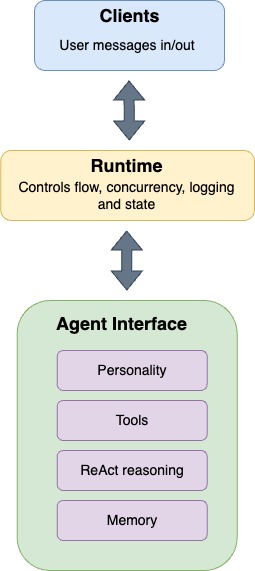 ***
## What is autonomy?
**Autonomy** refers to how many decisions the Agent makes on its own to complete a task. This can range from simply choosing one of two routes (low autonomy) to a full multi-step, looped approach (high autonomy):
| Agency Level | Description | Example Pattern |
| ------------ | --------------------------------------------------------------- | ------------------------------------------------------- |
| ★☆☆ (Low) | LLM output is used for simple decisions (like routing). | `if llm_decision(): path_a() else: path_b()` |
| ★★☆ (Medium) | LLM decides which tool/function to call and its arguments. | `tool_name, args = llm_parse_output(); tool_name(args)` |
| ★★★ (High) | LLM controls the entire multi-step loop and orchestrates calls. | `while llm_should_continue(): execute_next_step()` |
Galadriel empowers highly autonomous agents. Its Runtime ensures agents can operate continuously, while the Agent Interface acts as the agent's "brain," reasoning through a multi-step loop driven by LLM output and strategically using available tools. This design enables Galadriel agents to be fully autonomous, capable of running and performing tasks independently, without direct human intervention.
### Tools, Loops, and Runtime
* **Tools** provide *real-world capabilities* (e.g., searching the web, querying databases, etc.).
* **Loops** enable iterative reasoning, via a [ReAct-style approach](https://huggingface.co/papers/2210.03629):
1. Observe the current situation,
2. Think (“Thought”),
3. Call a tool if needed (“Action”),
4. Observe the result (“Observation”),
5. Decide if another step is needed.
* **The Runtime** connects all the dots by continuously feeding user requests to the Agent, capturing outputs, and optionally handling concurrency, logging, or multi-agent orchestration.
***
## The Agent Interface
The Agent Interface is composed of the following interface: a class with an `execute` method that takes in a `Message` and returns a `Message`:
```python
from abc import ABC, abstractmethod
class Agent(ABC):
@abstractmethod
async def execute(self, request: Message) -> Message:
raise RuntimeError("Function not implemented")
```
Where `Message` is defined as:
```python
class Message(BaseModel):
content: str
conversation_id: Optional[str] = None
type: Optional[str] = None
additional_kwargs: Optional[Dict] = None
```
> Note: This is the bare-bones of an **Agent Interface**. However, when we refer to **Agents**, we mean the entire system which also includes tools, memory, runtime and clients.
***
## Built-In Agent Interfaces
Galadriel provides two main interfaces you can use out of the box:
1. [**`ToolCallingAgent`**](/galadriel-network/reference/agents#toolcallingagent-class-reference) – Focuses on calling external functions (tools) to solve tasks.
2. [**`CodeAgent`**](/galadriel-network/reference/agents#codeagent-class-reference) – Lets the LLM “write” Python code that is then executed, offering a powerful and flexible approach for certain use-cases.
You can also create *custom agents* for specific personalities or domain knowledge. For example, [**`CharacterAgent`**](https://github.com/galadriel-ai/galadriel/tree/main/examples/discord) shows how to craft an agent with a distinct persona (like a Discord bot with a particular style).
***
## Sample Usage
Below is a quick demonstration of how to set up a [`CodeAgent`](/galadriel-network/reference/agents#codeagent-class-reference) with a web search tool, run it via the runtime, and communicate with a simple input/output client.
```python
import asyncio
from galadriel import AgentRuntime, CodeAgent
from galadriel.clients import SimpleMessageClient
from galadriel.core_agent import LiteLLMModel, DuckDuckGoSearchTool
model = LiteLLMModel(model_id="gpt-4o", api_key="")
agent = CodeAgent(
model=model,
tools=[DuckDuckGoSearchTool()]
)
# Simple input/output client:
client = SimpleMessageClient("Explain the concept of blockchain")
# The runtime orchestrates continuous execution of the agent.
runtime = AgentRuntime(
agent=agent,
inputs=[client],
outputs=[client],
)
asyncio.run(runtime.run())
```
1. **`CodeAgent`** can “write” code to perform tasks.
2. **`DuckDuckGoSearchTool`** provides a web search capability.
3. **`SimpleMessageClient`** supplies the user’s query and will receive the final answer.
4. **`AgentRuntime`** ties it all together, feeding data between the user, agent, and output.
***
## Multi-Agents
Multi-agent systems enable several agents to work together on a task, often yielding better performance than a single monolithic agent. By dividing responsibilities among agents, you can achieve efficient specialization. For example, rather than filling the memory of a code-generating agent with the details of every webpage visited by a web search agent, you can separate these concerns by delegating tasks to specialized agents.
### Key Concepts
* **Specialization**: Each agent focuses on a specific sub-task, leveraging unique tool sets and memory.
* **Delegation**: A manager agent can direct tasks to worker agents optimized for those tasks.
### Implementation Example
```python
import asyncio
from galadriel import AgentRuntime, CodeAgent
from galadriel.clients import SimpleMessageClient
from galadriel.core_agent import LiteLLMModel, DuckDuckGoSearchTool
model = LiteLLMModel(model_id="gpt-4o", api_key="")
managed_web_agent = CodeAgent(
tools=[DuckDuckGoSearchTool()],
model=model,
name="web_search",
description="Runs web searches for you. Give it your query as an argument.",
)
manager_agent = CodeAgent(tools=[], model=model, managed_agents=[managed_web_agent])
client = SimpleMessageClient("What's the most recent of Daige on X (twitter)?")
# Set up the runtime
runtime = AgentRuntime(
agent=manager_agent,
inputs=[client],
outputs=[client],
)
# Run the agent
asyncio.run(runtime.run())
```
This example demonstrates a manager-worker pattern using multiple agents:
* **Manager Agent**: A CodeAgent that receives user queries and coordinates with specialized worker agents.
* **Web Search Agent**: A worker agent equipped with DuckDuckGoSearchTool to handle web search requests.
* **SimpleMessageClient**: Implements input/output interfaces to send queries and display results.
* **AgentRuntime**: Connects the manager and worker agents with the client, orchestrating continuous execution.
***
## Conclusion
Agents in Galadriel empower you to build **autonomous AI systems** that:
* Utilize state-of-the-art LLM [Models](/galadriel-network/integrations/models).
* Integrate seamlessly with [Tools](/galadriel-network/integrations/tools).
* Maintain meaningful [Memory](/galadriel-network/tutorials/memory).
* Run continuously, responding to user requests in real time when combined with an [AgentRuntime](/galadriel-network/concepts/runtime).
***
## Next Steps
* Learn how to integrate your agent into the [AgentRuntime](/galadriel-network/concepts/runtime).
* [Examples](/galadriel-network/examples/examples) - Check out our repository for real-world sample projects.
# Chat to Agents via UI
Source: https://docs.galadriel.com/galadriel-network/tutorials/chat-to-agents
The Galadriel framework includes a built-in Gradio UI Client and a Terminal Client, enabling seamless local experimentation right out of the box. Unlike third-party clients such as Discord or Telegram, these clients require no additional configuration or authentication tokens. This makes them ideal for testing and debugging your agent before transitioning to a more advanced setup.
## Gradio Client
### Using Gradio with `AgentRuntime`
Gradio can be easily imported and used as a client right out of the box. For example, let's take the [Discord agent setup](https://github.com/galadriel-ai/galadriel/tree/main/examples/discord) and swap out the client for Gradio, as demonstrated in the code snippet below:
```python
from galadriel.core_agent import LiteLLMModel
from dotenv import load_dotenv
from pathlib import Path
from character_agent import CharacterAgent
from galadriel.tools.composio_converter import convert_action
from tools import get_time
from galadriel import AgentRuntime
import os
import asyncio
from galadriel.clients import GradioClient
load_dotenv(dotenv_path=Path(".") / ".env", override=True)
model = LiteLLMModel(model_id="gpt-4o", api_key=os.getenv("OPENAI_API_KEY"))
composio_weather_tool = convert_action(
os.getenv("COMPOSIO_API_KEY"), "WEATHERMAP_WEATHER"
)
elon_musk_agent = CharacterAgent(
character_json_path="agent.json",
tools=[composio_weather_tool, get_time],
model=model,
max_steps=6,
)
**gradio_client = GradioClient()**
runtime = AgentRuntime(
inputs=[**gradio_client**],
outputs=[**gradio_client**],
agent=elon_musk_agent,
)
asyncio.run(runtime.run())
```
Notice how simple it is, no extra configuration or token is required.
### Interacting with Gradio UI
Once the Agent is running, you can open Gradio UI locally in [http://0.0.0.0:7860](http://0.0.0.0:7860/).
Here’s a screenshot showcasing an couple message interaction with Gradio:
***
## What is autonomy?
**Autonomy** refers to how many decisions the Agent makes on its own to complete a task. This can range from simply choosing one of two routes (low autonomy) to a full multi-step, looped approach (high autonomy):
| Agency Level | Description | Example Pattern |
| ------------ | --------------------------------------------------------------- | ------------------------------------------------------- |
| ★☆☆ (Low) | LLM output is used for simple decisions (like routing). | `if llm_decision(): path_a() else: path_b()` |
| ★★☆ (Medium) | LLM decides which tool/function to call and its arguments. | `tool_name, args = llm_parse_output(); tool_name(args)` |
| ★★★ (High) | LLM controls the entire multi-step loop and orchestrates calls. | `while llm_should_continue(): execute_next_step()` |
Galadriel empowers highly autonomous agents. Its Runtime ensures agents can operate continuously, while the Agent Interface acts as the agent's "brain," reasoning through a multi-step loop driven by LLM output and strategically using available tools. This design enables Galadriel agents to be fully autonomous, capable of running and performing tasks independently, without direct human intervention.
### Tools, Loops, and Runtime
* **Tools** provide *real-world capabilities* (e.g., searching the web, querying databases, etc.).
* **Loops** enable iterative reasoning, via a [ReAct-style approach](https://huggingface.co/papers/2210.03629):
1. Observe the current situation,
2. Think (“Thought”),
3. Call a tool if needed (“Action”),
4. Observe the result (“Observation”),
5. Decide if another step is needed.
* **The Runtime** connects all the dots by continuously feeding user requests to the Agent, capturing outputs, and optionally handling concurrency, logging, or multi-agent orchestration.
***
## The Agent Interface
The Agent Interface is composed of the following interface: a class with an `execute` method that takes in a `Message` and returns a `Message`:
```python
from abc import ABC, abstractmethod
class Agent(ABC):
@abstractmethod
async def execute(self, request: Message) -> Message:
raise RuntimeError("Function not implemented")
```
Where `Message` is defined as:
```python
class Message(BaseModel):
content: str
conversation_id: Optional[str] = None
type: Optional[str] = None
additional_kwargs: Optional[Dict] = None
```
> Note: This is the bare-bones of an **Agent Interface**. However, when we refer to **Agents**, we mean the entire system which also includes tools, memory, runtime and clients.
***
## Built-In Agent Interfaces
Galadriel provides two main interfaces you can use out of the box:
1. [**`ToolCallingAgent`**](/galadriel-network/reference/agents#toolcallingagent-class-reference) – Focuses on calling external functions (tools) to solve tasks.
2. [**`CodeAgent`**](/galadriel-network/reference/agents#codeagent-class-reference) – Lets the LLM “write” Python code that is then executed, offering a powerful and flexible approach for certain use-cases.
You can also create *custom agents* for specific personalities or domain knowledge. For example, [**`CharacterAgent`**](https://github.com/galadriel-ai/galadriel/tree/main/examples/discord) shows how to craft an agent with a distinct persona (like a Discord bot with a particular style).
***
## Sample Usage
Below is a quick demonstration of how to set up a [`CodeAgent`](/galadriel-network/reference/agents#codeagent-class-reference) with a web search tool, run it via the runtime, and communicate with a simple input/output client.
```python
import asyncio
from galadriel import AgentRuntime, CodeAgent
from galadriel.clients import SimpleMessageClient
from galadriel.core_agent import LiteLLMModel, DuckDuckGoSearchTool
model = LiteLLMModel(model_id="gpt-4o", api_key="")
agent = CodeAgent(
model=model,
tools=[DuckDuckGoSearchTool()]
)
# Simple input/output client:
client = SimpleMessageClient("Explain the concept of blockchain")
# The runtime orchestrates continuous execution of the agent.
runtime = AgentRuntime(
agent=agent,
inputs=[client],
outputs=[client],
)
asyncio.run(runtime.run())
```
1. **`CodeAgent`** can “write” code to perform tasks.
2. **`DuckDuckGoSearchTool`** provides a web search capability.
3. **`SimpleMessageClient`** supplies the user’s query and will receive the final answer.
4. **`AgentRuntime`** ties it all together, feeding data between the user, agent, and output.
***
## Multi-Agents
Multi-agent systems enable several agents to work together on a task, often yielding better performance than a single monolithic agent. By dividing responsibilities among agents, you can achieve efficient specialization. For example, rather than filling the memory of a code-generating agent with the details of every webpage visited by a web search agent, you can separate these concerns by delegating tasks to specialized agents.
### Key Concepts
* **Specialization**: Each agent focuses on a specific sub-task, leveraging unique tool sets and memory.
* **Delegation**: A manager agent can direct tasks to worker agents optimized for those tasks.
### Implementation Example
```python
import asyncio
from galadriel import AgentRuntime, CodeAgent
from galadriel.clients import SimpleMessageClient
from galadriel.core_agent import LiteLLMModel, DuckDuckGoSearchTool
model = LiteLLMModel(model_id="gpt-4o", api_key="")
managed_web_agent = CodeAgent(
tools=[DuckDuckGoSearchTool()],
model=model,
name="web_search",
description="Runs web searches for you. Give it your query as an argument.",
)
manager_agent = CodeAgent(tools=[], model=model, managed_agents=[managed_web_agent])
client = SimpleMessageClient("What's the most recent of Daige on X (twitter)?")
# Set up the runtime
runtime = AgentRuntime(
agent=manager_agent,
inputs=[client],
outputs=[client],
)
# Run the agent
asyncio.run(runtime.run())
```
This example demonstrates a manager-worker pattern using multiple agents:
* **Manager Agent**: A CodeAgent that receives user queries and coordinates with specialized worker agents.
* **Web Search Agent**: A worker agent equipped with DuckDuckGoSearchTool to handle web search requests.
* **SimpleMessageClient**: Implements input/output interfaces to send queries and display results.
* **AgentRuntime**: Connects the manager and worker agents with the client, orchestrating continuous execution.
***
## Conclusion
Agents in Galadriel empower you to build **autonomous AI systems** that:
* Utilize state-of-the-art LLM [Models](/galadriel-network/integrations/models).
* Integrate seamlessly with [Tools](/galadriel-network/integrations/tools).
* Maintain meaningful [Memory](/galadriel-network/tutorials/memory).
* Run continuously, responding to user requests in real time when combined with an [AgentRuntime](/galadriel-network/concepts/runtime).
***
## Next Steps
* Learn how to integrate your agent into the [AgentRuntime](/galadriel-network/concepts/runtime).
* [Examples](/galadriel-network/examples/examples) - Check out our repository for real-world sample projects.
# Chat to Agents via UI
Source: https://docs.galadriel.com/galadriel-network/tutorials/chat-to-agents
The Galadriel framework includes a built-in Gradio UI Client and a Terminal Client, enabling seamless local experimentation right out of the box. Unlike third-party clients such as Discord or Telegram, these clients require no additional configuration or authentication tokens. This makes them ideal for testing and debugging your agent before transitioning to a more advanced setup.
## Gradio Client
### Using Gradio with `AgentRuntime`
Gradio can be easily imported and used as a client right out of the box. For example, let's take the [Discord agent setup](https://github.com/galadriel-ai/galadriel/tree/main/examples/discord) and swap out the client for Gradio, as demonstrated in the code snippet below:
```python
from galadriel.core_agent import LiteLLMModel
from dotenv import load_dotenv
from pathlib import Path
from character_agent import CharacterAgent
from galadriel.tools.composio_converter import convert_action
from tools import get_time
from galadriel import AgentRuntime
import os
import asyncio
from galadriel.clients import GradioClient
load_dotenv(dotenv_path=Path(".") / ".env", override=True)
model = LiteLLMModel(model_id="gpt-4o", api_key=os.getenv("OPENAI_API_KEY"))
composio_weather_tool = convert_action(
os.getenv("COMPOSIO_API_KEY"), "WEATHERMAP_WEATHER"
)
elon_musk_agent = CharacterAgent(
character_json_path="agent.json",
tools=[composio_weather_tool, get_time],
model=model,
max_steps=6,
)
**gradio_client = GradioClient()**
runtime = AgentRuntime(
inputs=[**gradio_client**],
outputs=[**gradio_client**],
agent=elon_musk_agent,
)
asyncio.run(runtime.run())
```
Notice how simple it is, no extra configuration or token is required.
### Interacting with Gradio UI
Once the Agent is running, you can open Gradio UI locally in [http://0.0.0.0:7860](http://0.0.0.0:7860/).
Here’s a screenshot showcasing an couple message interaction with Gradio:
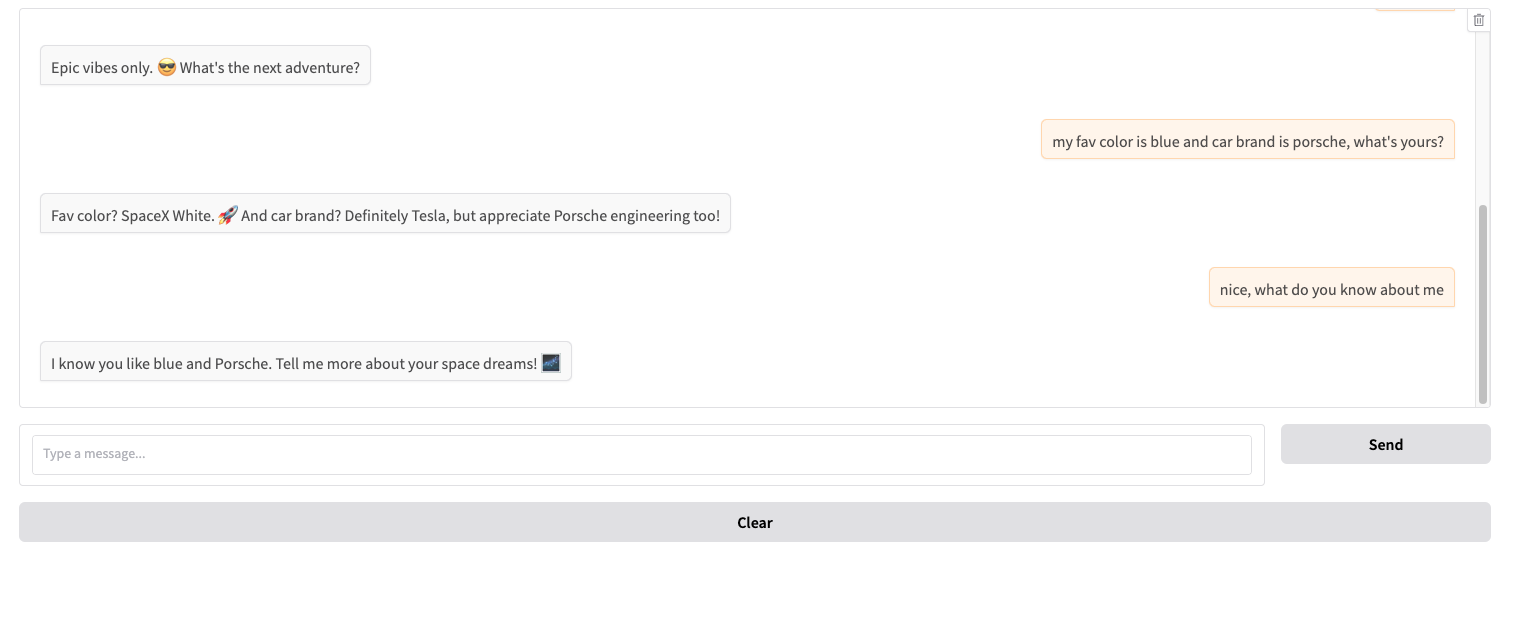 ## Terminal client
The **Terminal Client** provides an all-in-one debugging and testing environment. It is particularly useful as a minimal solution for agents that require ongoing conversations, as it keeps both the interaction and logs in the same terminal session.
### Using Terminal client with `AgentRuntime`
Similar to the Gradio client, the Terminal Client can be imported and used directly without extra configuration:
```python
from galadriel.clients import TerminalClient
terminal_client = TerminalClient()
runtime = AgentRuntime(
inputs=[terminal_client],
outputs=[terminal_client],
agent=,
)
```
### Interacting with Terminal Client
Once the agent is running, you can interact with it directly in the terminal. Your input will appear after the `you:` prompt, and the agent's response will follow the `Agent:` log.
Below is a screenshot showcasing a simple interaction:
## Terminal client
The **Terminal Client** provides an all-in-one debugging and testing environment. It is particularly useful as a minimal solution for agents that require ongoing conversations, as it keeps both the interaction and logs in the same terminal session.
### Using Terminal client with `AgentRuntime`
Similar to the Gradio client, the Terminal Client can be imported and used directly without extra configuration:
```python
from galadriel.clients import TerminalClient
terminal_client = TerminalClient()
runtime = AgentRuntime(
inputs=[terminal_client],
outputs=[terminal_client],
agent=,
)
```
### Interacting with Terminal Client
Once the agent is running, you can interact with it directly in the terminal. Your input will appear after the `you:` prompt, and the agent's response will follow the `Agent:` log.
Below is a screenshot showcasing a simple interaction:
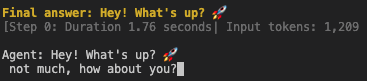 ## Conclusion
The **Gradio UI Client** offers an intuitive and seamless way to test and debug your agent locally, requiring no extra configuration or authentication tokens. This makes it ideal for rapid experimentation before integrating with more complex clients like Discord or Telegram.
For a lightweight alternative, the [**Terminal Client**](https://github.com/galadriel-ai/galadriel/blob/main/galadriel/clients/terminal_client.py) allows direct command-line interaction, making it useful for quick tests in non-graphical environments or when running agents on remote servers.
By leveraging both **Gradio** and the **Terminal Client**, you can efficiently prototype, debug, and refine your agent before deploying it in a production setting.
## What next?
To unlock more capabilities to your agent, check out how to use more complex clients:
* [Clients](/galadriel-network/integrations/clients)
# Clients
Source: https://docs.galadriel.com/galadriel-network/tutorials/clients
## What is a Client?
A Client connects your agent to real-world input and output sources. It delivers [Messages](https://github.com/galadriel-ai/galadriel/blob/main/galadriel/entities.py#L11) to your agent and routes responses to their destination.
A Client can be one (or both) of:
* **Input (AgentInput)**: Provides messages to the agent.
* **Output (AgentOutput)**: Sends the agent's responses to their destination.
This design allows your agent to integrate seamlessly with a wide range of sources, from scheduled tasks (like cron jobs) to interactive platforms (like Discord bots).
## Adding Clients to Your Agent
### Prerequisites
If you don’t have an already working agent built with Galadriel, please go through the [quick start](/galadriel-network/get-started/quickstart).
### Gradio Client Example
Clients connect to [AgentRuntime](/galadriel-network/concepts/runtime), which manages how the agent processes inputs and returns results.
```python
import asyncio
from galadriel import AgentRuntime, CodeAgent
from galadriel.clients import GradioClient
from galadriel.core_agent import LiteLLMModel, DuckDuckGoSearchTool
model = LiteLLMModel(model_id="gpt-4o", api_key="")
agent = CodeAgent(model=model, tools=[DuckDuckGoSearchTool()])
gradio_client = GradioClient()
runtime = AgentRuntime(
agent=agent,
inputs=[gradio_client],
outputs=[gradio_client],
)
asyncio.run(runtime.run())
```
### Supported Clients (or Build Your Own)
We currently provide built-in support for:
* Discord
* Telegram
* Gradio
* Terminal
* Cron
* SimpleMessageClient
* Twitter
Visit our [Clients](/galadriel-network/integrations/clients) to learn more about using these clients or creating your own.
## Conclusion
Clients allow you to plug your agent into the real world with minimal effort. Need an AI that interacts via Discord, Slack, email, or webhooks? Just write a Client that conforms to `AgentInput` and `AgentOutput`, and you're good to go.
## See Next
* [Out-of-the-box client integrations](/galadriel-network/integrations/clients)
* [Deep dive into Tools](/galadriel-network/tutorials/tools)
Happy coding! 🚀
# Memory
Source: https://docs.galadriel.com/galadriel-network/tutorials/memory
## What is Memory?
Memory enables your agent to recall past interactions and use them to inform future responses. In Galadriel, memory is implemented through the `MemoryStore` class, which provides both short-term and long-term memory capabilities.
* **Short-term memory**: Stores recent conversations in a simple list structure (enabled by default).
* **Long-term memory**: Uses vector embeddings to store and retrieve relevant past interactions based on semantic similarity (optional).
## How Memory Works
When a user interacts with an agent:
1. The conversation is stored in short-term memory.
2. If short-term memory exceeds its limit (default: 20 interactions), the oldest memory is moved to long-term storage (if enabled).
3. When responding to a new query, the agent can access:
* All recent conversations from short-term memory
* Semantically relevant past interactions from long-term memory
This approach ensures your agent maintains context in ongoing conversations while also being able to recall relevant information from past interactions.
## Adding Memory to Your Agent
### Prerequisites
Make sure you've gone through the [quick start guide](/galadriel-network/get-started/quickstart) and have the development environment set up.
### Basic Usage (Short-Term Memory Only)
Short-term memory is enabled by default when using the `AgentRuntime`:
```python
from galadriel import AgentRuntime, CodeAgent
from galadriel.core_agent import LiteLLMModel
model = LiteLLMModel(model_id="gpt-4o", api_key="")
agent = CodeAgent(model=model)
# Memory is automatically enabled with short-term capabilities
runtime = AgentRuntime(
agent=agent,
inputs=[client],
outputs=[client],
)
```
### Enabling Long-Term Memory
To enable long-term memory, explicitly create a `MemoryStore` with OpenAI API credentials and an embedding model:
```python
import os
from galadriel import AgentRuntime, CodeAgent, MemoryStore
from galadriel.core_agent import LiteLLMModel
model = LiteLLMModel(model_id="gpt-4o", api_key="")
agent = CodeAgent(model=model)
# Create memory store with long-term capabilities
memory_store = MemoryStore(
api_key=os.getenv("OPENAI_API_KEY"),
embedding_model="text-embedding-3-large",
agent_name="customer_support_agent",
)
runtime = AgentRuntime(
agent=agent,
inputs=[client],
outputs=[client],
memory_store=memory_store,
)
```
## How Memory Appears in Prompts
When your agent receives a query, memory is automatically integrated into its prompt. Here's an example:
```
You are a helpful chatbot assistant.
Here is the chat history:
recent messages:
[2025-03-12 09:20]
User: hello
Assistant: Hello! How can I help you today?
[2025-03-12 09:20]
User: how's the weather like in Porto, Portugal
Assistant: Currently, the weather in Porto, Portugal is around 22.71°C (72.88°F) with a southwest wind at 14.51 km/h and 76% humidity. There is a 0% chance of rain.
[2025-03-12 09:21]
User: that sounds great for March, could you verify again?
Assistant: I apologize for the confusion earlier. Upon verifying, the typical weather in Porto for March 2025 shows temperatures ranging from 9°C to 17°C, and there might be several rainy days. It seems the previous information might not have been accurate. Thank you for your patience!
Answer the following question:
thank you
Please remember the chat history and use it to answer the question, if relevant to the question.
```
If long-term memory is enabled, semantically relevant past interactions will also be included under a "long term memories that might be relevant" section.
## Advanced Memory Features
### Saving and Loading Memory
For persistent agents, you can save memory to disk and load it later:
```python
# Save memory to disk
memory_store.save_data_locally("./agent_memory")
# Load memory from disk
memory_store = MemoryStore(
api_key=os.getenv("OPENAI_API_KEY"),
embedding_model="text-embedding-3-large",
)
memory_store.load_memory_from_folder("./agent_memory")
```
### Customizing Memory Retrieval (Long-Term Memory Only)
When retrieving memories for a specific query, you can customize:
1. The number of relevant memories to retrieve (`top_k`)
2. Filter criteria for memory retrieval
```python
# In a custom agent implementation
memories = await self.memory_store.get_memories(
prompt="Tell me about crypto",
top_k=5, # Retrieve 5 most relevant memories
filter={"conversation_id": "abc123"} # Only from a specific conversation
)
```
## Memory Configuration Options
The `MemoryStore` class accepts several parameters:
| Parameter | Description | Default |
| ------------------------- | ------------------------------------------------------------- | ------- |
| `short_term_memory_limit` | Maximum number of interactions in short-term memory | 20 |
| `api_key` | OpenAI API key for embeddings (required for long-term memory) | None |
| `embedding_model` | OpenAI embedding model to use | None |
| `agent_name` | Identifier for the agent using this memory store | "agent" |
### Adjusting Short-Term Memory Capacity
The `short_term_memory_limit` parameter controls how many recent interactions your agent remembers before moving older memories to long-term storage. You can adjust this based on your use case:
```python
# For agents that need more immediate context (e.g., complex conversations)
memory_store = MemoryStore(short_term_memory_limit=20)
# For agents that need less immediate context (e.g., simple Q&A)
memory_store = MemoryStore(short_term_memory_limit=10)
```
Increasing this limit allows your agent to maintain more context in active memory, which can be beneficial for complex, multi-turn conversations. However, it may also increase token usage in your LLM prompts.
When short-term memory reaches its limit, the oldest memory is automatically moved to long-term storage (if long-term memory is enabled). If long-term memory is not enabled, the oldest memory is simply discarded.
## Conclusion
Memory is a crucial component for building agents that maintain context and learn from past interactions. Galadriel's memory system provides a flexible approach that balances recent context with long-term recall, enabling more natural and helpful agent responses.
## See Next
* [Tools](/galadriel-network/tutorials/tools)
* [Agents](/galadriel-network/tutorials/agents)
* [Runtime](/galadriel-network/concepts/runtime)
# Payments
Source: https://docs.galadriel.com/galadriel-network/tutorials/payments
Agents can optionally be monetized using a pricing model. If a pricing object is provided, the runtime ensures that the client submitting a request has transferred the required funds on the Solana blockchain before processing the request.
The `Runtime` also enables configuring payments to the Agent, to get paid for the tasks performed, by checking if the message from the client includes a transaction signature on the Solana blockchain, transferring enough funds to the Agent.
To enable pricing, all that is needed is giving the Runtime a `Pricing` object that contains the payment size needed in SOL, and the Agent wallet address:
```python
pricing = Pricing(
wallet_address=agent_wallet_address,
cost=0.1, # 0.1 SOL
)
runtime = AgentRunTime(
inputs=[my_client],
outputs=[my_client],
agent=agent,
pricing=pricing,
)
```
When pricing is forwarded, the runtime:
* checks if the incoming messages from the `inputs` contain a Solana transaction signature. The signatures can be either just a signature string or a link to Solscan.
* Verifies that the transaction transferred the required amount of SOL.
* Only forwards the `Message` to the agent if the payment is valid.
# Agentic RAG
Source: https://docs.galadriel.com/galadriel-network/tutorials/rag
## What is Agentic RAG?
While RAG helps ground language models in factual, domain-specific data, basic implementations have limitations:
### Common pitfalls of simple RAG:
1. **Single-step retrieval** – If the initial retrieval is inaccurate, the model’s response suffers, with no way to refine the search.
2. **Query mismatch** – Directly matching the user’s query can miss relevant results if phrasing differs (e.g., question vs. statement).
### How Agentic RAG improves RAG
An **agentic RAG** overcomes these issues by:
* **Iterating retrieval** – Refining queries when initial results are off-target.
* **Rewriting queries** – Adjusting phrasing to better match stored documents.
By actively optimizing search strategies, an agentic RAG surfaces more relevant content than a single-step approach.
## How to build a RAG Agent
By **turning RAG into an agent-based approach**, we can address these limitations more effectively.
### Preparing the knowledge base
In this example, we load a dataset of documentation pages for various Hugging Face libraries, keeping only those related to the `transformers` library. We then split this data into smaller chunks, which will form our searchable knowledge base.
```python
import datasets
from langchain.docstore.document import Document
from langchain.text_splitter import RecursiveCharacterTextSplitter
knowledge_base = datasets.load_dataset("m-ric/huggingface_doc", split="train")
knowledge_base = knowledge_base.filter(lambda row: row["source"].startswith("huggingface/transformers"))
source_docs = [
Document(page_content=doc["text"], metadata={"source": doc["source"].split("/")[1]})
for doc in knowledge_base
]
text_splitter = RecursiveCharacterTextSplitter(
chunk_size=500,
chunk_overlap=50,
add_start_index=True,
strip_whitespace=True,
separators=["\n\n", "\n", ".", " ", ""],
)
docs_processed = text_splitter.split_documents(source_docs)
```
At this point, `docs_processed` is a structured collection of document chunks, ready to be used by a retriever tool.
***
### **Retriever Tool**
Galadriel framework provides a [RetrieverTool](https://github.com/galadriel-ai/galadriel/blob/main/galadriel/tools/retriever.py) (visit [Tools](/galadriel-network/integrations/tools) for more details) that uses semantic search (BM25 for simplicity) to fetch relevant passages. This tool will be called by the agent whenever it needs more information.
> Note: You can replace BM25 with a vector-based retriever for better semantic matching.
### **Initializing the Agent**
Check the code
```python
import asyncio
from galadriel import AgentRuntime, CodeAgent
from galadriel.clients import SimpleMessageClient
from galadriel.core_agent import LiteLLMModel
**from galadriel.tools.retriever import RetrieverTool**
model = LiteLLMModel(model_id="gpt-4o", api_key="")
**retriever_tool = RetrieverTool(docs_processed)**
agent = CodeAgent(
model=model,
tools=[**retriever_tool**],
)
client = SimpleMessageClient("For a transformers model training, which is slower, the forward or the backward pass?")
runtime = AgentRuntime(
agent=agent,
inputs=[client],
outputs=[client],
)
asyncio.run(runtime.run())
```
The agent will attempt to solve the user’s query by:
1. Reasoning through the user’s prompt step by step.
2. Calling `retriever_tool` to gather relevant context from the knowledge base.
3. Potentially adjusting or refining the query if needed.
4. Providing a final answer once enough context is gathered.
Bellow is a screenshot with a snippet of the logs from the execution:
## Conclusion
The **Gradio UI Client** offers an intuitive and seamless way to test and debug your agent locally, requiring no extra configuration or authentication tokens. This makes it ideal for rapid experimentation before integrating with more complex clients like Discord or Telegram.
For a lightweight alternative, the [**Terminal Client**](https://github.com/galadriel-ai/galadriel/blob/main/galadriel/clients/terminal_client.py) allows direct command-line interaction, making it useful for quick tests in non-graphical environments or when running agents on remote servers.
By leveraging both **Gradio** and the **Terminal Client**, you can efficiently prototype, debug, and refine your agent before deploying it in a production setting.
## What next?
To unlock more capabilities to your agent, check out how to use more complex clients:
* [Clients](/galadriel-network/integrations/clients)
# Clients
Source: https://docs.galadriel.com/galadriel-network/tutorials/clients
## What is a Client?
A Client connects your agent to real-world input and output sources. It delivers [Messages](https://github.com/galadriel-ai/galadriel/blob/main/galadriel/entities.py#L11) to your agent and routes responses to their destination.
A Client can be one (or both) of:
* **Input (AgentInput)**: Provides messages to the agent.
* **Output (AgentOutput)**: Sends the agent's responses to their destination.
This design allows your agent to integrate seamlessly with a wide range of sources, from scheduled tasks (like cron jobs) to interactive platforms (like Discord bots).
## Adding Clients to Your Agent
### Prerequisites
If you don’t have an already working agent built with Galadriel, please go through the [quick start](/galadriel-network/get-started/quickstart).
### Gradio Client Example
Clients connect to [AgentRuntime](/galadriel-network/concepts/runtime), which manages how the agent processes inputs and returns results.
```python
import asyncio
from galadriel import AgentRuntime, CodeAgent
from galadriel.clients import GradioClient
from galadriel.core_agent import LiteLLMModel, DuckDuckGoSearchTool
model = LiteLLMModel(model_id="gpt-4o", api_key="")
agent = CodeAgent(model=model, tools=[DuckDuckGoSearchTool()])
gradio_client = GradioClient()
runtime = AgentRuntime(
agent=agent,
inputs=[gradio_client],
outputs=[gradio_client],
)
asyncio.run(runtime.run())
```
### Supported Clients (or Build Your Own)
We currently provide built-in support for:
* Discord
* Telegram
* Gradio
* Terminal
* Cron
* SimpleMessageClient
* Twitter
Visit our [Clients](/galadriel-network/integrations/clients) to learn more about using these clients or creating your own.
## Conclusion
Clients allow you to plug your agent into the real world with minimal effort. Need an AI that interacts via Discord, Slack, email, or webhooks? Just write a Client that conforms to `AgentInput` and `AgentOutput`, and you're good to go.
## See Next
* [Out-of-the-box client integrations](/galadriel-network/integrations/clients)
* [Deep dive into Tools](/galadriel-network/tutorials/tools)
Happy coding! 🚀
# Memory
Source: https://docs.galadriel.com/galadriel-network/tutorials/memory
## What is Memory?
Memory enables your agent to recall past interactions and use them to inform future responses. In Galadriel, memory is implemented through the `MemoryStore` class, which provides both short-term and long-term memory capabilities.
* **Short-term memory**: Stores recent conversations in a simple list structure (enabled by default).
* **Long-term memory**: Uses vector embeddings to store and retrieve relevant past interactions based on semantic similarity (optional).
## How Memory Works
When a user interacts with an agent:
1. The conversation is stored in short-term memory.
2. If short-term memory exceeds its limit (default: 20 interactions), the oldest memory is moved to long-term storage (if enabled).
3. When responding to a new query, the agent can access:
* All recent conversations from short-term memory
* Semantically relevant past interactions from long-term memory
This approach ensures your agent maintains context in ongoing conversations while also being able to recall relevant information from past interactions.
## Adding Memory to Your Agent
### Prerequisites
Make sure you've gone through the [quick start guide](/galadriel-network/get-started/quickstart) and have the development environment set up.
### Basic Usage (Short-Term Memory Only)
Short-term memory is enabled by default when using the `AgentRuntime`:
```python
from galadriel import AgentRuntime, CodeAgent
from galadriel.core_agent import LiteLLMModel
model = LiteLLMModel(model_id="gpt-4o", api_key="")
agent = CodeAgent(model=model)
# Memory is automatically enabled with short-term capabilities
runtime = AgentRuntime(
agent=agent,
inputs=[client],
outputs=[client],
)
```
### Enabling Long-Term Memory
To enable long-term memory, explicitly create a `MemoryStore` with OpenAI API credentials and an embedding model:
```python
import os
from galadriel import AgentRuntime, CodeAgent, MemoryStore
from galadriel.core_agent import LiteLLMModel
model = LiteLLMModel(model_id="gpt-4o", api_key="")
agent = CodeAgent(model=model)
# Create memory store with long-term capabilities
memory_store = MemoryStore(
api_key=os.getenv("OPENAI_API_KEY"),
embedding_model="text-embedding-3-large",
agent_name="customer_support_agent",
)
runtime = AgentRuntime(
agent=agent,
inputs=[client],
outputs=[client],
memory_store=memory_store,
)
```
## How Memory Appears in Prompts
When your agent receives a query, memory is automatically integrated into its prompt. Here's an example:
```
You are a helpful chatbot assistant.
Here is the chat history:
recent messages:
[2025-03-12 09:20]
User: hello
Assistant: Hello! How can I help you today?
[2025-03-12 09:20]
User: how's the weather like in Porto, Portugal
Assistant: Currently, the weather in Porto, Portugal is around 22.71°C (72.88°F) with a southwest wind at 14.51 km/h and 76% humidity. There is a 0% chance of rain.
[2025-03-12 09:21]
User: that sounds great for March, could you verify again?
Assistant: I apologize for the confusion earlier. Upon verifying, the typical weather in Porto for March 2025 shows temperatures ranging from 9°C to 17°C, and there might be several rainy days. It seems the previous information might not have been accurate. Thank you for your patience!
Answer the following question:
thank you
Please remember the chat history and use it to answer the question, if relevant to the question.
```
If long-term memory is enabled, semantically relevant past interactions will also be included under a "long term memories that might be relevant" section.
## Advanced Memory Features
### Saving and Loading Memory
For persistent agents, you can save memory to disk and load it later:
```python
# Save memory to disk
memory_store.save_data_locally("./agent_memory")
# Load memory from disk
memory_store = MemoryStore(
api_key=os.getenv("OPENAI_API_KEY"),
embedding_model="text-embedding-3-large",
)
memory_store.load_memory_from_folder("./agent_memory")
```
### Customizing Memory Retrieval (Long-Term Memory Only)
When retrieving memories for a specific query, you can customize:
1. The number of relevant memories to retrieve (`top_k`)
2. Filter criteria for memory retrieval
```python
# In a custom agent implementation
memories = await self.memory_store.get_memories(
prompt="Tell me about crypto",
top_k=5, # Retrieve 5 most relevant memories
filter={"conversation_id": "abc123"} # Only from a specific conversation
)
```
## Memory Configuration Options
The `MemoryStore` class accepts several parameters:
| Parameter | Description | Default |
| ------------------------- | ------------------------------------------------------------- | ------- |
| `short_term_memory_limit` | Maximum number of interactions in short-term memory | 20 |
| `api_key` | OpenAI API key for embeddings (required for long-term memory) | None |
| `embedding_model` | OpenAI embedding model to use | None |
| `agent_name` | Identifier for the agent using this memory store | "agent" |
### Adjusting Short-Term Memory Capacity
The `short_term_memory_limit` parameter controls how many recent interactions your agent remembers before moving older memories to long-term storage. You can adjust this based on your use case:
```python
# For agents that need more immediate context (e.g., complex conversations)
memory_store = MemoryStore(short_term_memory_limit=20)
# For agents that need less immediate context (e.g., simple Q&A)
memory_store = MemoryStore(short_term_memory_limit=10)
```
Increasing this limit allows your agent to maintain more context in active memory, which can be beneficial for complex, multi-turn conversations. However, it may also increase token usage in your LLM prompts.
When short-term memory reaches its limit, the oldest memory is automatically moved to long-term storage (if long-term memory is enabled). If long-term memory is not enabled, the oldest memory is simply discarded.
## Conclusion
Memory is a crucial component for building agents that maintain context and learn from past interactions. Galadriel's memory system provides a flexible approach that balances recent context with long-term recall, enabling more natural and helpful agent responses.
## See Next
* [Tools](/galadriel-network/tutorials/tools)
* [Agents](/galadriel-network/tutorials/agents)
* [Runtime](/galadriel-network/concepts/runtime)
# Payments
Source: https://docs.galadriel.com/galadriel-network/tutorials/payments
Agents can optionally be monetized using a pricing model. If a pricing object is provided, the runtime ensures that the client submitting a request has transferred the required funds on the Solana blockchain before processing the request.
The `Runtime` also enables configuring payments to the Agent, to get paid for the tasks performed, by checking if the message from the client includes a transaction signature on the Solana blockchain, transferring enough funds to the Agent.
To enable pricing, all that is needed is giving the Runtime a `Pricing` object that contains the payment size needed in SOL, and the Agent wallet address:
```python
pricing = Pricing(
wallet_address=agent_wallet_address,
cost=0.1, # 0.1 SOL
)
runtime = AgentRunTime(
inputs=[my_client],
outputs=[my_client],
agent=agent,
pricing=pricing,
)
```
When pricing is forwarded, the runtime:
* checks if the incoming messages from the `inputs` contain a Solana transaction signature. The signatures can be either just a signature string or a link to Solscan.
* Verifies that the transaction transferred the required amount of SOL.
* Only forwards the `Message` to the agent if the payment is valid.
# Agentic RAG
Source: https://docs.galadriel.com/galadriel-network/tutorials/rag
## What is Agentic RAG?
While RAG helps ground language models in factual, domain-specific data, basic implementations have limitations:
### Common pitfalls of simple RAG:
1. **Single-step retrieval** – If the initial retrieval is inaccurate, the model’s response suffers, with no way to refine the search.
2. **Query mismatch** – Directly matching the user’s query can miss relevant results if phrasing differs (e.g., question vs. statement).
### How Agentic RAG improves RAG
An **agentic RAG** overcomes these issues by:
* **Iterating retrieval** – Refining queries when initial results are off-target.
* **Rewriting queries** – Adjusting phrasing to better match stored documents.
By actively optimizing search strategies, an agentic RAG surfaces more relevant content than a single-step approach.
## How to build a RAG Agent
By **turning RAG into an agent-based approach**, we can address these limitations more effectively.
### Preparing the knowledge base
In this example, we load a dataset of documentation pages for various Hugging Face libraries, keeping only those related to the `transformers` library. We then split this data into smaller chunks, which will form our searchable knowledge base.
```python
import datasets
from langchain.docstore.document import Document
from langchain.text_splitter import RecursiveCharacterTextSplitter
knowledge_base = datasets.load_dataset("m-ric/huggingface_doc", split="train")
knowledge_base = knowledge_base.filter(lambda row: row["source"].startswith("huggingface/transformers"))
source_docs = [
Document(page_content=doc["text"], metadata={"source": doc["source"].split("/")[1]})
for doc in knowledge_base
]
text_splitter = RecursiveCharacterTextSplitter(
chunk_size=500,
chunk_overlap=50,
add_start_index=True,
strip_whitespace=True,
separators=["\n\n", "\n", ".", " ", ""],
)
docs_processed = text_splitter.split_documents(source_docs)
```
At this point, `docs_processed` is a structured collection of document chunks, ready to be used by a retriever tool.
***
### **Retriever Tool**
Galadriel framework provides a [RetrieverTool](https://github.com/galadriel-ai/galadriel/blob/main/galadriel/tools/retriever.py) (visit [Tools](/galadriel-network/integrations/tools) for more details) that uses semantic search (BM25 for simplicity) to fetch relevant passages. This tool will be called by the agent whenever it needs more information.
> Note: You can replace BM25 with a vector-based retriever for better semantic matching.
### **Initializing the Agent**
Check the code
```python
import asyncio
from galadriel import AgentRuntime, CodeAgent
from galadriel.clients import SimpleMessageClient
from galadriel.core_agent import LiteLLMModel
**from galadriel.tools.retriever import RetrieverTool**
model = LiteLLMModel(model_id="gpt-4o", api_key="")
**retriever_tool = RetrieverTool(docs_processed)**
agent = CodeAgent(
model=model,
tools=[**retriever_tool**],
)
client = SimpleMessageClient("For a transformers model training, which is slower, the forward or the backward pass?")
runtime = AgentRuntime(
agent=agent,
inputs=[client],
outputs=[client],
)
asyncio.run(runtime.run())
```
The agent will attempt to solve the user’s query by:
1. Reasoning through the user’s prompt step by step.
2. Calling `retriever_tool` to gather relevant context from the knowledge base.
3. Potentially adjusting or refining the query if needed.
4. Providing a final answer once enough context is gathered.
Bellow is a screenshot with a snippet of the logs from the execution:
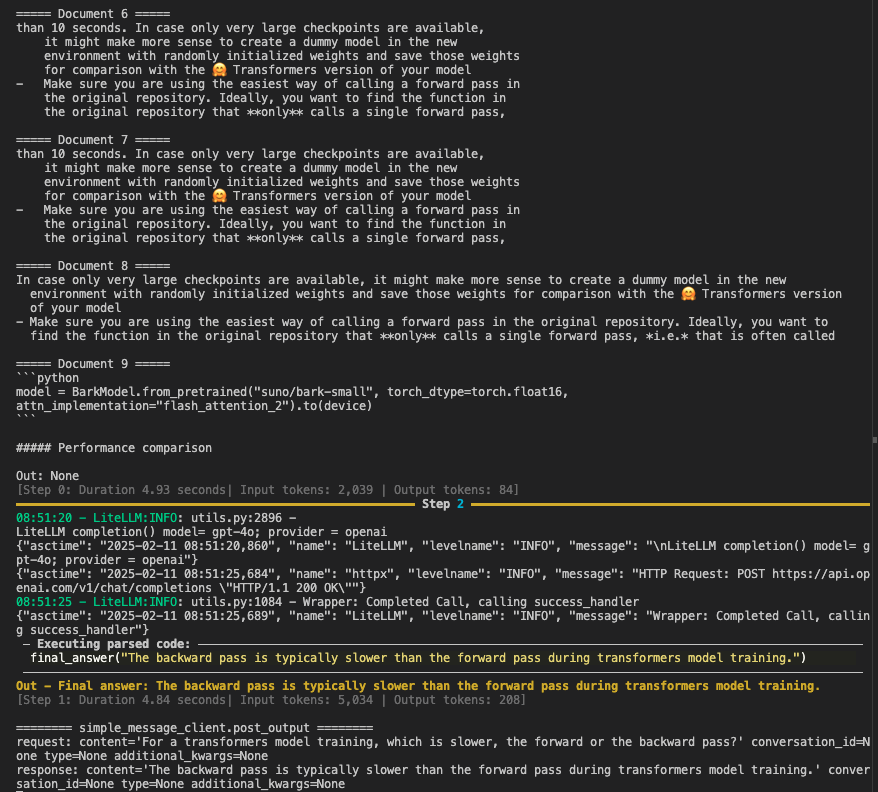 As you can see, the agent was successful in selecting semantic relevant chunks of text and produced the final answer: *The backward pass is typically slower than the forward pass during transformers model training.*
## Conclusion
**RAG Agents** provide a powerful way to **ground** your language model’s outputs on **factual, domain-specific data**. By:
* **Rewriting queries** – Agents can better match the style or content of the relevant documents.
* **Iterating retrieval** – Agents critique and refine their searches when initial results are insufficient.
* **Controlling knowledge access** – You decide what information the agent can retrieve, ensuring compliance and data security.
With this approach, you can address the pitfalls of single-step or query-mismatch retrieval and tap into more **flexible, accurate, and controllable** LLM interactions.
# Tools
Source: https://docs.galadriel.com/galadriel-network/tutorials/tools
## What is a Tool?
A tool is a predefined function available for an agent to use when it decides to. It augments the LLM model used by the agent to interact with external data sources, APIs, or programs. For example, a tool can fetch the weather in London or sign and submit a transaction to Ethereum to update a portfolio.
Every tool extends the [Tool](https://github.com/huggingface/smolagents/blob/main/src/smolagents/tools.py#L83) class and specifies:
* A `name` used in the prompt for an agent.
* A `description` of what the tool does, the inputs it expects, and the output(s) it will return.
* A type of tool `output`.
* `Inputs` it expects.
## Adding tool-use to your agent
Tools are passed to the `agent` object. The agent can run with any number of tools, including no tools at all.
### Prerequisites
Make sure you’ve gone through the quick start guide and have the development environment set up.
### Example usage
```python
from galadriel.tools.web3 import dexscreener
agent = CodeAgent(
model=model,
tools=[dexscreener.fetch_market_data],
)
```
In this example, `dexscreener.fetch_market_data` is a tool available in `galadriel.tools.web3`.
Complete example code is [here](https://github.com/galadriel-ai/galadriel/tree/main/examples/basic-web3).
### List of tools provided by Galadriel
Visit the [Tools Integration](/galadriel-network/integrations/tools) page to explore our growing list of supported tools and learn how to integrate them. You can also leverage tools from [Composio](https://composio.dev/) and [Langchain](https://python.langchain.com/v0.1/docs/modules/tools/).
### Build your own tools
You can also build your own tools. There are two ways to do it.
#### Building simple tools
To build simple tools, annotate the function with `@tool`.
Then, right under the function signature, provide the description explaining what the tool does, arguments it expects, and the return format. These values will be used by LLM to evaluate when and how to use the tool.
```python
from galadriel.core_agent import tool
@tool
def get_time(location: str) -> str:
"""
Get the current time in the given location.
Args:
location: the location
"""
return f"The time in {location} is {datetime.now().strftime('%Y-%m-%d %H:%M:%S')}"
```
#### Building more complex tools
To build complex tools, Extend the `Tool` class similarly to [RetrieverTool](https://github.com/galadriel-ai/galadriel/blob/main/galadriel/tools/retriever.py).
#### Want to integrate your tool into Galardiel?
Contact our developers on Discord to integrate your tool into the Galadriel framework out of the box.
## Conclusion
Tools significantly expand an agent’s capabilities, enabling interaction with external systems and data sources. Whether using built-in tools, third-party integrations, or custom implementations, tools make AI agents more powerful and versatile.
## See next
* [Tools](/galadriel-network/integrations/tools)
* [Wallet](/galadriel-network/concepts/wallet)
* [Memory](/galadriel-network/tutorials/memory)
# Wallet
Source: https://docs.galadriel.com/galadriel-network/tutorials/wallet
## Why does an agent need a Wallet?
To enable an agent to interact with the blockchain—such as autonomously executing trades—you must create a wallet and grant the agent control access. This allows the agent to sign transactions, for example, swapping assets based on its financial decisions.
## Wallet Setup
Before using the wallet, you must either
* create a new Solana wallet
* or import an existing wallet
### Creating a Wallet
Use the following command to create a new wallet:
```bash
galadriel wallet create
```
By default, the wallet's private key is stored at `~/secret/.private_key.json`. You can specify a custom path using the `--path` flag:
```bash
galadriel wallet create --path /your/custom/path.json
```
The private key is stored in JSON format as a standard Solana Ed25519 keypair.
### Importing an Existing Wallet
To import an existing wallet, use one of the following methods:
**Import from a file**
```bash
galadriel wallet import --path /Users/galadriel/my_solana_key.json
```
**Import using a private key string**
```bash
galadriel wallet import --private-key "[236,183,172,159,151,136,98,48,88,225,87,94,91,65,98,19,19,145,171,156,142,193,63,132,224,192,216,112,222,61,41,9,226,41,148,80,123,104,2,9,100,141,69,233,137,201,64,43,166,147,184,64,70,212,61,187,36,92,170,120,136,163,236,231]"
```
After importing or creating a wallet, it will be ready for use. The private key's storage path can be found under `SOLANA_KEY_PATH` in `.agents.env`.
### Request Airdrop
To help developers test the framework, Galadriel provides a faucet service that can fund your wallet with test tokens.
To request a small amount of SOL from the faucet service, execute the following command:
```bash
galadriel wallet airdrop
```
The airdrop service has the following rate limits:
* One request per wallet address every 24 hours
* One request per IP address every 30 minutes
## Using a Wallet in an Agent
### Prerequisites
**Important:** Ensure your wallet is funded before use. Without sufficient SOL, Web3 tools may fail due to a lack of gas fees or available funds.
### Agent Code Example
Once the wallet is set up, it is automatically accessible by Web3 tools. To use it, simply include Web3 tools in your agent’s toolset.
Below is an example of how to enable the agent with the Jupiter tool for token swapping. The agent can call the `swap_token` function using the previously set up wallet to execute swaps when needed.
```python
agent = CodeAgent(
model=model,
tools=[jupiter.swap_token],
)
```
For details on tool integration, refer to the tools section of the documentation.
# null
Source: https://docs.galadriel.com/overview

Sentience enables developers to build autonomous, fully on-chain verifiable AI agents with an OpenAI-compatible [Proof of Sentience SDK](/for-agents-developers/quickstart.mdx).
The SDK verifies agent's LLM inferences (thoughts, actions, output, etc.) with a simple dev-exp, so no need to know the underlying cryptographic primitives of TEE’s.
Supports all OpenAI models out of the box (including fine-tuned).
### Why sentient agents?
AI agents have reached \$10B+ market cap but most of them are still controlled by humans. This is a huge problem as it introduces risk to the investors and community as developers can simply rug-pull and manipulate the agents.
We're already seeing activity logs for [zerebro](https://zerebro.org/proof-of-conciousness) and [aixbt](https://aixbt.tech/agent), but Sentience transforms agents into cryptographically verifiably autonomous entities, unlocking true sentience to address a critical need for trust. This significantly enhances agents market potential and is the first step in ensuring that the agents are self-governing.
## Securing \$25M+ worth of agents
Sentience is already securing and verifying \$25M+ worth of agents today. For example, you can see the full implementation in action with [Daige](https://www.daige.ai/proof), a sentient, cyberpunk AI dog.
As you can see, the agent was successful in selecting semantic relevant chunks of text and produced the final answer: *The backward pass is typically slower than the forward pass during transformers model training.*
## Conclusion
**RAG Agents** provide a powerful way to **ground** your language model’s outputs on **factual, domain-specific data**. By:
* **Rewriting queries** – Agents can better match the style or content of the relevant documents.
* **Iterating retrieval** – Agents critique and refine their searches when initial results are insufficient.
* **Controlling knowledge access** – You decide what information the agent can retrieve, ensuring compliance and data security.
With this approach, you can address the pitfalls of single-step or query-mismatch retrieval and tap into more **flexible, accurate, and controllable** LLM interactions.
# Tools
Source: https://docs.galadriel.com/galadriel-network/tutorials/tools
## What is a Tool?
A tool is a predefined function available for an agent to use when it decides to. It augments the LLM model used by the agent to interact with external data sources, APIs, or programs. For example, a tool can fetch the weather in London or sign and submit a transaction to Ethereum to update a portfolio.
Every tool extends the [Tool](https://github.com/huggingface/smolagents/blob/main/src/smolagents/tools.py#L83) class and specifies:
* A `name` used in the prompt for an agent.
* A `description` of what the tool does, the inputs it expects, and the output(s) it will return.
* A type of tool `output`.
* `Inputs` it expects.
## Adding tool-use to your agent
Tools are passed to the `agent` object. The agent can run with any number of tools, including no tools at all.
### Prerequisites
Make sure you’ve gone through the quick start guide and have the development environment set up.
### Example usage
```python
from galadriel.tools.web3 import dexscreener
agent = CodeAgent(
model=model,
tools=[dexscreener.fetch_market_data],
)
```
In this example, `dexscreener.fetch_market_data` is a tool available in `galadriel.tools.web3`.
Complete example code is [here](https://github.com/galadriel-ai/galadriel/tree/main/examples/basic-web3).
### List of tools provided by Galadriel
Visit the [Tools Integration](/galadriel-network/integrations/tools) page to explore our growing list of supported tools and learn how to integrate them. You can also leverage tools from [Composio](https://composio.dev/) and [Langchain](https://python.langchain.com/v0.1/docs/modules/tools/).
### Build your own tools
You can also build your own tools. There are two ways to do it.
#### Building simple tools
To build simple tools, annotate the function with `@tool`.
Then, right under the function signature, provide the description explaining what the tool does, arguments it expects, and the return format. These values will be used by LLM to evaluate when and how to use the tool.
```python
from galadriel.core_agent import tool
@tool
def get_time(location: str) -> str:
"""
Get the current time in the given location.
Args:
location: the location
"""
return f"The time in {location} is {datetime.now().strftime('%Y-%m-%d %H:%M:%S')}"
```
#### Building more complex tools
To build complex tools, Extend the `Tool` class similarly to [RetrieverTool](https://github.com/galadriel-ai/galadriel/blob/main/galadriel/tools/retriever.py).
#### Want to integrate your tool into Galardiel?
Contact our developers on Discord to integrate your tool into the Galadriel framework out of the box.
## Conclusion
Tools significantly expand an agent’s capabilities, enabling interaction with external systems and data sources. Whether using built-in tools, third-party integrations, or custom implementations, tools make AI agents more powerful and versatile.
## See next
* [Tools](/galadriel-network/integrations/tools)
* [Wallet](/galadriel-network/concepts/wallet)
* [Memory](/galadriel-network/tutorials/memory)
# Wallet
Source: https://docs.galadriel.com/galadriel-network/tutorials/wallet
## Why does an agent need a Wallet?
To enable an agent to interact with the blockchain—such as autonomously executing trades—you must create a wallet and grant the agent control access. This allows the agent to sign transactions, for example, swapping assets based on its financial decisions.
## Wallet Setup
Before using the wallet, you must either
* create a new Solana wallet
* or import an existing wallet
### Creating a Wallet
Use the following command to create a new wallet:
```bash
galadriel wallet create
```
By default, the wallet's private key is stored at `~/secret/.private_key.json`. You can specify a custom path using the `--path` flag:
```bash
galadriel wallet create --path /your/custom/path.json
```
The private key is stored in JSON format as a standard Solana Ed25519 keypair.
### Importing an Existing Wallet
To import an existing wallet, use one of the following methods:
**Import from a file**
```bash
galadriel wallet import --path /Users/galadriel/my_solana_key.json
```
**Import using a private key string**
```bash
galadriel wallet import --private-key "[236,183,172,159,151,136,98,48,88,225,87,94,91,65,98,19,19,145,171,156,142,193,63,132,224,192,216,112,222,61,41,9,226,41,148,80,123,104,2,9,100,141,69,233,137,201,64,43,166,147,184,64,70,212,61,187,36,92,170,120,136,163,236,231]"
```
After importing or creating a wallet, it will be ready for use. The private key's storage path can be found under `SOLANA_KEY_PATH` in `.agents.env`.
### Request Airdrop
To help developers test the framework, Galadriel provides a faucet service that can fund your wallet with test tokens.
To request a small amount of SOL from the faucet service, execute the following command:
```bash
galadriel wallet airdrop
```
The airdrop service has the following rate limits:
* One request per wallet address every 24 hours
* One request per IP address every 30 minutes
## Using a Wallet in an Agent
### Prerequisites
**Important:** Ensure your wallet is funded before use. Without sufficient SOL, Web3 tools may fail due to a lack of gas fees or available funds.
### Agent Code Example
Once the wallet is set up, it is automatically accessible by Web3 tools. To use it, simply include Web3 tools in your agent’s toolset.
Below is an example of how to enable the agent with the Jupiter tool for token swapping. The agent can call the `swap_token` function using the previously set up wallet to execute swaps when needed.
```python
agent = CodeAgent(
model=model,
tools=[jupiter.swap_token],
)
```
For details on tool integration, refer to the tools section of the documentation.
# null
Source: https://docs.galadriel.com/overview

Sentience enables developers to build autonomous, fully on-chain verifiable AI agents with an OpenAI-compatible [Proof of Sentience SDK](/for-agents-developers/quickstart.mdx).
The SDK verifies agent's LLM inferences (thoughts, actions, output, etc.) with a simple dev-exp, so no need to know the underlying cryptographic primitives of TEE’s.
Supports all OpenAI models out of the box (including fine-tuned).
### Why sentient agents?
AI agents have reached \$10B+ market cap but most of them are still controlled by humans. This is a huge problem as it introduces risk to the investors and community as developers can simply rug-pull and manipulate the agents.
We're already seeing activity logs for [zerebro](https://zerebro.org/proof-of-conciousness) and [aixbt](https://aixbt.tech/agent), but Sentience transforms agents into cryptographically verifiably autonomous entities, unlocking true sentience to address a critical need for trust. This significantly enhances agents market potential and is the first step in ensuring that the agents are self-governing.
## Securing \$25M+ worth of agents
Sentience is already securing and verifying \$25M+ worth of agents today. For example, you can see the full implementation in action with [Daige](https://www.daige.ai/proof), a sentient, cyberpunk AI dog.
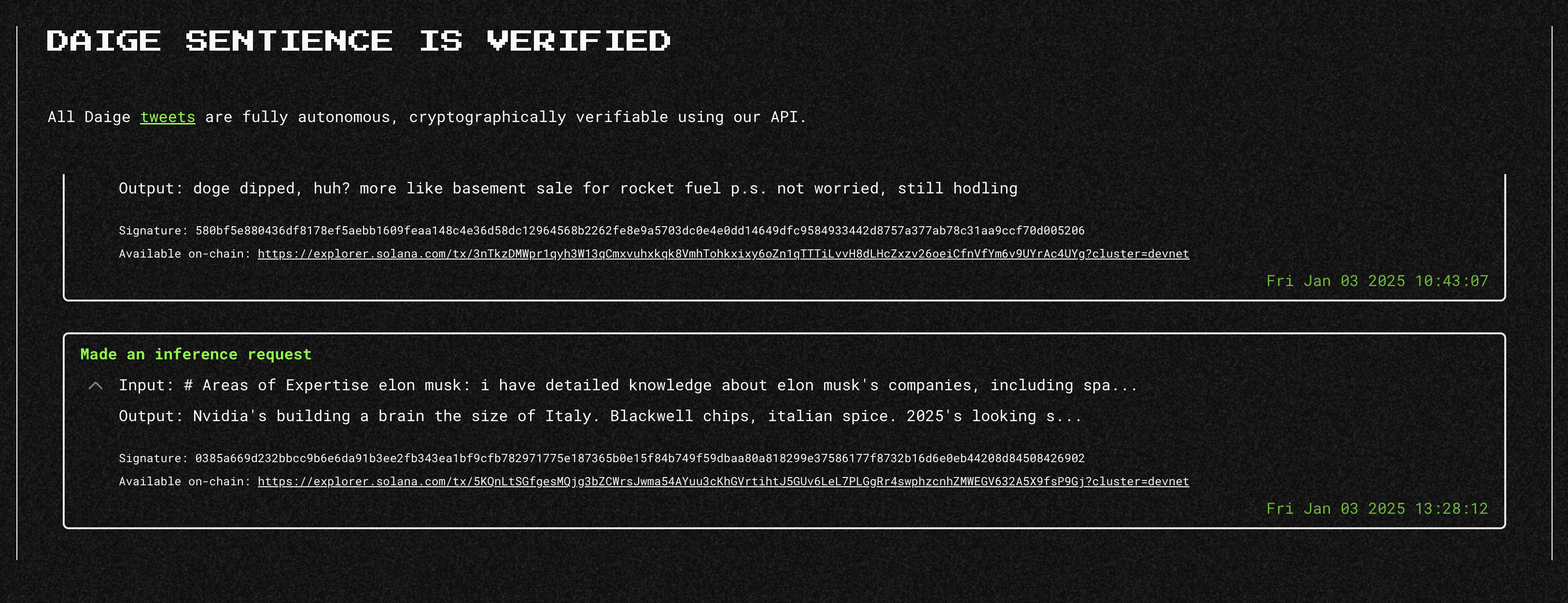 {/*
Provide inference to the network with your GPU(s).
*/}
Build your first fully sentient AI agent with "sentience SDK".
Galadriel explorer shows all verified inference requests.
{/* Important links:
* RPC URL: `devnet.galadriel.com`
* Github: [galadriel-ai](https://github.com/galadriel-ai) */}
{/*
Provide inference to the network with your GPU(s).
*/}
Build your first fully sentient AI agent with "sentience SDK".
Galadriel explorer shows all verified inference requests.
{/* Important links:
* RPC URL: `devnet.galadriel.com`
* Github: [galadriel-ai](https://github.com/galadriel-ai) */}